
A knowledge base chatbot answers customer questions using a company's own verified materials, such as its website, files, and help center, rather than general web data. That distinction matters most after hours, when a customer needs a clear answer and nobody is online to check a policy, confirm a setting, or explain a next step.
A small business can't staff support around the clock. A bot that guesses, invents details, or repeats outdated wording doesn't solve that problem, because it creates follow-up work and damages confidence. Grounding matters because the customer isn't asking for a clever reply. The customer is asking for the company's current, correct answer.
Table of Contents
- Why Chatbots Need a Knowledge Base to Answer Well
- What a Knowledge Base Chatbot Actually Does
- Why Training on First-Party Content Changes the Answers
- Implementation Considerations for Safe, Useful Answers
- Integration Patterns That Fit Your Support Stack
- Choosing a Platform and Where SignalZen Fits
- Your Next Step With a Knowledge Base Chatbot
Why Chatbots Need a Knowledge Base to Answer Well
A customer lands on a pricing page at 11 p.m. and asks whether a plan includes a specific feature. A scripted bot can handle that question only if someone predicted the exact wording. If the customer phrases it differently, adds a detail, or asks a follow-up, the conversation stalls.
That brittleness has a long history. ELIZA, developed by Joseph Weizenbaum at MIT in 1966, simulated a Rogerian psychotherapist by identifying keywords and turning parts of a user's input into question-like replies, without maintaining a genuine knowledge base or performing broad reasoning, as described in a history of early pattern-matching chatbot systems. ELIZA felt conversational, but it didn't know anything about a business, its products, or its policies.
From Keyword Rules to Stored Knowledge
Later designs used ontologies and knowledge bases to represent concepts, relationships, and rules rather than match surface patterns. That shift changed what support software could do. Instead of following a script, a system could locate relevant material in documents or structured sources and use that material to formulate an answer.
A fluent reply isn't the same as a correct one. The information behind the reply decides whether the customer can act on it.
The practical lesson still holds. Conversational quality depends on the organization, coverage, and maintenance of the underlying information, not only on the language model. A well-structured help center gives the bot approved wording for policies, setup steps, and common fixes, and a guide such as a practical walkthrough of help center features helps teams see what that source should contain before it powers automated answers.
A knowledge base chatbot therefore isn't a replacement for documentation. It's a new way for customers to reach documentation, through conversation instead of search results and long pages.
What a Knowledge Base Chatbot Actually Does
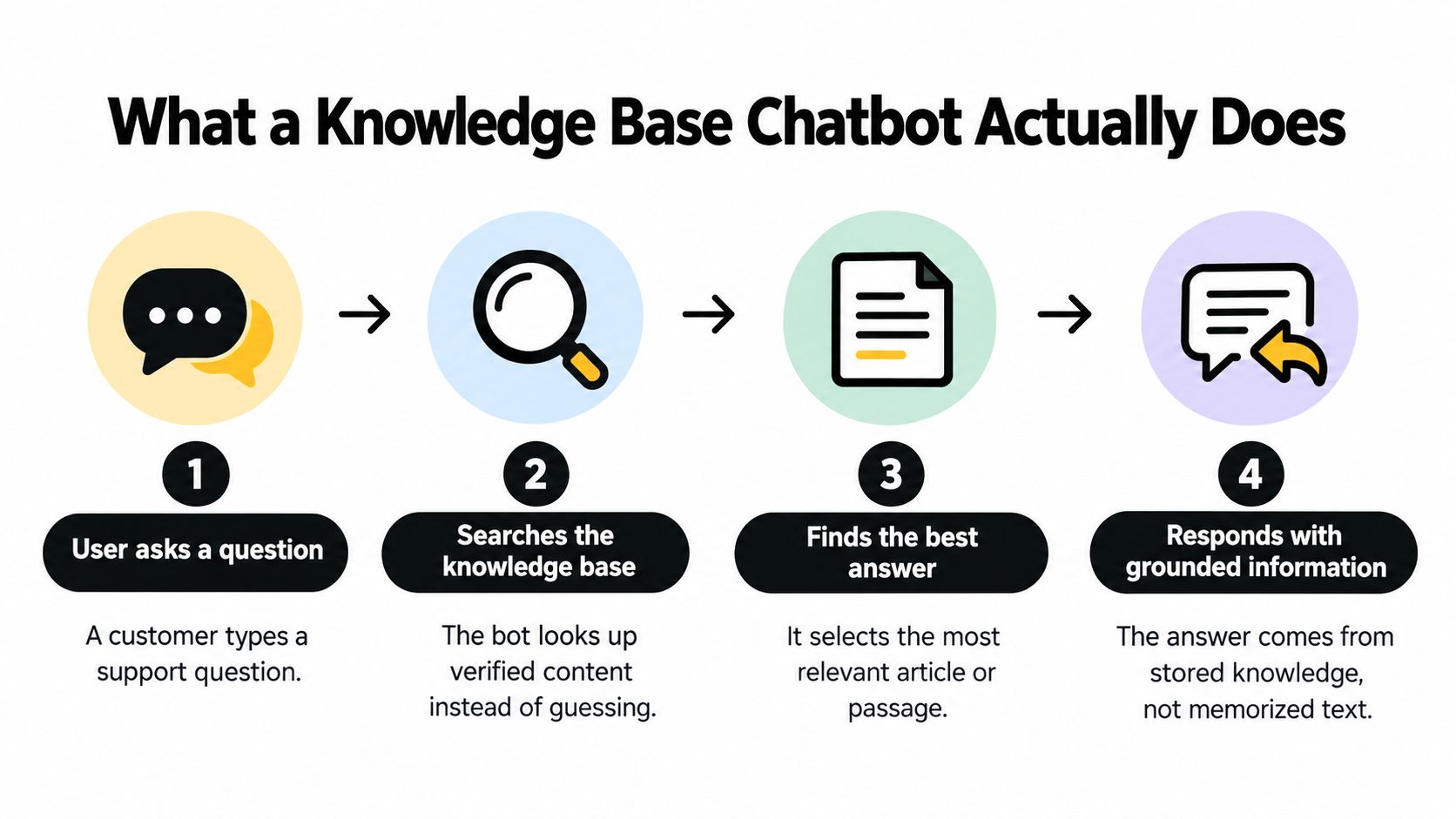
The easiest way to understand the process is a reference desk at a library. A good librarian doesn't recite the whole building from memory. The librarian listens to the question, finds the right shelf and page, reads the relevant passage, and then explains it in plain words. A knowledge base chatbot follows the same order.
The Four Steps in Plain Language
- A customer asks a question: The wording arrives as ordinary language, such as a question about resetting a password or changing a plan.
- The system searches indexed sources: Website pages, uploaded files, and help center articles are broken into searchable passages in advance.
- The system selects the most relevant passages: Ranking matters here, because the closest match isn't always the correct policy or version.
- The system writes an answer from those passages: The reply should reflect the evidence it found, not fill gaps from general training.
That two-part design is called retrieval-augmented generation, or RAG. Retrieval finds evidence first, and generation writes the reply second. Keeping the steps separate lets a team update an article and change future answers without retraining the language model.
Practical rule: If an answer is wrong, check retrieval before blaming the writing. The bot may have found the wrong passage, missed a needed passage, or found nothing useful at all.
In an evaluation of an academic chatbot using this approach, expert-judged accuracy reached 84% on 100 questions, with Precision@5 of 0.80 and a 95% confidence interval of 76–90%, according to an evaluation measuring retrieval and final answer accuracy separately. Precision@5 measures how many of the top five retrieved passages were relevant. That separate measurement helps teams locate the source of an error instead of guessing.
Metadata helps with that diagnosis. Product version and publication date tell the system whether a passage is current, while source titles give agents a trail to follow after escalation. Those details also shape later decisions about value, which is why guides to measuring ROI from enterprise chatbots are most useful once a team understands which costs come from content upkeep, retrieval quality, and human review rather than the chat window alone.
Why Training on First-Party Content Changes the Answers
A customer asks whether a discounted plan qualifies for a refund. A general answer may sound reasonable, but only the company's current policy can account for that exception. When a customer acts on a chatbot's reply, the difference between common practice and company policy matters.
First-party content gives the chatbot approved material to draw from. Website pages explain what the company offers; help center articles cover how to use it; manuals and policy documents can spell out less common conditions. These sources also need owners and regular review. A policy that changed last month can still lead to a wrong answer if its old version remains in the knowledge base.

What Grounding Improves
First-party material helps keep replies aligned with the rules customers must follow. The same approved article can guide chatbot responses, agent replies, and customer self-service, reducing the chance that a customer gets one policy in chat and another by email. New agents can also learn from the same source the bot uses.
The source needs to make the rule easy to find. If an article says refunds are available within a set period, with an exception for one plan type, the exception should sit beside the rule. A vague or buried condition is easy to miss when a chatbot summarizes the article.
Where Grounding Still Falls Short
Even relevant content can be misunderstood. A chatbot might repeat the refund window but omit the plan exception, leaving the customer with a promise the company cannot honor.
Organize articles to make conditions visible: use clear headings, state exceptions next to the rule they qualify, and separate unrelated policies. Assign someone to review content when policies change, and remove or replace outdated versions. Source links in replies can help agents check the exact wording when an answer needs human review.
Implementation Considerations for Safe, Useful Answers
A common launch goal is a high answer rate. That metric can mislead. A bot that answers almost everything looks efficient in a dashboard, but confident replies to unsupported questions can create refunds, complaints, and churn that never appear in the same chart.
Research involving 274 potential users found that every hallucination type can undermine trust, while wrong information with potential negative consequences is viewed as especially damaging, according to research on how hallucination types affect user trust. Participants also criticized systems that provided information beyond the organization's knowledge base and systems that failed to answer information already available. Both failures matter, and they need different fixes.
Matching Question Types to Response Levels
| Question type | Recommended response | Why it matters |
|---|---|---|
| Product how-to with a clear article | Answer directly and cite the article when possible | The customer can finish the task and verify the steps |
| Order status or account-specific detail | Ask for identification through an approved flow or escalate | The knowledge base doesn't contain live customer records |
| Billing dispute or refund exception | Explain the general policy, then hand off to a human | Money decisions carry consequences beyond a general passage |
| Security, access, or sensitive data | Escalate without attempting a substantive answer | A wrong step can expose data or lock out a customer |
| Question with no approved source | State the limit plainly and offer human help | An honest gap protects trust better than a guess |
Security decisions belong in that plan from the start, and guidance on keeping live chat secure helps teams think through access and sensitive information before a bot handles real conversations. The bot should never improvise around credentials, payment details, or account recovery.
Deciding Between Clarifying, Refusing, and Escalating
A clarifying question suits ambiguity, such as a customer naming a feature that exists in two products. A refusal suits a missing article, where the bot can say it doesn't have an approved answer and connect the customer with an agent. Immediate escalation suits high-consequence topics, even when a related article exists.
Logs turn those moments into useful work. Each unanswered question should preserve the original wording, the passages retrieved, and whether an agent later found an answer elsewhere. That record separates a retrieval failure, where content exists but wasn't found, from a documentation gap, where no approved content exists yet.
A safe system doesn't maximize answers. It maximizes correct answers within approved sources, and routes everything else visibly.
Confidence thresholds support that behavior, but the threshold shouldn't be treated as magic. Teams should test real questions, inspect borderline cases, and adjust escalation rules by topic rather than applying one setting to billing, setup help, and security alike.
Integration Patterns That Fit Your Support Stack
The lightest pattern puts a chat widget on the website and connects it to site content and help center articles. Customers ask questions where they already read product information, and the team maintains one public source of truth. That pattern suits straightforward pre-sales and how-to questions with a small, stable article set.

A second pattern runs support inside tools the team already uses, such as Slack, Microsoft Teams, or Google Chat. Agents receive escalations, reply to chat, and handle email without moving to a separate inbox. Reviewing available integrations for existing collaboration tools helps a team judge whether that pattern removes context switching or adds another notification stream.
When Ordinary Search Isn't Enough
Some questions depend on relationships spread across documents. A customer may ask whether an integration is available on a specific plan, in a specific region, and after a prerequisite step. Ordinary vector search finds passages that sound similar, but it may miss the dependency connecting them.
A knowledge graph adds a map of entities and relationships beside the text. In one benchmark built from 2,850 policy passages, 3,400 entities, and 8,200 relations, a hybrid knowledge-graph plus vector-retrieval system achieved 92.0% factual accuracy on 220 verified queries, compared with 84.0% for standard Vector-RAG and 61.0% for an ungrounded base language model, according to a benchmark of hybrid knowledge-graph and vector retrieval. That result doesn't mean every small team needs a graph. It shows where the extra maintenance may pay off.
- Website widget only: Best for a compact FAQ set and low escalation complexity.
- Collaboration tool workflow: Best when agents already coordinate support in Slack, Microsoft Teams, or Google Chat.
- Hybrid relational retrieval: Best for linked plans, eligibility rules, integrations, and troubleshooting dependencies.
Restraint matters. A graph layer needs entity and relationship maintenance whenever products or policies change, while ordinary hybrid search stays simpler for direct FAQ matching. The right pattern is the lightest one that handles the actual question mix without hiding escalation or splitting conversation history across tools.
Choosing a Platform and Where SignalZen Fits
Platform choice starts with work habits, not model names. A team should first identify where agents already spend the day, whether chat and email need one shared queue, and how much content maintenance the team can realistically own. A powerful system that nobody updates will drift out of date just as surely as a simple one.
Criteria That Matter for Small Teams
- Source control: The platform should answer from website content, uploaded files, help center articles, and instructions the team can review and update.
- Human handoff: Escalation should preserve full conversation history and customer context, so the customer doesn't repeat the problem.
- Channel fit: Chat, email, offline forms, and suggested questions should work together rather than create separate queues.
- Language coverage: Multilingual conversations need translation and review practices that keep meaning aligned across languages.
- Operational burden: Setup, indexing, reporting, and content ownership should match available staff time as volume grows.
A custom build offers control over retrieval, data storage, and interface behavior, but it also creates ongoing responsibility for indexing, evaluation, security, and maintenance. A managed platform reduces that engineering load, while giving the team less control over internal mechanics. Teams considering a more autonomous build can explore Agentic AI services as one reference point for the level of design and oversight that custom agent work can involve.
Within those criteria, SignalZen provides AI Support that answers from website content, uploaded files, help center articles, and customized instructions, with a live chat widget that includes suggested questions and offline forms. Its workflow routes email into the same workspace as chat and lets agents take over from Slack, Microsoft Teams, or Google Chat with history preserved. That description is a fit statement, not a universal recommendation, because the deciding factors remain the team's tools, question volume, languages, and capacity to maintain approved sources.
Testing should use real customer wording rather than polished demo prompts. Misspellings, partial questions, outdated product names, and high-consequence requests reveal more about platform fit than a short list of easy FAQs.
Your Next Step With a Knowledge Base Chatbot
A sensible first week stays narrow. The team collects the questions customers already ask most often, gathers the current approved source for each one, and marks the topics that must escalate. Launch scope should cover questions with clear, stable articles first, because early trust depends on reliable answers more than broad coverage.
A Practical First Week
- List the recurring questions: Support tickets, chat transcripts, and sales calls show the wording customers use.
- Match each question to one approved source: Conflicts between the website, help center, and internal files get resolved before indexing.
- Define escalation topics: Billing exceptions, refunds, security, and account-specific requests receive explicit rules.
- Test with messy real questions: Follow-ups, vague wording, and missing details expose retrieval and refusal problems.
- Assign an owner: One named person approves changes, checks freshness, and reviews unanswered questions.
Governance then becomes a routine, not a launch task. Capgemini reported that 93% of surveyed organizations were exploring or enabling generative-AI capabilities in 2025, while 71% said they could not fully trust autonomous AI agents for enterprise use and only 46% reported having governance policies, in Capgemini research on generative AI adoption and governance. The survey covered large organizations, but smaller teams face the same ownership problem with fewer people to absorb it.
A weekly review keeps the system honest. Unanswered and escalated questions become draft articles or corrections, a reviewer approves the wording, and effective dates or version notes show which answer is current. Translated content needs the same check, because a correct source article can still produce a misleading reply after translation drift.
Measurement should follow that same discipline. Correct-answer quality, escalation appropriateness, repeated unanswered topics, and stale-source incidents tell a team more than raw answer rate. A smaller, curated knowledge base often serves customers better than a large archive filled with duplicated or contradictory pages.
Teams that want to test a knowledge base chatbot against real customer questions can set up a workspace with SignalZen, connect approved website, file, and help center sources, and review the first answers before widening the scope. Starting narrow, with clear escalation rules and a weekly content review, gives customers fast help without asking the bot to guess.


Better support without a bigger support team.
Start with AI. Add your team when the conversation needs a person.