
How many people on your Zendesk bill answered a customer yesterday? For plenty of teams the honest number is smaller than the seat count, and that gap is the moment someone opens a spreadsheet and starts pricing Zendesk alternatives.
Three things usually trigger the search. Seat costs climb with every hire, including the part-timers who cover weekends. Channel needs shift, so a team that started on email now handles in-app chat and Instagram DMs. Or the workflow never fit in the first place, and admins spend their Fridays maintaining triggers nobody reads.
The category is bigger than the frustration suggests. A 2024 global CRM software market analysis put customer-service applications at 22.1% of CRM software revenue, with cloud deployment above 60.2% of revenue, which is why almost every vendor now ships a browser-based help desk with AI attached (Research and Markets).
Every tool below is judged on five things a switching team checks: channels, automation depth, integrations, pricing model, and the company size it fits. Feature-list length doesn't get a vote.
Table of Contents
- 1. SignalZen
- 2. Freshdesk
- 3. Intercom
- 4. Help Scout
- 5. Zoho Desk
- 6. Crisp
- 7. Gorgias
- 8. HubSpot Service Hub
- 9. Front
- 10. LiveAgent
- Zendesk Alternatives at a Glance
- How to Choose the Right Platform for Your Team
1. SignalZen
Most small support teams don't want another console to watch. SignalZen's approach is that they don't need one, because chat and email conversations arrive in Slack, Microsoft Teams, or Google Chat and get answered there by the same people who already field internal questions.
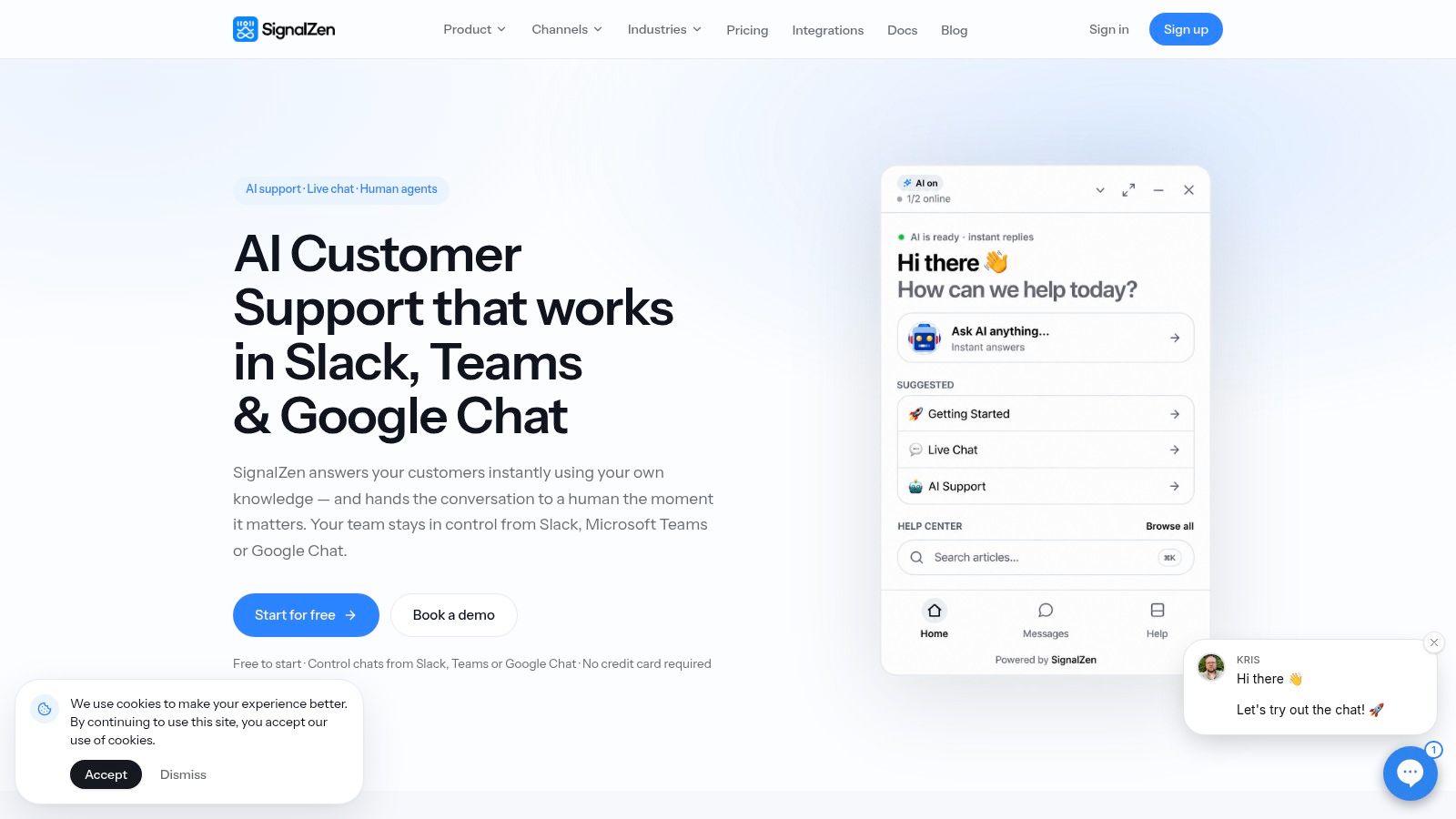
The AI answers from material the business controls: website content, uploaded files, help center articles, and written instructions. When a question falls outside that, the conversation moves to a person with the full history intact plus an AI summary of what's been covered and what's still open. Agents get drafted replies from an AI Copilot and a one-click tone adjustment, and the support mailbox feeds the same queue as widget chats, so email and chat aren't two jobs. Two-way translation covers multilingual customers with a single-language team, and mobile apps plus an in-app SDK push coverage past the browser.
Where it fits and where it doesn't
Test the handoff before anything else. A comparison of Zendesk alternatives makes the point that most roundups never measure how much customer context survives the jump from automated answer to human agent, which is exactly where small teams lose the most time. Ask for that sequence in the demo, not a deflection percentage.
- Works inside collaboration tools: Agents reply from Slack, Microsoft Teams, or Google Chat, with the Console and mobile apps available when someone wants a dedicated view.
- Flat cost shape: Unlimited chats and bandwidth are included on every plan, so a busy month doesn't produce a surprise invoice.
- Free evaluation: A 30-day free trial with no credit card required means the trial costs time, not budget.
- Content-dependent AI quality: Answers are only as good as the website, files, and help center behind them, so stale documentation shows up fast.
- Ask for a quote: Specific plan prices aren't listed publicly, so price the agent count you'll have in six months.
Full details sit on the SignalZen site.
2. Freshdesk
Teams that want the same help desk they had, minus the invoice, usually end up here. Freshdesk keeps the conventional ticketing model: email turns into tickets, rules assign them, a customer portal and knowledge base deflect the repeat questions, and reporting tracks the backlog.
Automation is the reason most switches happen at all. In Salesforce's State of Service research, covering more than 5,500 service professionals across 30 countries, 81% said they were using workflow or process automation and 79% had invested in AI in 2024. A help desk without rules-based routing and assignment feels like a regression within a month, which is why plain shared inboxes frustrate ex-Zendesk admins.
What to check before you buy: Confirm that the channels you need today, not the channels on the comparison page, sit in the tier you're pricing. Freshdesk Omni handles chat, phone, and social, and it's sold separately from the core help desk.
- Cheapest migration path: Agents need a day of retraining, not a week, because views, statuses, and ticket fields map closely.
- Tier traps: Chat and social support depend on the Omni product, so a base-plan quote can look cheaper than the final bill.
- AI is an add-on: Copilot-style assistance sits on higher tiers rather than the entry plan.
See Freshdesk plans for the current tier split.
3. Intercom
For product-led SaaS companies, support happens inside the app, not in an inbox. Intercom handles that pattern better than most: a shared inbox for tickets, Messenger for in-app conversations, a public help center, and Fin, its AI agent that answers from approved content and escalates when it can't.
AI adoption is real but shallow, which is the useful part of the picture. A 2025 survey of more than 600 CX professionals at U.S. mid-market companies found 57% had adopted AI for customer experience, while only 13% had used it for more than two years (Business Wire via Morningstar). In practice that means many operations are still learning what their AI handles well, and a two-week trial won't tell you.
The pricing model is the decision
Fin is billed per outcome on top of seats, so cost moves with success. Model it before signing: run last quarter's ticket volume through your expected resolution rate and see what the bill looks like in a good month. A tool that saves agent hours while doubling your invoice is a hard sell to finance.
- Strongest conversational UX: In-app messaging and a Messenger that customers use.
- Two cost layers: Seat fees plus per-outcome AI charges, which makes forecasting harder than flat per-agent pricing.
- Plan-gated depth: Advanced workflows and multilingual help center support sit on higher tiers.
If Fin's per-outcome billing is the sticking point, this breakdown of Intercom alternatives compares the swap options.
4. Help Scout
Email-first teams tend to like Help Scout within an hour of logging in. It's a shared inbox that behaves like email, with collision detection, private notes, saved replies, and customer profiles, plus Docs for knowledge base content and Beacon for in-site help. There's no ticket taxonomy to learn before you can answer anyone.
The trade-off is deliberate narrowness. Live chat and SMS arrive on the Standard plan, multiple knowledge bases are supported, and AI Inbox assistance helps sort and draft, but the product doesn't try to be a contact center. For a team of four to eight agents handling a few hundred conversations a week, that's usually a feature rather than a gap.
- Fast onboarding: A free plan covers up to five users, so you can run real conversations before spending anything.
- Per-user creep: Costs scale with headcount, and a growing team of 15 agents pays meaningfully more than a team of six.
- Routing needs a paid tier: Advanced workflows and assignment rules aren't on the free plan, so build the quote around the tier you'll use.
Compare configurations in the Help Scout alternatives guide before you commit to a seat count.
5. Zoho Desk
Zoho Desk solves the budget problem first. Ticketing, SLAs, blueprints for repeatable processes, a knowledge base and self-service widget, plus reporting, all at an entry price that undercuts most of this list. Teams already inside Zoho CRM, Books, or Projects get a genuine bonus, because customer records and support history sit in one place.
The adoption gap explains why entry pricing matters so much. An industry compilation reports that 91% of companies with 11 or more employees use CRM systems, against roughly 50% of businesses with fewer than 10 employees (Cirrus Insight). The smaller half of the market still needs shared customer context; it just can't fund a six-figure platform to get it.
- Accessible start: Entry plans cover real ticketing and self-service rather than a stripped demo.
- Zoho ecosystem integration: Existing Zoho users cut tool sprawl; everyone else inherits one more admin console.
- Advanced features gated: AI and telephony capabilities sit on higher plans or add-ons, and the breadth of settings can slow a small admin down.
Start at Zoho Desk pricing.
6. Crisp
Crisp's pricing model is the interesting part. Plans are priced per workspace rather than per agent, which changes the maths for teams of six or more who all need inbox access. The free plan includes two agents, and paid tiers list unlimited conversations, with agent limits and customer-profile caps varying by tier.
The product covers website chat, a shared inbox, email, and messaging channels like WhatsApp Business and social DMs depending on plan, with Slack and Shopify integrations for teams that work across tools. It's a compact toolkit rather than a deep help desk: no elaborate SLA engine, limited workflow depth, and AI credits that come with their own caps.
A workspace price is only cheaper until you need a feature that resets the model. Ask what triggers an upgrade mid-contract before you move a whole team onto it.
- Predictable for multi-agent teams: Workspace billing avoids the per-seat multiplication problem.
- Channel coverage varies: Messaging integrations are tier-dependent, so list your required channels first.
- Depth limits at scale: Reporting and workflow complexity won't match a dedicated enterprise help desk.
Check current tiers on Crisp's pricing page.
7. Gorgias
Online stores ask different support questions than SaaS companies. "Where is my order" and "can I swap the size" need order data next to the conversation, and Gorgias is built around that: Shopify-connected order details, refund and address actions from the ticket, and automation for shipping-status replies.
Channel expectations are high because the customer decides where the conversation happens. In 2024, 88% of shoppers surveyed across the United States, United Kingdom, Germany, France, India, Australia, and Canada wanted a consistent experience across channels, according to Bazaarvoice's Shopper Experience Index, based on more than 8,000 consumers. For a store, that usually means email plus Instagram and Facebook messaging handled in one queue.
Billing tied to tickets, not agents
Gorgias charges by support volume, with AI outcomes priced as a separate layer. That suits seasonal retail, where December needs eight agents and February needs two. It punishes the opposite case: a store whose ticket count grows faster than its revenue, or one that runs aggressive automation campaigns without watching the marginal cost per automated resolution.
- E-commerce depth: Order context inside the ticket from day one saves constant tab switching.
- Volume risk: Promotions and delivery delays both raise ticket counts and therefore bills.
- Narrow fit: Non-commerce teams lose most of the value.
The Gorgias alternatives comparison covers stores that want the same workflows with a different billing shape.
8. HubSpot Service Hub
Support teams that share customer records with sales and marketing get real value here. Tickets, a shared inbox, live chat, knowledge base and feedback surveys sit on the same contact record as deal history and campaign activity, so an agent can see that a frustrated customer is also a renewing account.
AI ambition is high across the industry, and the pricing reflects it. In 2024, 87% of global contact-center and customer-experience leaders said generative AI was key for their customer-service and CX teams, per CallMiner's CX Landscape Report, conducted with Vanson Bourne among 700 senior decision-makers. HubSpot meters eligible AI features through credits on paid subscriptions, so the ceiling depends on your plan and consumption.
- CRM context: The strongest reason to choose it, and a weak reason if you don't use HubSpot elsewhere.
- Free tier: Covers up to two users, which is enough to test the interface, not to run a team.
- Real cost jump: Professional and Enterprise plans are substantially more expensive than entry pricing and carry required one-time onboarding fees.
Review tiers on HubSpot Service Hub.
9. Front
Front centers support work on a shared inbox. Email, chat, and messaging come together in one place, where agents can comment internally, assign conversations, and apply rules. Analytics track response times and workload. This setup fits collaborative teams, including agencies managing client inboxes and operations teams handling internal requests.
Seat limits can shape the cost of a growing team. Front caps seats by plan tier, so headcount may require a higher tier even when the team does not need its additional features. Check Front's plans for current limits.
- Collaboration-first design: Internal comments and shared drafts make the inbox feel more like a team workspace than a ticketing system.
- Plan progression: Starter includes a public knowledge base, while omnichannel support is available on Professional.
- AI sits higher up: Several AI capabilities are add-ons or reserved for Enterprise, so include them when comparing plan costs.
10. LiveAgent
LiveAgent is the pragmatic choice for teams that still answer the phone. Email, chat, phone, and social messages all convert into tickets in one interface, with a knowledge base, customer portal, and multiple language support. Higher plans add call-center functionality and IVR, which matters for retailers and service businesses where a percentage of customers will always ring rather than type.
Setup is comparatively quick because the model is a familiar one: a universal inbox, routing rules, canned answers, and reports. The catch is that per-agent pricing scales in both directions, so a seasonal team should price a 20-seat month and a 5-seat month before deciding. Advanced features like call-center tools and SLAs depend on the tier, and channel coverage should be confirmed line by line rather than assumed from the feature page.
- Phone included: Voice support without a separate contact-center contract.
- Per-agent billing: Predictable, but it tracks headcount in a way ticket-based pricing doesn't.
- Confirm the tier: SLAs, IVR, and some integrations sit above the entry plans.
Full plan details are on LiveAgent.
Zendesk Alternatives at a Glance
| Best For | Support Channels | Pricing Model | Automation & AI | Ideal Company Size |
|---|---|---|---|---|
| SignalZen, recommended for support in existing team tools | Chat, email, Slack, Microsoft Teams, Google Chat | Free to start; plan prices not specified; unlimited chats and bandwidth | AI answers, drafted replies, summaries, translation, and human handoff | Small and midsize businesses |
| Freshdesk, general-purpose ticketing and self-service | Email; multichannel options through Freshdesk Omni | Tiered plans; channel availability varies by plan | Ticket automation and assignment | Small and midsize businesses |
| Intercom, conversational support for digital businesses | Live chat, inbound email, in-app messaging | Seat costs plus usage-based AI charges | Fin AI Agent and AI-assisted workflows | SaaS and digital businesses |
| Help Scout, straightforward support for email-led teams | Shared inbox, live chat, SMS on select plans | Free plan available; per-user pricing | Workflows and AI inbox assistance | Small teams |
| Zoho Desk, cost-conscious support, especially for Zoho users | Ticketing and multichannel support | Tiered plans; advanced features may require higher tiers or add-ons | Workflow automation; advanced AI may require higher plans | Small and midsize businesses |
| Crisp, multichannel messaging with workspace-based pricing | Website chat, email, WhatsApp, social channels | Free tier; paid plans priced per workspace | AI features with plan-dependent limits | Small and midsize teams |
| Gorgias, e-commerce customer support | Customer conversations and e-commerce support channels | Usage-based support activity charges; additional AI outcome fees | Optional AI Agent | Online stores and e-commerce teams |
| HubSpot Service Hub, support connected to CRM data | Service help desk channels | Free tier; paid subscriptions with plan-related costs and limits | Eligible AI features use HubSpot Credits | Businesses using HubSpot CRM |
| Front, collaborative customer communications | Shared inbox and ticketing; omnichannel on select plans | Per-seat, tiered plans | Automation, analytics, and plan-dependent AI | Growing support teams |
| LiveAgent, multichannel ticketing and phone support | Email, chat, phone, and social media | Tiered per-agent plans | Automation and self-service features | Teams needing multichannel or call-center support |
How to Choose the Right Platform for Your Team
Start with channels, because they eliminate more options than price does. Write down every channel you handled in the last 90 days with real volume against each one, then check which tier includes them. A tool that covers email brilliantly and treats WhatsApp as an add-on won't survive a shift in customer behaviour.
Then pick your pricing model on purpose. Per-seat pricing rewards small agent teams and punishes shift coverage. Workspace pricing rewards agent density. Usage pricing rewards low ticket volume and punishes marketing campaigns. Zendesk itself shows why the total matters more than the sticker: recent comparisons note that its AI Copilot can add roughly $50 per agent per month, automated resolutions can carry separate fees of about $1.50 to $2.00 each, and one analysis estimated a 20-person team at more than $3,000 per month before any automation configuration.
Integrations come third, and only the ones inside the tier you'd buy. A native Jira or Shopify connection advertised on the homepage is worthless if it requires the tier above your budget.
Pressure-test AI claims against your own content. Export your twenty most common questions, feed them to the vendor's AI during the trial, and count how many it answers correctly without an agent. Deflection numbers from a vendor deck rarely survive contact with messy internal documentation.
Two finalists, one week, real conversations. Split live volume between them, keep the old system running in parallel, and judge on time-to-first-response and how often agents need to ask the customer to repeat themselves.
Before you cancel anything, check the renewal date on the current contract and schedule the cutover ahead of it. Teams that migrate in a hurry pay for two platforms for a quarter and lose the goodwill of the agents doing the work.
SignalZen gives small and midsize teams AI support that answers from their own website, files, and help center, then hands the conversation to a human with the history and a summary intact, all managed from Slack, Microsoft Teams, or Google Chat. Every plan includes unlimited chats and bandwidth, so a busy month doesn't rewrite your budget, and you can trial it for 30 days without a credit card. Start at SignalZen and see how the handoff works with your own questions.


Better support without a bigger support team.
Start with AI. Add your team when the conversation needs a person.