
Customers usually do not leave because a support rep sounded rude. They leave after a messy handoff, when the chat bot knew one version of the problem, the human agent saw another, and the customer had to rebuild the whole story from scratch. That break in continuity is where trust slips.
Good communication is less about sounding polished and more about keeping the conversation intact. A clear answer still fails if the customer has to repeat themselves, resend files, or explain a promise that disappeared between chat, email, and escalation.
Table of Contents
- Why Customer Communication Actually Fails
- The Three Outcomes That Define Communication Quality
- Empathy Scripts That Actually Work
- Channel-Specific Best Practices for Chat, Email, and Social
- When to Use AI and When to Hand Off to Humans
- Measuring What Actually Matters in Customer Communication
- Building a Communication System That Scales
Why Customer Communication Actually Fails
A common support scene repeats across businesses every day. A customer writes in about an order issue, the chatbot replies fast with a policy link, and the conversation stalls because the system never captured the underlying problem. Ten minutes later, a human agent joins, asks for the same details, and the customer starts over with a shorter fuse than before.

The failure usually isn't attitude. It's context loss, the part of communicating with customers that teams never formalize.
The handoff is where the damage happens
When a chat turns into an email thread or gets routed from automation to a person, the original details often vanish. The customer remembers what they already said, but the next responder sees only a partial snapshot. That's when the same question gets asked twice, the same attachment gets requested again, and the customer stops feeling helped.
Practical rule: if the receiving person can't continue without re-asking basics, the handoff failed even if the ticket was “reassigned” correctly.
That's why a useful article on boost productivity with better messaging makes more sense when it treats messaging as operational flow, not just tone. Clear writing helps, but it can't rescue a broken transfer of facts.
The historical pattern is familiar too. Customer communication has evolved from call centers to email, chat, and AI-assisted replies, but the underlying job hasn't changed: capture the issue, route it, preserve the context, and answer quickly enough to keep momentum.
The customer experiences the gap, not the process
Inside the company, a handoff can look efficient. The queue is clean, the SLA clock is moving, and the case has a new owner. On the customer side, it feels like starting over.
That's why the fix is to treat conversation history as customer-facing infrastructure. If the message, attachments, identity details, and open questions do not follow the customer, the channel mix won't matter. More channels can create more friction if continuity is missing.
The Three Outcomes That Define Communication Quality
Strong customer communication usually comes down to three outcomes. Speed gets the customer an answer or at least an acknowledgment. Clarity tells them what's happening and what happens next. Continuity keeps the story intact as the conversation moves across tools and people.
Speed is more than first response time
Customers notice delay even when the final answer is right. In a controlled e-commerce experiment, people who received a chatbot response after 0.5 seconds reported higher satisfaction than those who waited 10 seconds, even when the slower version showed a typing animation (Utwente thesis). The lesson is simple, acknowledgment matters.
That does not mean rushing out weak answers. A fast wrong reply creates more work later. The better target is instant acknowledgment, then useful progress, then resolution.
Clarity reduces panic
Customers want to know what the system understood, who owns the issue, and whether they need to do anything next. Vague replies create a second conversation inside the customer's head, and that uncertainty often turns into repeat contact. Clear communication names the next step before the customer has to ask for it.
A good reply answers three things fast, what you understood, what happens now, and whether the customer needs to wait or act.
Continuity protects loyalty
Continuity is the most overlooked outcome because it's harder to measure than speed. Yet it's the one customers remember when escalation fails. PwC's 2025 survey found that 52% of consumers had stopped using or buying from a brand because of a bad experience, and 70% of executives believed customer expectations were changing faster than their organizations could adapt (PwC 2025 Customer Experience Survey).
The practical takeaway is that communication quality is not just about correctness. It's about keeping context, reducing repetition, and staying consistent across chat and email. If the answer is right but the journey is broken, the customer still leaves frustrated.
Empathy Scripts That Actually Work
Empathy gets watered down fast in support teams. Too many responses start with a scripted apology and jump straight to the fix, as if acknowledging the emotion would slow the work down. It usually does the opposite, because customers calm down when they feel understood.
What to say instead of generic reassurance
Generic lines like “I understand your frustration” often sound automated because they could apply to any case. Specific acknowledgment sounds human because it shows the reply came from the actual message.
- For a damaged delivery: “Thanks for sending the photos. That arrived in a broken state, and it makes sense this disrupted your timeline. I'm checking replacement options now.”
- For a billing error: “This charge doesn't match what you expected, and I can see why that would be frustrating. I'm reviewing the account details before I ask you to do anything else.”
- For a delayed project handoff: “You've already waited longer than you should have. I'm pulling the last update and will tell you exactly what's blocking this.”
These versions work because they do three things at once, they name the problem, acknowledge the impact, and show ownership. The customer doesn't need poetry. They need proof that someone read the message carefully.
Personalization has to reference real context
Personalization is not just using a customer's name. A meta-analysis covering 15 studies and 5,398 observations found that personalization significantly predicted satisfaction with r = 0.391 and directly predicted loyalty with r = 0.344. Human-driven personalization produced stronger satisfaction effects than AI-driven personalization, with r = 0.431 versus r = 0.375 (Springer PDF).
That means support replies should reference concrete facts already in the thread, such as the product, previous troubleshooting, order status, or unresolved goal. A customer should feel that the agent knows what happened before, not that the system inserted a name tag.
The best empathy leaves room for choice
The strongest scripts don't just soothe, they restore control. Offering a next step, a choice between options, or a clear handoff window helps the customer feel less stuck. That's especially important when the issue is emotionally loaded or financially sensitive.
How to deal with angry customers effectively is a useful companion read for teams that need more phrasing examples, but the core rule stays the same, acknowledge the impact before explaining the solution.
Channel-Specific Best Practices for Chat, Email, and Social
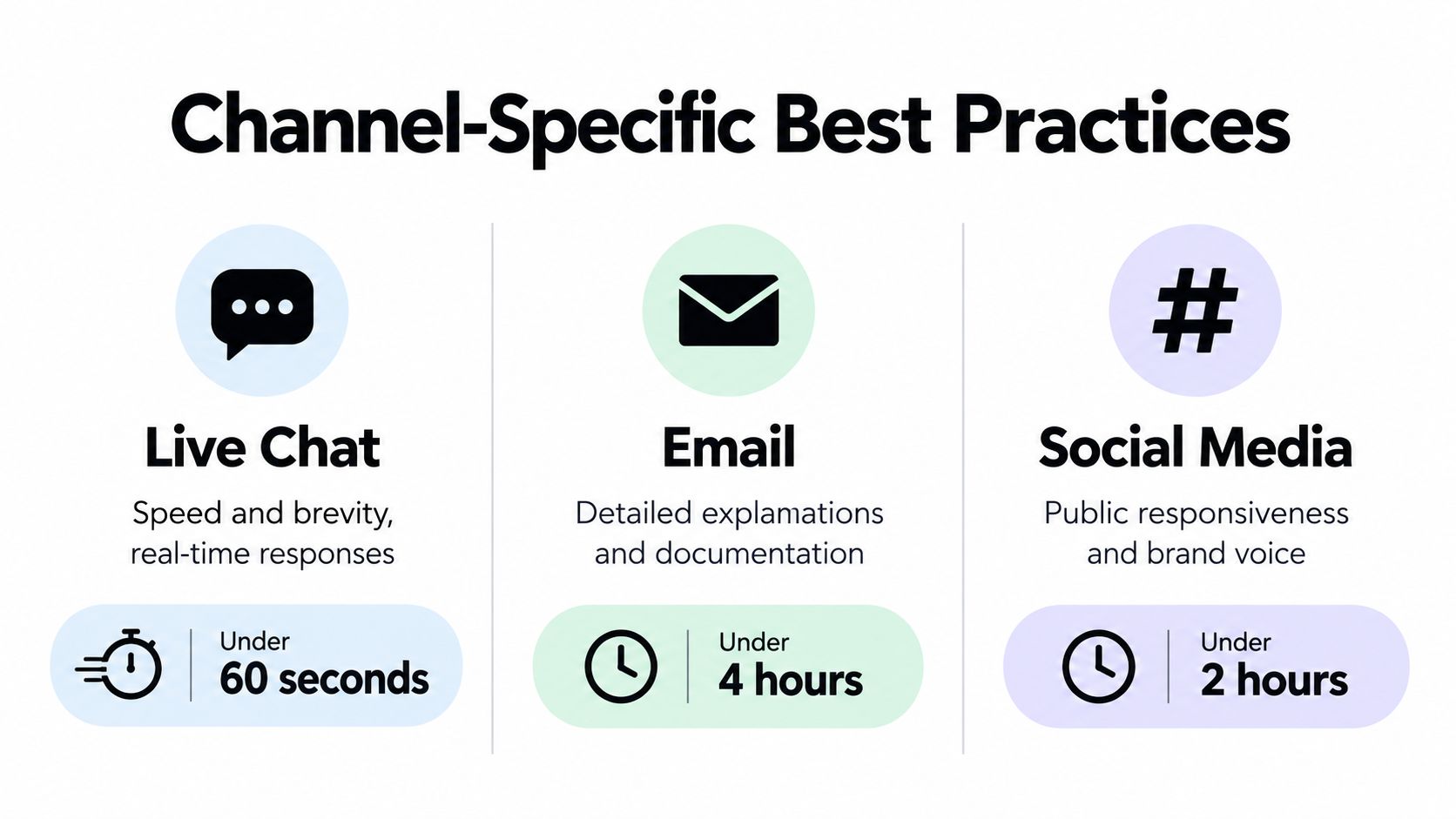
Different channels need different pacing, but they should never feel like separate conversations. A customer who starts in live chat and finishes by email should not have to retell the whole story, especially if the first channel already captured the essentials.
Live chat needs brevity and visible momentum
Chat works best when the replies are short, direct, and easy to scan. Customers in chat usually want progress, not a long essay. Suggested questions, file sharing, and screenshot sharing help turn a vague issue into something resolvable in one exchange.
That same speed only works if the system captures context for later. If the chat starts on the website and ends with a human, the receiving person should already know what was said, what the customer uploaded, and what outcome they wanted.
Email needs structure and permanence
Email is better for layered explanations, policy clarifications, and follow-ups that need a durable record. Subject lines should be specific enough to be found again, and the thread should stay intact so the customer can reference the earlier message without digging through the inbox.
For teams handling both quick questions and complex cases, online customer service best practices are most useful when they treat email as part of the same support history, not a separate department.
Social needs public calm and private resolution
Social channels carry extra risk because every reply is public. The first response should acknowledge the issue without getting defensive, then move the operational details into direct messages if the case needs private follow-up. That keeps the brand voice steady while avoiding a public back-and-forth.
Twilio's 2025 survey of 7,640 consumers across 18 countries found that 54% wanted businesses to disclose when they were interacting with AI, 69% said AI interactions should not feel robotic, and only 15% absolutely trusted brands with their data (Twilio survey summary). That makes tone consistency and disclosure part of channel management, not a side issue.
When to Use AI and When to Hand Off to Humans
AI works well for predictable questions, approved answers, and low-risk requests. Humans are better when judgment matters, the issue is emotionally charged, or policy does not fully cover the case. Strong support teams route by risk, not by ego.
Use AI for routine, bounded work
AI can handle order checks, FAQ responses, initial triage, translation, and similar repetitive requests when the answer comes from approved sources. It helps most when the system can verify the facts without guessing. See how teams use ChatGPT for customer support when the workflow stays inside that boundary. That keeps human agents free for cases that need judgment or context.
Escalate when the case needs judgment
Billing disputes, product defects, privacy concerns, complaints with conflicting details, and unclear policy situations should move to a person quickly. The same applies when the customer is upset and a generic reply would sound dismissive. Those cases need interpretation, not just retrieval.
If the answer depends on tone, judgment, or exception handling, a human should own it.
Preserve the full handoff
The handoff matters as much as the decision to escalate. The next agent should receive the conversation history, attachments, identity details, and any promise already made to the customer. A good AI summary helps, but it should be reviewed before anyone sends it on.
The hidden failure point is context loss. If a chat moves to email, or an AI assistant passes the case to a human, the customer should not have to restate the problem from scratch. Save the original wording, keep the thread attached, and pass along the specific reason for escalation so the next reply starts from the same place.
SignalZen is one option that combines AI support, a customizable live chat widget, email support in the same workspace, AI summaries, and human handoff with conversation context preserved. It also works from Slack, Microsoft Teams, or Google Chat, which helps small teams that do not want a separate support inbox.
Measuring What Actually Matters in Customer Communication
Many teams still track average first-response time and call it a day. That number is useful, but it can hide a lot of pain. A quick reply that forces the customer to repeat themselves still creates friction, and a fast wrong answer just creates more work later.
Track continuity, not just speed
A better dashboard includes handoff completeness, repeat-contact rate, and post-interaction satisfaction. Handoff completeness asks whether the next person had what they needed to continue. Repeat-contact rate shows whether the first conversation really solved the issue. Post-interaction satisfaction captures the customer's view after the exchange ends.
These measures work because they point to different failures. A high repeat-contact rate can mean the answer was unclear. Low handoff completeness usually means context did not survive the move between tools or teams. Satisfaction gives the customer's verdict on both.
Split timing into useful parts
Teams should also separate time-to-first-token, time-to-first-human-acknowledgment, and time-to-resolution. Those are not the same thing, and they shouldn't be lumped together. An instant acknowledgment followed by a careful fix is usually better than a rapid dead end.
A simple review method helps too:
- Audit transfers: Check whether the next responder can answer without asking the customer to repeat details.
- Compare reply types: Look at generic AI replies, context-aware AI replies, and human-reviewed replies by issue severity.
- Watch abandonment: See where customers give up before the issue is resolved.
- Review by channel: Chat, email, and social can fail in different ways, so they need separate patterns.
That kind of measurement makes customer communication visible as a system, not just a script.
Building a Communication System That Scales
A scalable communication setup starts with one verified knowledge source and one shared view of the conversation. When the AI and the human team both pull from the same material, answers stay consistent, and customers don't get different versions of the truth depending on who replies.
Keep the source of truth central
A single knowledge base can feed both automated replies and agent guidance. That reduces drift, especially when policies change or teams answer the same question in different ways. It also makes translation easier because the message is being adapted from a known source instead of rewritten from memory.
Design handoffs like product features
Handoff workflows should automatically carry history, attachments, identity information, and open questions into the next step. AI summaries help agents get oriented quickly, but the original thread still needs to be available. If the agent has to reconstruct the case manually, the system is leaking time.
Train for review, not just reply
Agents should know how to edit AI drafts, adjust tone, and verify whether the summary matches the thread. That's especially important when the issue is sensitive or high-value. A polished-sounding reply is not enough if it misses the actual context.
A practical checklist for a growing team looks like this.
- Centralize documentation: Keep approved answers in one place.
- Route by complexity: Let routine requests stay automated, move exceptions to humans.
- Preserve history automatically: Don't rely on agents to copy and paste context.
- Use clear escalation rules: Sensitive, ambiguous, or emotional cases should move fast.
- Review the numbers regularly: Focus on handoff completeness, repeat contacts, and satisfaction by channel.
Small and medium businesses often do best with simple tooling that fits their existing workflow instead of adding another inbox to monitor. That keeps the customer experience personal without making the team slower.
If customer conversations keep breaking at the handoff, SignalZen gives teams a way to keep chat, email, AI replies, and human escalation in one flow. Visit SignalZen to see how a shared workspace can keep context attached to the customer instead of forcing them to start over.


Better support without a bigger support team.
Start with AI. Add your team when the conversation needs a person.