

Hit the target, miss the customer. That's the flaw in most popular advice on contact center analytics. Shorter calls, faster answers, and higher containment look like progress on a dashboard, but they don't prove anyone's problem got solved. A metric only matters when it leads to a fix, and a fix only counts when customers stop coming back with the same issue.
Table of Contents
- What Contact Center Analytics Measures and How to Calculate It
- How Analytics Turns Raw Interactions into Evidence
- Dashboards Built for Executives, Leaders and Agents
- Why a Better Metric Can Make Support Worse
- How to Turn a Metric Dip into an Operational Fix
- Analytics for a Small Team Without a Data Team
- Choose Your First Three Metrics This Week
What Contact Center Analytics Measures and How to Calculate It
Contact center analytics turns every customer interaction, whether a call, chat, email, or ticket, into measurable evidence for service decisions. It gives managers a shared way to judge speed, resolution, and quality instead of relying on impressions from a few memorable contacts.
The market has moved beyond basic call counts for years. Future Market Insights estimated worldwide sales reached approximately USD 1.2 billion in 2021, after growing at about 19.1% annually from 2017 through 2021. That growth pushed teams toward analyzing conversations, behavior, and outcomes, not just operational reports.
The Eight Baseline Metrics
| Metric | What it measures | Formula | Better when |
|---|---|---|---|
| Average handle time (AHT) | Average time an agent spends per contact, including talk, hold and after-call work | (Talk + hold + after-call work) ÷ contacts handled | Lower, until quality or repeat contacts suffer |
| First contact resolution (FCR) | Share of issues solved in a single contact | Issues resolved on first contact ÷ total issues | Higher |
| Customer satisfaction (CSAT) | Customer rating of a single interaction | Satisfied responses ÷ total responses × 100 | Higher |
| Service level | Share of contacts answered within the target wait time you set | Contacts answered within target ÷ contacts offered | Meets the target you set |
| Abandonment rate | Share of customers who leave before an agent answers | Abandoned contacts ÷ contacts offered | Lower |
| Average speed of answer (ASA) | Average wait before an agent picks up | Total queue wait time ÷ answered contacts | Lower |
| Occupancy | Share of logged-in time spent handling contacts | Handle time ÷ logged-in time | Moderate; very high levels signal burnout |
| Transfer rate | Share of contacts moved to another agent or queue | Transferred contacts ÷ total contacts | Lower |
Where Definitions Quietly Bend the Numbers
AHT is the easiest metric to game by accident. A team that excludes after-call work looks faster than one that includes it, even when agents do identical work. Readers who want the calculation broken down step by step can use this guide to AHT in a call center before comparing queues.
CSAT has a different trap. It counts only customers who answered the survey, so it describes respondents, not everyone served. Service level is equally dependent on definition, because the result changes the moment a manager changes the target wait time.
Practical rule: Identical definitions come first. Comparisons across teams or quarters mean nothing until every team counts talk, hold, wrap-up, and answered contacts the same way.
Automation changes what gets counted, too. Applied's guide to customer service automation is useful context for deciding which contacts automation should handle before those contacts enter AHT or FCR calculations.
Set targets from a four-week baseline drawn from the team's own ticket and call data, not from published averages built on different channels, customers, and definitions.
How Analytics Turns Raw Interactions into Evidence
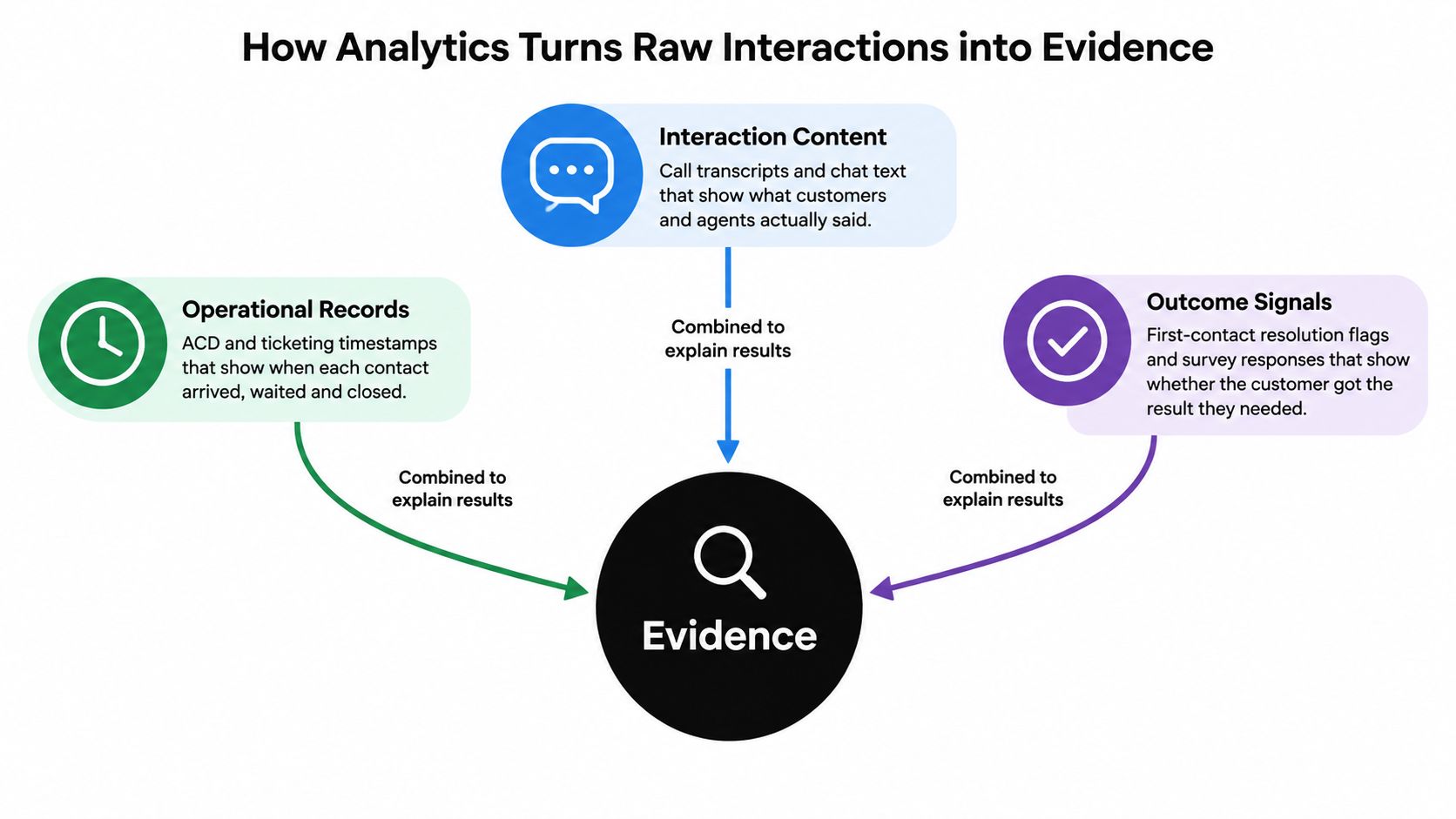
Every result rests on three data layers. Operational records show timestamps, queues, and volumes. Interaction content shows what customers and agents actually said. Outcome signals show surveys, repeat contacts, refunds, and whether the issue stayed resolved.
Think of a kitchen. Operational data is the order log showing how many tickets arrived and how long each took. Content is what the guest said about the food. Outcomes are whether the guest came back.
Scale makes manual judgment unreliable. A Nectar Desk benchmark compilation reports that call centers globally handle more than 300 billion customer interactions per year. Definitions of an interaction vary by provider, but that magnitude still rules out manual review as a basis for thorough quality control or reliable trend detection.
Techniques Stack in Order
| Technique | Question it answers | Data it needs | Fits when |
|---|---|---|---|
| Operational reporting | How many contacts arrived, when, and how long they took | ACD, ticketing and CRM timestamps | Every team, from day one |
| Speech analytics | What was said, how long silences lasted, and where callers became frustrated | Call recordings and transcripts | High call volume or strict compliance needs |
| Text and chat analytics | Which topics, intents and sentiments appear in chat and email | Chat logs, email threads and transcripts | Most contacts arrive by chat or email |
| Quality scoring, manual and AI | Did the agent follow the process and answer correctly | Scorecards with sampled or scored interactions | Coaching and audit trails are required |
| Predictive analytics | Which contacts are likely to escalate, churn or breach service levels | Several months of history with labeled outcomes | Volumes are stable and outcome data is clean |
Start with operational reporting because every team already generates timestamps. Add content analysis when volume or channel mix makes a question impossible to answer from timestamps alone.
Mobile and remote work adds a capture problem. Supervisors who struggle to see calls handled away from a desk phone can review approaches to keeping track of mobile client calls so those conversations aren't missing from transcripts and quality samples.
Predictive tools belong last, not first. They need clean outcome labels, and a team that can't yet agree on what counts as resolved will train a model to predict its own confusion.
Dashboards Built for Executives, Leaders and Agents
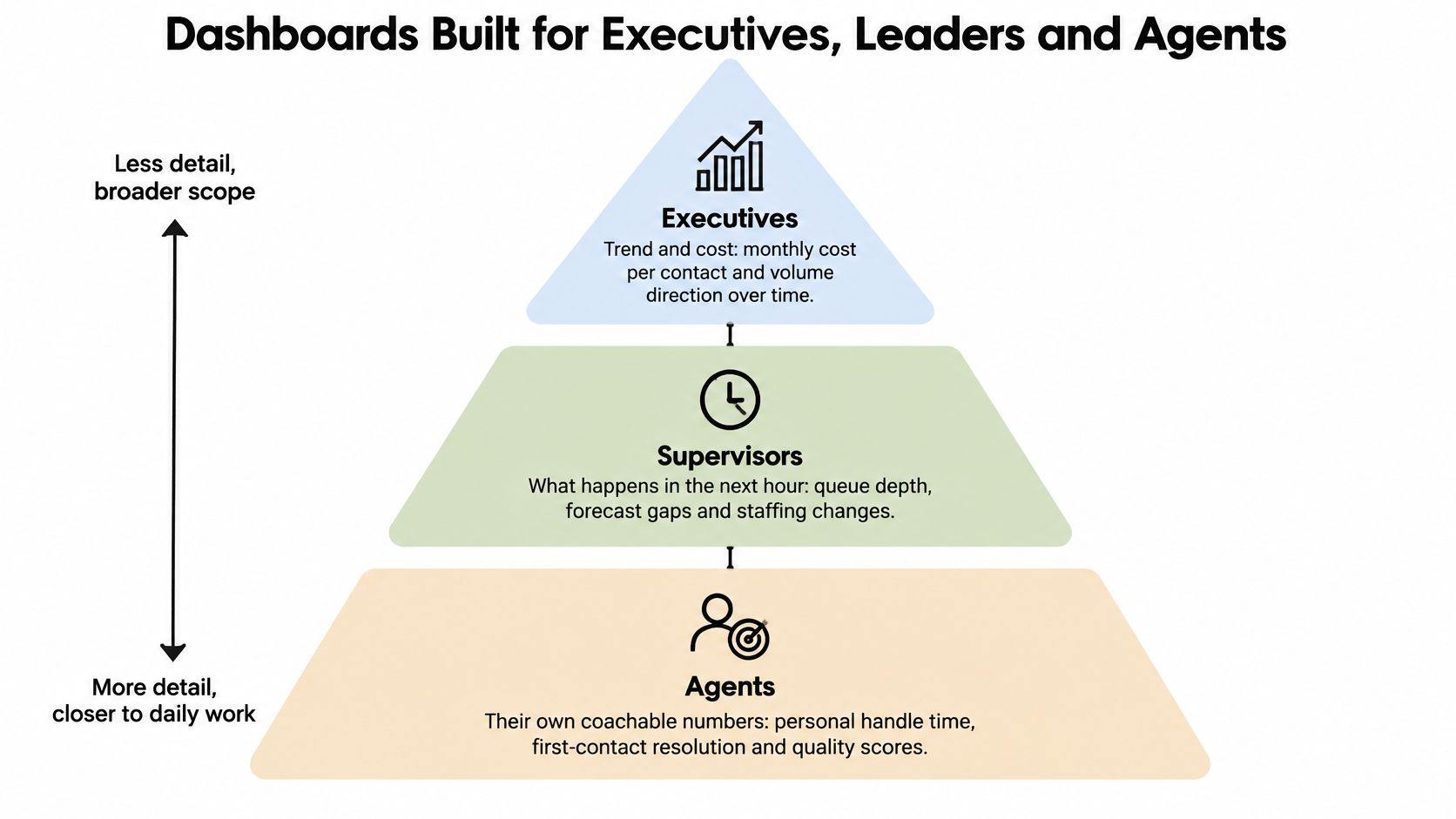
One dashboard can't serve everyone. A leader needs trend and cost, a supervisor needs the next hour, and an agent needs coachable numbers tied to personal work. Build three tiers instead of forcing every audience onto one crowded screen.
| Tier | Audience | Metrics shown | Refresh and review |
|---|---|---|---|
| Executive scorecard | Leaders | CSAT trend, FCR, repeat contact rate, cost per contact | Reviewed weekly or monthly |
| Team operations board | Supervisors | Service level, abandonment, ASA, queue backlog, occupancy | Refreshed in real time or hourly |
| Agent coaching view | Individual agents | AHT next to FCR, QA score, transfer rate, team median | Reviewed daily or weekly |
Layout Rules That Prevent Bad Readings
- One question per chart: A chart that tries to show volume, speed, and satisfaction together usually answers none of them clearly.
- A target line on every KPI: A number without a target invites managers to react to normal movement as if it were a crisis.
- Distribution instead of averages only: Show median and 90th percentile handle time because averages hide the long calls that generate complaints.
- Separate panels by channel: Give chat, email, and voice their own panels so a drop in one channel never hides inside a blended score.
Agent views deserve special care. Compare agents with the team median rather than a public ranking, and always place AHT beside FCR and QA score. Speed shown alone teaches people to rush.
If a chart wouldn't change a decision this week, remove it.
That test keeps dashboards operational. Decorative charts consume attention, and attention is the scarcest resource a supervisor has during a busy queue.
Why a Better Metric Can Make Support Worse
A lower handle time can mean worse support. A higher containment rate can mean worse support, too. Efficiency metrics measure how an interaction ended or how long it took, not whether the customer got the right result.
Say agents learn that AHT drives their reviews. They shorten calls, skip verification steps, and close tickets earlier. The dashboard improves while customers return days later, angrier and more expensive to help.
Pair Every Efficiency Metric With an Outcome
| Efficiency metric | Pair it with | Why the pair matters |
|---|---|---|
| Average handle time | Repeat contact rate within 7 days | Shorter calls that come back cost more than they save |
| AI containment rate | Verified resolution and factual accuracy audit | Containment counts endings, not solved problems |
| CSAT | Survey response rate and reason codes | Low response rates skew scores toward the extremes |
| First contact resolution | Customer-confirmed resolution | Agents self-report resolution and often overstate it |
AI containment needs the closest scrutiny. It counts conversations that ended without a person, including conversations where the customer gave up, accepted a wrong answer, or found help elsewhere. Higher containment can therefore signal suppressed escalation rather than successful resolution.
That audit rarely happens. Recent CX-observability research reported by CIO Dive found that among AI-using operators, 78.5% had no metric for hallucinations or factual accuracy. Without that check, confident reporting can rest on answers nobody verified.
CSAT misleads in a quieter way. Response rates are often small, and respondents tend to be the very happy or the very angry. A rising score can mean only that fewer unhappy customers bothered to reply.
Averages Hide the Contacts That Hurt Most
- AHT looks stable: A small number of very long, difficult contacts may be driving escalations while the average barely moves.
- FCR looks strong: Agent-reported resolution often means the agent believes the issue is fixed, not that the customer confirms it.
- Containment looks efficient: Customers who abandon the bot and email later appear as two unrelated events unless contacts are linked.
The pairing rule is simple. A metric counts as a success only when its paired outcome holds. If AHT falls while 7-day repeat contacts rise, support didn't improve. It got faster at failing.
How to Turn a Metric Dip into an Operational Fix
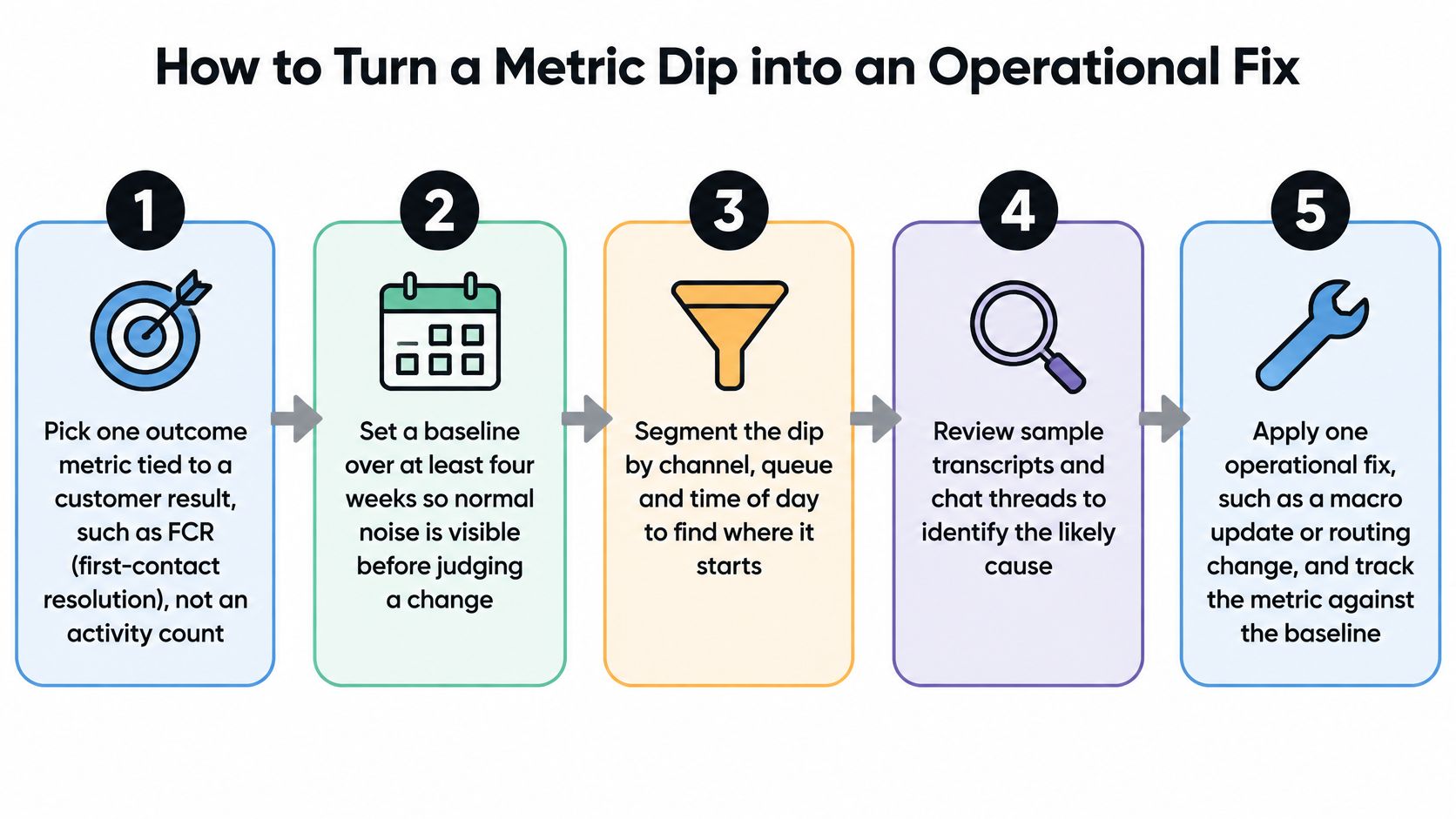
A dip isn't a diagnosis. It's a prompt to investigate one segment, name one driver, and test one change. Teams that skip those steps usually respond with more training, more pressure, or a new dashboard, none of which fixes a broken article or routing rule.
The Seven-Step Procedure
- Pick one outcome metric: Choose a customer result such as FCR, not an activity count such as tickets touched.
- Set a four-week baseline: Four weeks makes normal daily and weekly noise visible before anyone judges a change.
- Segment the dip: Split results by channel, queue, issue type, agent group, and time of day to find where the problem concentrates.
- Read the worst segment: Review 20 to 30 interactions from that segment and note the recurring cause in plain language.
- Name one driver and one change: A missing help article, an unclear refund policy, or a macro agents can't find are testable drivers.
- Run the change for two to four weeks: Compare results with the baseline or with a comparable queue that didn't receive the change.
- Keep, adjust, or revert: Decide from the outcome pair, not from effort spent or enthusiasm for the new process.
Segmentation does most of the diagnostic work. A company-wide FCR dip might be one queue on Monday mornings, one product area after a release, or one channel where handoffs lose context. Treating all agents as the problem wastes coaching time and misses the operational cause.
A Hypothetical Billing Example
Say FCR in a billing queue sits at 62% in this hypothetical example. Segmentation shows about 40% of billing contacts are refund-status questions, and reading those conversations shows the help center doesn't answer them clearly. Agents improvise, customers don't trust the answer, and many contact the team again.
The team adds one article that explains refund timing and one macro that points to it. After the test period, FCR rises to 71% and the 7-day repeat contact rate falls from 18% to 12% in the example. The paired improvement matters because it shows customers both got an answer and stopped returning.
That pattern prevents the familiar slide into poor customer service habits such as closing tickets quickly, repeating questions, and forcing customers to chase status updates. It also gives managers a defensible reason to keep the fix.
Product teams use similar discipline when they separate usage signals from outcomes. Managers borrowing methods from practical analytics frameworks for product managers should still keep the support version narrow, with one queue, one driver, and one visible customer result.
Change one thing at a time: Three simultaneous changes may improve the metric, but nobody will know which change worked or which one to roll out next.
Document the baseline, segment, driver, change, and result in one short note. That record turns contact center analytics from reporting into an operating habit that survives staff changes.
Analytics for a Small Team Without a Data Team
Most analytics advice assumes a large voice operation, workforce management software, extensive recordings, and dedicated analysts. Small teams face a different reality. They handle website chat, email, mobile support, and handoffs inside collaboration tools, often with the same few people covering every channel.
Manual quality review doesn't close that gap. Industry reporting compiled by AmpliAI indicates manual reviews often cover only 2–5% of interactions, while teams struggle to find time for QA. The practical question isn't which advanced dashboard to buy. It's which few measures can be trusted across channels.

The Minimum Viable Measurement Model
Apply eight shared tags to every conversation:
- Intent: What the customer wanted, such as refund status, login help, or order tracking.
- Resolution status: Resolved, unresolved, or waiting on the customer or another team.
- Escalation reason: Why a person took over or why the contact moved queues.
- First response time: How long the customer waited for the first meaningful reply.
- Time to resolution: Elapsed time from first contact to confirmed resolution.
- Repeat contact: Whether the same customer returned about the same issue.
- Knowledge source used: Which article, file, or instruction supported the answer.
- Language or translation issue: Whether wording or translation affected understanding.
Define those tags once in a shared sheet so chat and email mean the same thing. Record where transcripts are stored and who can access them in that sheet, too. For SignalZen users, collected data can be accessed in the Console by logging in with the appropriate client credentials.
One Weekly Review That Catches Drift
Sample about 20 AI-answered conversations each week. A person scores each one for factual grounding in approved material and for actual resolution. Track where the reviewer and the AI disagree, because a rising disagreement rate is an early warning before customers report errors at scale.
Add handoffs as a reported measure. Count how often an agent had to ask for information the customer already gave. That count exposes lost context faster than a generic satisfaction question.
Full automation doesn't produce reliable insight by itself. Shared tags make conversations comparable, and the weekly human review checks whether automated labels deserve trust. Without both, a small team gets polished numbers built on unexamined assumptions.
Choose Your First Three Metrics This Week
Metrics describe, techniques explain, and dashboards only matter when they change a decision. A small team doesn't need twenty KPIs to start using contact center analytics well. It needs three measures that balance speed, outcome, and quality.
- One efficiency metric: Pick AHT or ASA, depending on whether handling time or waiting time causes more pain.
- One outcome metric: Pick FCR or the 7-day repeat contact rate, with customer confirmation where possible.
- One quality metric: Use CSAT together with its response rate, and review CSAT survey questions before changing the survey wording.
Start the four-week baseline before changing staffing, macros, routing, or automation. Then read each metric beside its pair in the weekly review and name the first fix to test, such as one missing article or one broken handoff reason.
Check what Slack, Microsoft Teams, or Google Chat already reports before buying anything. SignalZen's AI Support answers customer questions automatically using the business's website, files, help center and instructions, and the business can start with AI support and add its team when a conversation needs a person.
The buying rule is strict. Purchase tooling only when the three chosen metrics can't be produced reliably from data already inside the team's current tools.
Stop rewarding speed that creates repeat work and start measuring whether answers are grounded, resolved, and confirmed. SignalZen brings AI support and human handoff for chat and email into Slack, Microsoft Teams, or Google Chat, so a small team can act on those measures without adding a separate help desk. Visit SignalZen to set up support that starts with AI and brings in people when a conversation needs them.



Better support without a bigger support team.
Start with AI. Add your team when the conversation needs a person.