
The shared support mailbox usually starts as a small convenience and ends as a daily source of friction. Three people answer the same customer, one reply gets sent twice, and a billing question sits untouched because everyone assumed someone else owned it. An email ticket system turns that messy stream into a tracked queue, so each message has an owner, a status, and a full history instead of living as a loose thread in someone's inbox.
That matters because email is still a durable support channel, not a leftover from an earlier era. Global daily email volume has grown from about 281.1 billion messages in 2018 to 361.6 billion in 2024, with projections of 376.4 billion in 2025, 392.5 billion in 2026, and more than 424 billion by 2028. The point for support teams is simple, the inbox is not shrinking, so the process on top of it has to get better.
Table of Contents
- What an Email Ticket System Really Does
- How an Inbound Email Becomes a Ticket
- Core Features Worth Expecting from a Modern System
- A Day in the Life of One Customer Email
- Unifying Email with Chat and Collaboration Tools
- Measuring Performance Beyond a Quick Reply
- Practical Tips and Common Mistakes to Avoid
- Bringing It All Together
What an Email Ticket System Really Does
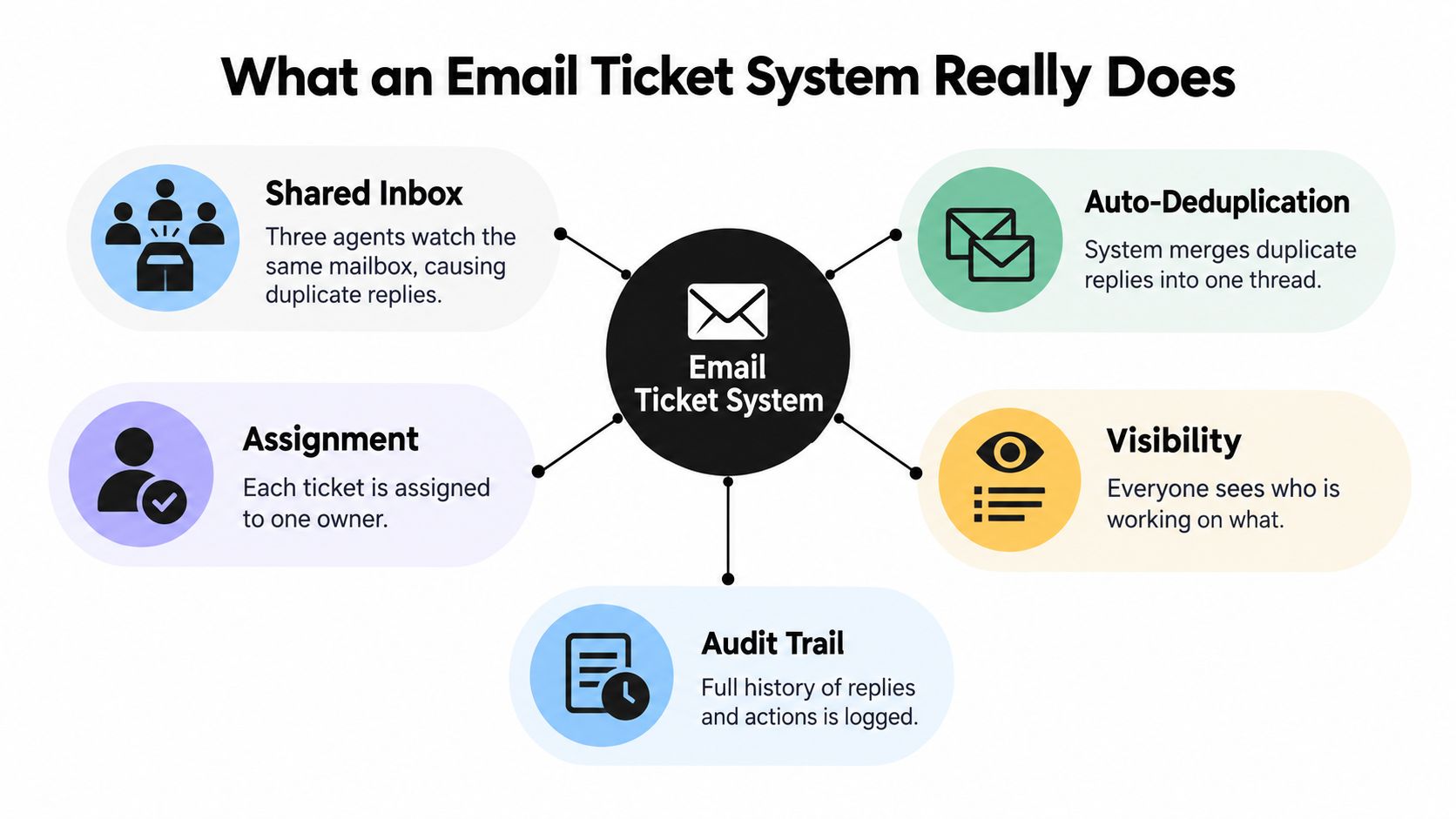
A shared inbox behaves like a hallway table where everyone drops notes, but nobody signs them. A ticket system changes that by turning each incoming email into a record with a clear owner, a visible state, and an audit trail. The customer still sends email as usual, but the team works the message as a managed case instead of a loose conversation.
From mailbox to managed queue
The useful shift is not cosmetic. A message becomes something the team can route, prioritize, search, and report on, which is why support leads treat the inbox like an operational queue rather than a place to “catch up later.” That structure matters even more for small and medium businesses, because a shared mailbox without ownership makes unanswered requests easy to miss.
The system also keeps history attached to the case. That means the customer's earlier notes, attachments, and replies stay with the same record, which helps agents avoid asking the same questions twice.
Why this is different from just reading email
Plain email works when one person handles one conversation end to end. It starts to break when several agents share the work, when a manager needs visibility, or when a request must be escalated. The ticket layer creates consistency by deciding who owns the case, what queue it belongs in, and what happens next if nobody answers in time.
For teams comparing tools, a practical overview such as Doczen's customer service automation guide is useful because it frames automation as a workflow problem, not just a software feature. That's the right lens for email support too, since the question is how messages move, not just where they land.
How an Inbound Email Becomes a Ticket
Think of the inbox as a mailroom with a clerk at the front desk. The email arrives, gets read for basic details, checked against what the system already knows, and then placed into the right bin before anyone replies. The value of the system is that this happens the same way every time, which is what makes support measurable.
Arrival, identity, and threading
When a customer sends a message, the system first accepts it and reads the message headers. A well-run ticket system uses standards-based threading, so each message has a unique Message-ID, replies carry In-Reply-To, and the prior chain appears in References. That keeps the new reply attached to the right case even if the subject line changes or the customer switches email clients.
Teams often get confused. If the system relies only on subject text, two unrelated conversations can get merged, or one customer's follow-up can be split into a duplicate ticket. A clean implementation treats the header chain as the primary thread and the ticket ID as a secondary match.
Ticket record and assignment
Once the message is matched, the system creates or updates the ticket record. That record usually holds the sender, subject, body, status, owner, priority, and whatever internal tags the team uses to classify the issue. The point is not to store data for its own sake, it's to make the case easy to route and easy to audit later.
At this stage, the ticket can be sent to a queue, assigned to a person, or left unowned for triage. A notification then tells the right agent that work has arrived, so the issue doesn't sit in the dark.
One practical reference for teams that want to understand the underlying mechanics is the internal email basics documentation, which shows why the parsing and threading layer matters before any reply is drafted.
Core Features Worth Expecting from a Modern System
A modern e mail ticketsystem should feel like a workbench, not a locked filing cabinet. The agent needs to see what arrived, what's already been said, and what still needs a human decision. The features that matter most are the ones that remove repetition without hiding context.
The features that earn their keep
- Shared visibility: Everyone can see the same queue, which prevents duplicate replies and makes it obvious who is handling what.
- Assignment and routing: Tickets can be routed by keyword, queue, or round-robin rules so the right person sees the right message first.
- Saved replies and macros: Repetitive questions don't need a fresh draft every time, which helps agents answer consistently.
- Internal notes: Managers and agents can discuss the case privately without sending those comments to the customer.
- Collision detection: The system warns when another agent is already typing, which reduces accidental double responses.
- Customer history: Prior conversations stay attached to the case, so the agent doesn't start cold.
What SMBs should prioritize first
For a small team, the essentials are assignment, history, internal notes, and basic reporting. Knowledge base integration, macros, and saved replies usually come next because they cut handling time on repeat questions. More advanced features are useful only if the core workflow is already clean.
This is also where newer tools have changed the category. Some platforms now add AI Copilot drafting, AI summaries, suggested questions, two-way translation, and chat-and-email unification. Those are useful examples of where the market has moved, but they still need a reliable queue underneath them or the automation just speeds up confusion.
Practical rule: If an agent can't tell who owns a ticket in five seconds, the system is still missing a basic control.
For teams choosing between products, the internal email integration page is a helpful way to compare how email support behaves once it's inside a shared workspace rather than stranded in a separate inbox.
A Day in the Life of One Customer Email
A customer writes in about being charged twice for the same order. The message lands in the system, the subject line is read, and the sender is matched to an existing customer record. The ticket is routed to the billing queue because the message contains a payment keyword, and the agent on duty sees the case with the earlier order history already attached.
Where AI helps, and where it should stop
The first draft can come from AI assistance, but only as a draft. The agent checks the wording, confirms that the refund policy applies, and then sends the reply under human control. If the request needs approval, the ticket moves briefly to a supervisor, who reviews the refund decision without losing the original thread.
That handoff is the part many teams miss. The best workflow does not make the customer repeat themselves when the case moves from AI to human or from agent to manager. The thread, the reason for escalation, and the earlier responses all need to stay together.
Why the follow-up still matters
Later that day, the same customer replies again from the same email address. Because the system is threading correctly, the follow-up lands in the original ticket instead of creating a second case. The agent sees the complete conversation, adds a final response, and closes the ticket with a short templated note and a link to the relevant help article.
That sequence is what “resolved” should look like in practice. It is not just an answered inbox, it is a case that moved from arrival to ownership to closure without losing context.
Unifying Email with Chat and Collaboration Tools
Many teams already live in Slack, Microsoft Teams, or Google Chat, so the smartest support setup doesn't force them to learn a separate habit for every channel. The better approach is to bring email into the same workspace where the team already collaborates, then keep ownership and history intact as messages move between channels. A guide to CRM integration with Outlook is a good reminder that the challenge is not connection alone, it's preserving usable context after the connection is made.

What happens when email joins chat
Email usually enters the workspace through forwarding or mailbox ingestion. From there, the same ticket can be viewed, answered, assigned, or escalated from chat, which helps a team avoid bouncing between tools. The important part is that the email thread remains the source of truth, even if the day-to-day work happens in a team channel.
That setup is especially useful when a customer starts in email, gets a quick response in chat, and later returns by email. The system needs to recognize that it is still the same conversation, not a fresh support request.
Guardrails that keep the handoff clean
When channels merge, the team needs clear rules. The reply owner must stay visible, escalation should preserve the full thread, and AI-generated summaries should be treated as a handoff aid rather than a replacement for the record itself. If the customer is moved from email to chat, the agent should still be able to open the case and see the earlier messages, attachments, and decisions.
That's why unified systems matter for service quality. They reduce context switching, but only if they keep the case legible as it moves.
For a concrete look at how this works across team tools, the internal email integration for Slack and Microsoft Teams explains the operational side of shared ownership without splitting the customer history.
Measuring Performance Beyond a Quick Reply
A fast auto-reply is not the same thing as service. Customers care whether a human takes the case, whether the issue gets resolved, and whether the next reply has to repeat the same details. That's why support teams need metrics that separate acknowledgment from real progress.
The numbers that matter
| Tier | Response Time | Customer Expectation |
|---|---|---|
| Best-in-class | under one hour | 31% of customers expect a support reply within one hour, according to the benchmark cited in the available data from Fitsmallbusiness business email statistics |
| Good | under four hours | 46% of customers expect a reply within four hours, according to the benchmark cited in the available data from Swizero email response time |
| Acceptable | 12 hours or less | an average benchmark of about 12 hours 10 minutes is cited in the available data from Swizero email response time |
These benchmarks show why teams should track time to first human response, time to first meaningful answer, time to resolution, reopen rate, SLA breach rate, AI containment rate, and customer correction rate. A thank-you auto-message can be useful, but it should not count as the first response if nobody has begun solving the problem.
What to watch in the dashboard
A useful dashboard should break performance down by channel, language, priority, and whether a human or AI closed the ticket. That makes it easier to see whether automation is helping or just making the queue look cleaner. If low-priority cases are handled quickly while urgent tickets age in the queue, the average will hide the problem.
Teams also need to confirm that mail is landing reliably before they judge response speed. For that, a simple email deliverability test helps rule out inbox placement issues, which can otherwise make a strong workflow look slower than it really is.
Practical Tips and Common Mistakes to Avoid
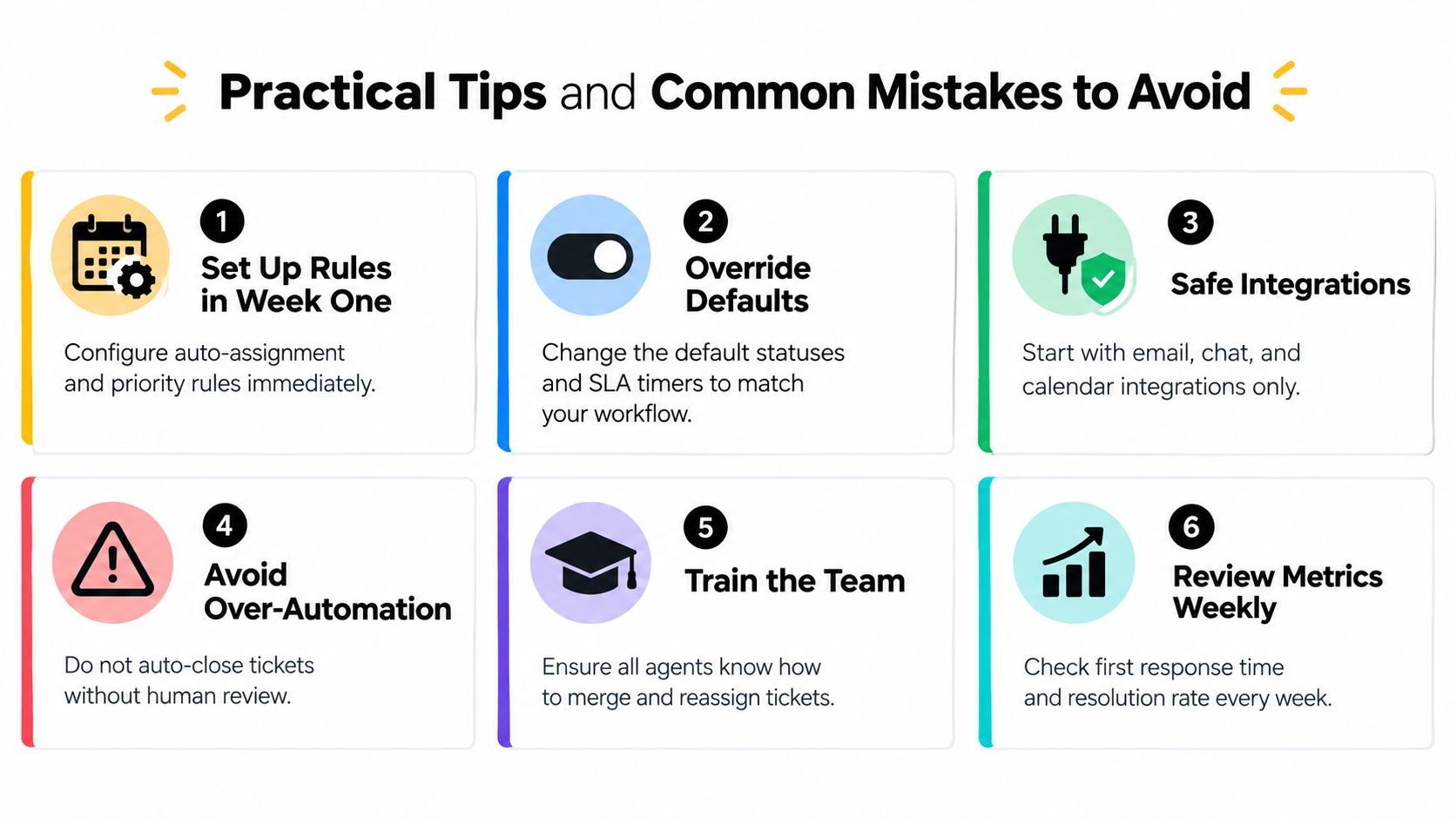
The first week of setup should feel like building guardrails, not turning on every feature at once. Start with routing rules, ownership, and a clear escalation path, then lock in what should happen when the team is unavailable. A simple queue done well beats a fancy queue that nobody trusts.
Setup habits that save time later
- Set up rules in week one: Auto-assignment, priority tags, and escalation paths should be in place before the queue fills up.
- Override the defaults: Status labels and SLA timers should match the actual workflow, not the vendor's sample setup.
- Start with safe integrations: Email, chat, and calendar links are usually enough for launch.
- Avoid over-automation: A ticket should not close itself without human review when the issue is ambiguous.
- Train the team on merges and reassignment: Agents need to know how to join duplicate threads and hand a case off cleanly.
- Review metrics weekly: First response time and resolution rate tell a better story than inbox volume alone.
Two areas that deserve extra caution
Conditional AI automation needs explicit confidence thresholds and a human approval path for sensitive cases. If the system is uncertain, it should draft or escalate, not improvise. That same caution applies to multilingual support, where translation memory, approved terminology, and language-specific review protect quality when a thread changes languages mid-conversation.
One platform that combines these pieces inside a shared workspace is SignalZen, which routes email into the same support flow as chat and gives agents shared context for handoff. Used well, that kind of setup keeps the team from treating AI as a shortcut and instead makes it a controlled layer in the queue.
Practical rule: If a process depends on everyone remembering the exception, the process is too fragile.
Bringing It All Together
A good email ticket system makes the inbox feel calm again. The duplicates drop, ownership becomes obvious, and every customer reply stays tied to one case instead of getting scattered across personal mailboxes. In the first 30 days, the clearest sign of success is not volume, it's that the team can answer faster without losing context.
SignalZen brings email, chat, and human handoff into one support workflow, so teams can manage cases without bouncing between disconnected inboxes. If a support team is ready to turn shared email into a trackable queue with preserved history, SignalZen is worth a look.



Better support without a bigger support team.
Start with AI. Add your team when the conversation needs a person.