

The fifth refund question of the week lands in a chat window at 10:40 on a Tuesday. The agent knows the answer exists somewhere. It might be in the shared drive folder with 400 files, or in a thread inside a departed colleague's inbox, or on a policy page last edited eighteen months ago. She types from memory, adds a hedge, and hopes it matches what the other three agents told customers that same morning.
Nothing about that scene is a technology failure. The company had the answer. It had it several times, in several versions, none of which carried a name, a date or a status. What it lacked was a way to turn scattered fragments into something an agent could trust inside the ten seconds a customer will wait.
That is the problem knowledge management systems exist to solve, and it is narrower and harder than the phrase suggests.
Table of Contents
- What a Knowledge Management System Is
- How a Knowledge System Differs from a Document Store
- Core Features Built on the Four Stages
- How First-Party Content Trains AI Support
- Selection Criteria for a Small Business Buyer
- Measuring Whether the System Pays Off
- Confirm the Fit Before You Choose a System
What a Knowledge Management System Is
Run the same question through a system built for it and the sequence changes. The agent types a product and a keyword into a search box inside the chat tool. The top result is an article about refunds on sale items, marked as approved, owned by the finance lead, reviewed three weeks ago and scoped to one storefront. She sends it, attaches the link, and moves to the next conversation. No memory required, no hedge, no guessing what a colleague said.
That difference is what the term describes:
A knowledge management system is the software, and the rules around it, that capture what an organization knows, structure it so people can find it, keep it current, and deliver it at the moment someone needs it, whether that moment happens in a chat window, a help center page or an AI answer.
Three verbs carry the definition: capture, structure, deliver. Many groups handle the first poorly, skip the second, and then blame the third.
The Memory Analogy, and Where It Breaks
A filing cabinet holds paper. A memory holds lessons: which exception applies, who signed off on the change, why the old policy was abandoned. A document store is a filing cabinet with a search box bolted on. A knowledge management system sits closer to memory, because it keeps the reasoning and the date attached to the answer.
The analogy breaks in one useful place. Human memory is unreliable and nobody audits it. A well-run system is auditable, and every answer traces back to a named source with a review date. That is exactly the property a support team needs when a customer disputes what they were told last month.
- Capture pulls the answer out of the chat transcript, the email and the file nobody opens.
- Structure tags it by product, workflow, language and status, so a search in a Spanish-language storefront doesn't surface a UK policy.
- Deliver puts it in front of the agent or the customer without a second tool or a tab switch.
Size explains why small teams now face a question that only large enterprises debated a decade ago. A 2025 market analysis estimated the global knowledge-management software market at $25.8 billion and projected it would reach $87 billion by 2034, according to Dataintelo's market report.
The simplest diagnostic fits in one sentence: can a new hire answer a customer's question without asking a colleague? If the answer is no, the company has files, not knowledge.
How a Knowledge System Differs from a Document Store
A document store answers one question: where is the file? A knowledge management system answers a harder one: what is the current approved answer, and who signed it off? The gap between those two questions explains most of the disappointment teams feel after buying better search and finding that agents still ask each other in Slack.
| Criterion | Document store | Knowledge management system |
|---|---|---|
| Unit of storage | Files and folders | Articles, answers and linked sources |
| Ownership | Usually the uploader, if recorded | Named owner for each article |
| Freshness | Stays as saved | Review dates and expiry flags |
| Retrieval | Keyword search over file names and text | Search plus metadata for product, language and status |
| Delivery | Someone must open and read the file | Pushed into chat, email, help center or AI answers |
| Feedback | Comments, if any | Corrections logged and routed back to the owner |
| Reporting | File counts and storage used | Answer use, unresolved questions and correction rates |
Say a small e-commerce team keeps its refund policy in a shared drive with 400 files across a dozen folders. The policy exists in three versions: one written before a payment provider change, one updated for a holiday returns window, and one pasted into a support macro. Nothing on any of the three marks which one is live, so the newest agent picks whichever appears first in search.
Move that policy into a knowledge system and three details change. The article gains a named owner, in this case the finance lead. It carries an effective date and a review date, so it expires if nobody touches it. It holds a status, so a superseded version gets flagged for review instead of appearing in results with equal weight. The words on the page barely change. What changes is whether an agent can defend the answer to a customer who complains.
The Trap That Eats the Budget
Adding search to a document store does not add ownership or expiry. It makes the wrong answer faster to find.
The rule that matters: retrieval quality and source quality are separate problems, and only one of them is solved by better search.
This is why vendors who lead with search accuracy leave buyers exposed. A system that returns an outdated policy in 200 milliseconds is worse than one that returns nothing, because nothing prompts a question and a confident wrong answer doesn't.
Run a five-minute test. List the ten questions your customers ask most. For each one, write down two things: the owner and the last review date. If any row is blank, the team is running a document store. That's not a software verdict, it's a governance verdict, and no migration fixes it.
Core Features Built on the Four Stages
Two agents share a call. One has handled angry customers for six years and knows the moment to stop apologizing and start offering a specific remedy. The other is three weeks in and follows the script. The gap between them is knowledge no document has captured, and any system that ignores it stays incomplete however good the search is.
That gap is what the SECI framework describes. Ikujiro Nonaka and Hirotaka Takeuchi set it out in the 1990s, most fully in their 1995 book The Knowledge-Creating Company, and it names four ways knowledge converts between forms, as later analysis of the SECI model explains. Socialization moves tacit knowledge through shared experience. Externalization turns that experience into explicit form, a checklist or a procedure. Combination merges explicit pieces from different places. Internalization turns the written version back into individual skill through use.
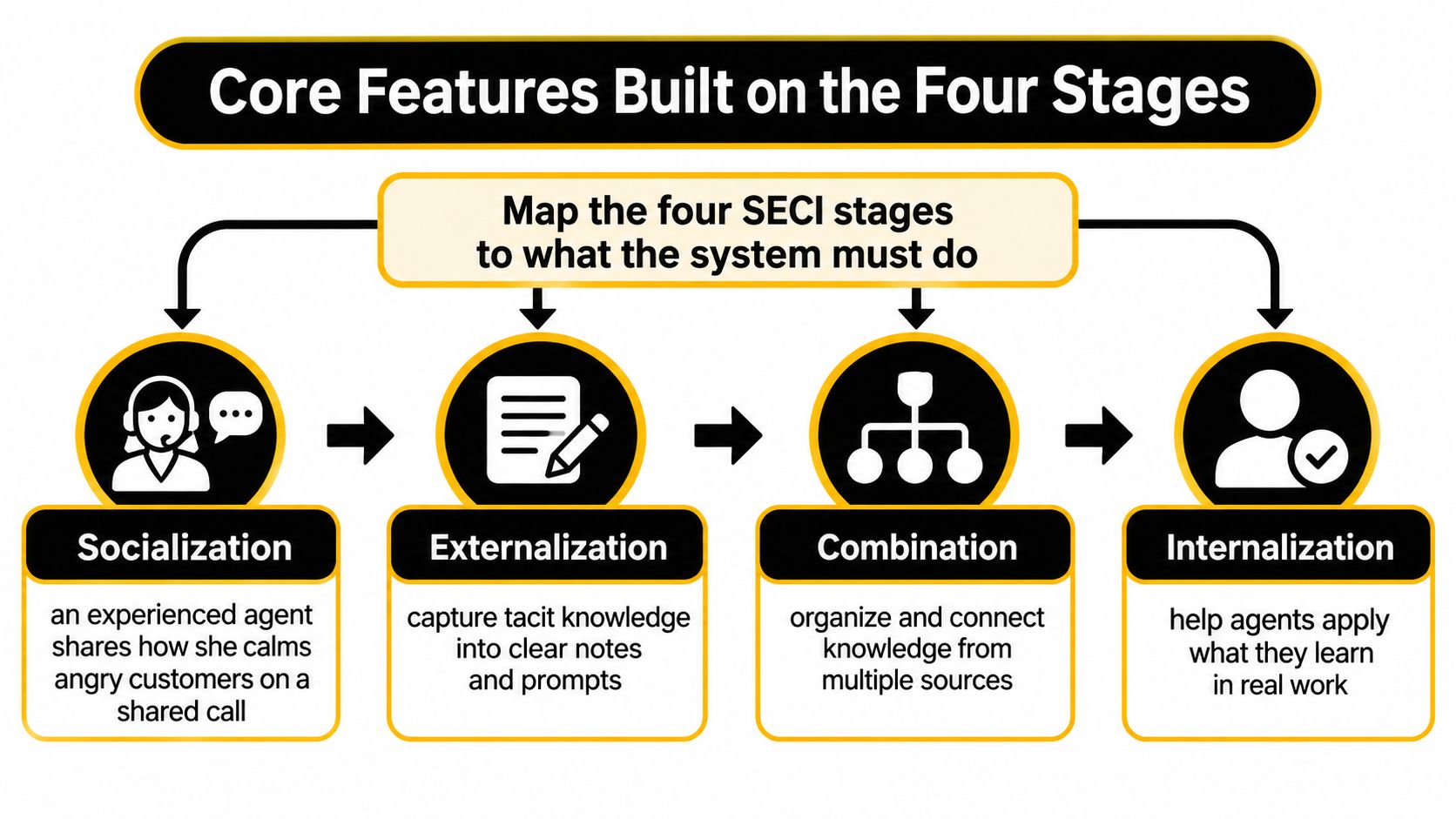
Each stage imposes a requirement on the software, and a system that handles only one of them fails in a predictable place.
- Socialization needs a capture path. Discussion threads, chat transcripts and a short form asking an agent what they did differently all beat a blank page nobody opens.
- Externalization needs a template. Fields for trigger, steps, exception and escalation turn raw experience into a usable draft.
- Combination needs one owner per merged article, otherwise three partial answers stay three partial answers with a fourth on the way.
- Internalization needs feedback attached to the source, so a new agent's correction lands on the article instead of a private note.
The feature set follows directly from that cycle.
| Feature | What It Does | Why It Matters |
|---|---|---|
| Capture | Pulls answers from chats, emails and files | Turns daily support work into reusable knowledge |
| Structured metadata | Tags content by product, workflow, language and status | Stops agents and AI mixing old and current answers |
| Search and retrieval | Ranks results by relevance and approval status | Gets the right answer out in seconds |
| Approval workflow | Requires a reviewer before publishing | Blocks unverified claims |
| Version history | Keeps prior versions and records who changed them | Lets you roll back a wrong policy |
| Review and expiry | Sends reminders and flags stale content | Keeps answers current |
| Access control | Sets who can view, edit and publish | Protects sensitive material |
| Cited AI answers | Shows which article an answer came from | Makes every answer checkable |
| Feedback loop | Routes corrections to the article owner | Improves the source, not just the reply |
| Analytics | Reports unanswered questions and correction rates | Shows where knowledge is missing |
Ownership and lifecycle are the two features buyers skip, and the two that decide whether the system holds up in month six. Every article needs a named owner, an effective date, a product or workflow scope, a language and a verification status. Stale material gets flagged for review rather than staying equally retrievable. Skip that structure and the system's confidence becomes the problem: it cites a policy that was true last spring in the same tone it uses for one approved yesterday.
The evidence for treating this as a governance problem first is consistent. A systematic literature review of 54 studies found that success factors for knowledge management systems span managerial, organizational, technological and human dimensions, which means retrieval technology alone doesn't decide the outcome (Knowledge and Process Management).
The same pattern shows up outside support. Teams answering public sector tenders have long worked from approved answer libraries with named owners and version histories, because a scored requirement demands evidence rather than a plausible paragraph, and platforms for government proposal software organize exactly that kind of reusable, attributed content.
The unit of work in all of this is still one article done well. Titles, structure, review dates and the writing itself are covered in this guide to the knowledge base article.
Track one number above all: the share of AI or agent answers grounded in currently approved sources. Add the age distribution of cited content and the rate of human corrections, and the dashboard will tell you whether the system is a memory or a rumor.
How First-Party Content Trains AI Support
A customer asks whether an order will arrive before a regional shipping cut-off. The AI can help only if it can draw on a current, approved source for that region. Its answers are only as reliable as the content it uses, and the way that content is maintained.

The process has five steps. Each needs a check.
- Connect first-party sources. AI Support can draw on a business's website, files, help center and instructions. A general-purpose model may not know a company's shipping cut-off, so the relevant business information needs to be available to the system.
- Organize the material. Record who owns each source, when it was reviewed and what it covers. Without those details, an old price list may appear alongside current guidance without any sign that it is out of date.
- Retrieve relevant information. When a visitor asks a question, the system uses the connected material to form an answer. Customers can ask on the business's website in their own language, at any hour.
- Answer or hand off. If the available evidence does not support an answer, the conversation should go to a person with its history intact.
- Use the outcome to correct the source. When an answer needs correction, update the content it came from, not just the individual reply.
Consider two everyday cases. An online shop keeps shipping cut-offs by warehouse region in its help center. Its AI can use those articles to answer repeat questions, while the team updates the source when a cut-off changes. A software company documents its setup steps, giving the AI a basis for guiding a new user through a configuration question.
Where the Trust Breaks
A relevant source can still produce a poor answer if it is outdated, contradicts another source or lacks a clear owner. A 2025 global AI survey by Wavestone identifies data limitations, hallucinations and incomplete information as risks for organizations using AI, including systems that use retrieval.
Teams can check an answer's chain back to its source: which approved material supported it, when that material was reviewed, and what the system should do when the evidence is weak. That chain makes it easier to distinguish a supported answer from a plausible one.
The rule to write down: if a topic has no approved source, the AI should say a person will help. The handoff should include the conversation history.
Support teams should review escalations where the AI lacked an approved source. Look for missing guidance, conflicting instructions and material that needs an owner or review. Learning about continuing education on clinical AI can introduce the broader question of how to account for AI's limitations. For support teams, the practical check is whether the customer support chatbot answers from sources the business controls and can keep current.
Selection Criteria for a Small Business Buyer
Buyers compare knowledge tools on features and price. The criteria that decide whether one works inside a team of six are duller: where agents already work, whether content has owners, and what happens at the exact moment the AI is wrong. The checklist below is the one worth carrying into a demo.
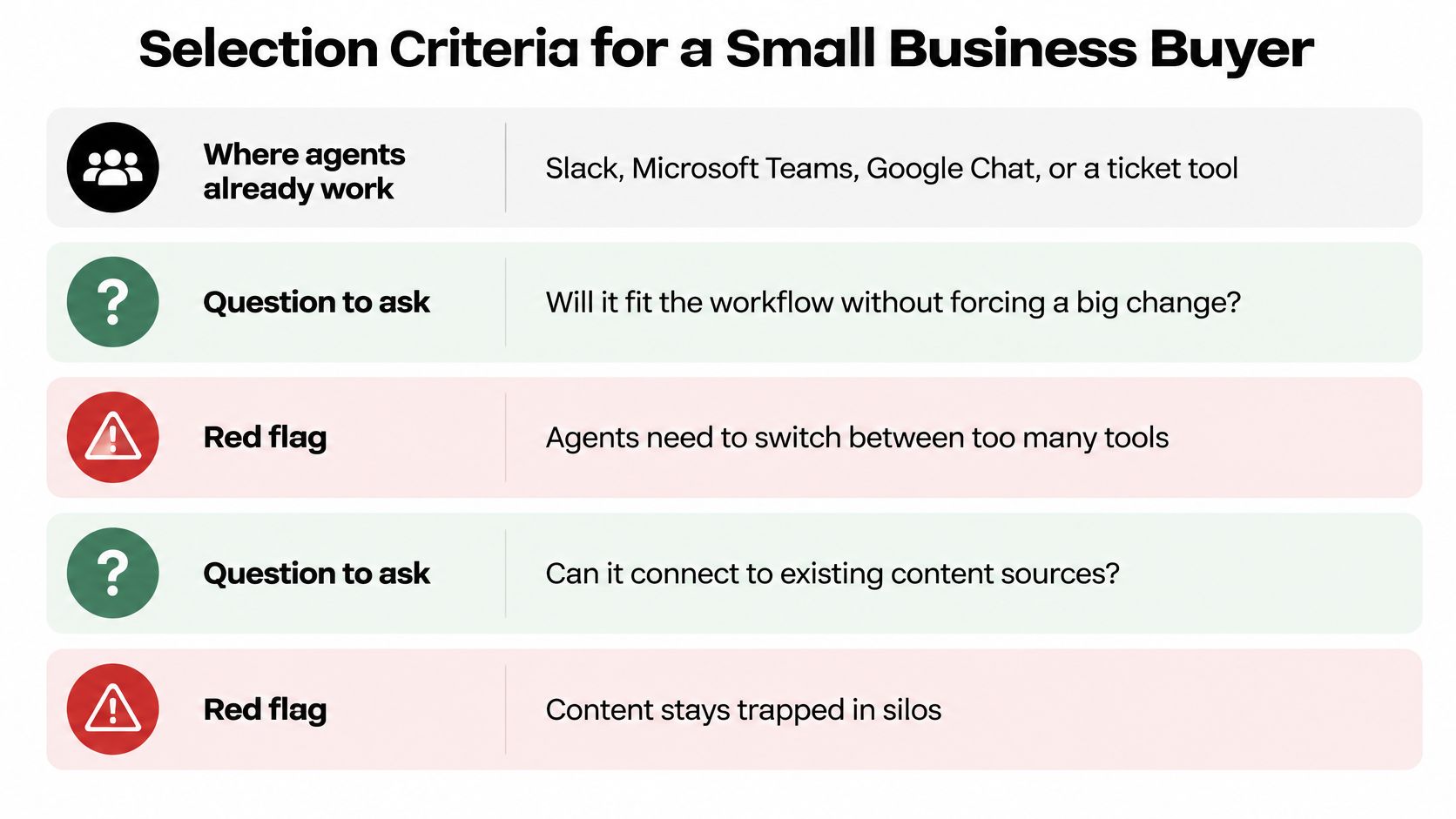
| Criterion | Question to Ask | Red Flag |
|---|---|---|
| Where work happens | Does it run inside the chat tools my team already uses? | Requires a separate support inbox |
| Source coverage | Can it learn from my website, files and help center? | Relies only on generic web data |
| Channel handling | Are chat and email in one queue with one report? | Separate tools with separate reporting |
| Language coverage | Can it answer in my customers' languages? | Needs a bilingual hire for each language |
| Content governance | Are owners, review dates and expiry tracked? | No way to flag outdated answers |
| Human handoff | Does the agent receive full history and a summary? | Customers have to repeat their problem |
| Source transparency | Does each AI answer show where it came from? | Answers with no traceable basis |
| Data handling | How are visitor messages and files stored and protected? | Vague or missing security information |
Adoption has already outrun governance. In 2025 small and midsize business research, 39% of SMBs said they already used AI in customer service and another 40% planned to adopt within a year, while 49% of current AI adopters ran self-service knowledge bases (SMB Group). That same body of work found 43% prioritized human oversight, 42% trained staff on AI strengths and limitations, and only 34% disclosed AI use to customers.
Read those last two numbers together and the buyer's job becomes clear. Choose a system that makes oversight easy to run and disclosure easy to state, not one that hides the machinery.
Three Requests for the Demo
- Show the source behind a sample answer. Ask the vendor to ask a question you supply and open the article the answer came from. If the trail stops at "the model", stop there too.
- Find the owner of a stale article. Pick the oldest item in the library and ask who reviews it and when it expires. Watch how long the answer takes.
- Walk the escalation path. Ask what the customer sees when no approved source exists, and whether the human receives the transcript.
Then put cost and effort on the same sheet. Ask for total monthly cost per agent or per channel, not a per-seat figure that climbs with every added channel, and ask what setup a team of two to ten people can complete without a developer. Onboarding that needs custom engineering is a red flag in a small business, and so is pricing that punishes you for answering customers in a second place. The same discipline applies in procurement teams weighing bid writing software: you're buying a governed library of approved answers, so ask for evidence rather than a demo script.
Measuring Whether the System Pays Off
Knowledge systems don't pay off directly. They pay off through people. Capture and retrieval improve how fast a team learns and how well it responds, and that improvement shows up later as innovation and operating performance, which is why the effect is a chain rather than a switch. A systematic review covering 37 studies found that human capital mediates the relationship between knowledge management and organizational performance, with innovation as an additional pathway, and a second review of 24 peer-reviewed articles linked capturing, storing and sharing knowledge with efficiency, innovation and responsiveness (Journal of Information Systems and Informatics).
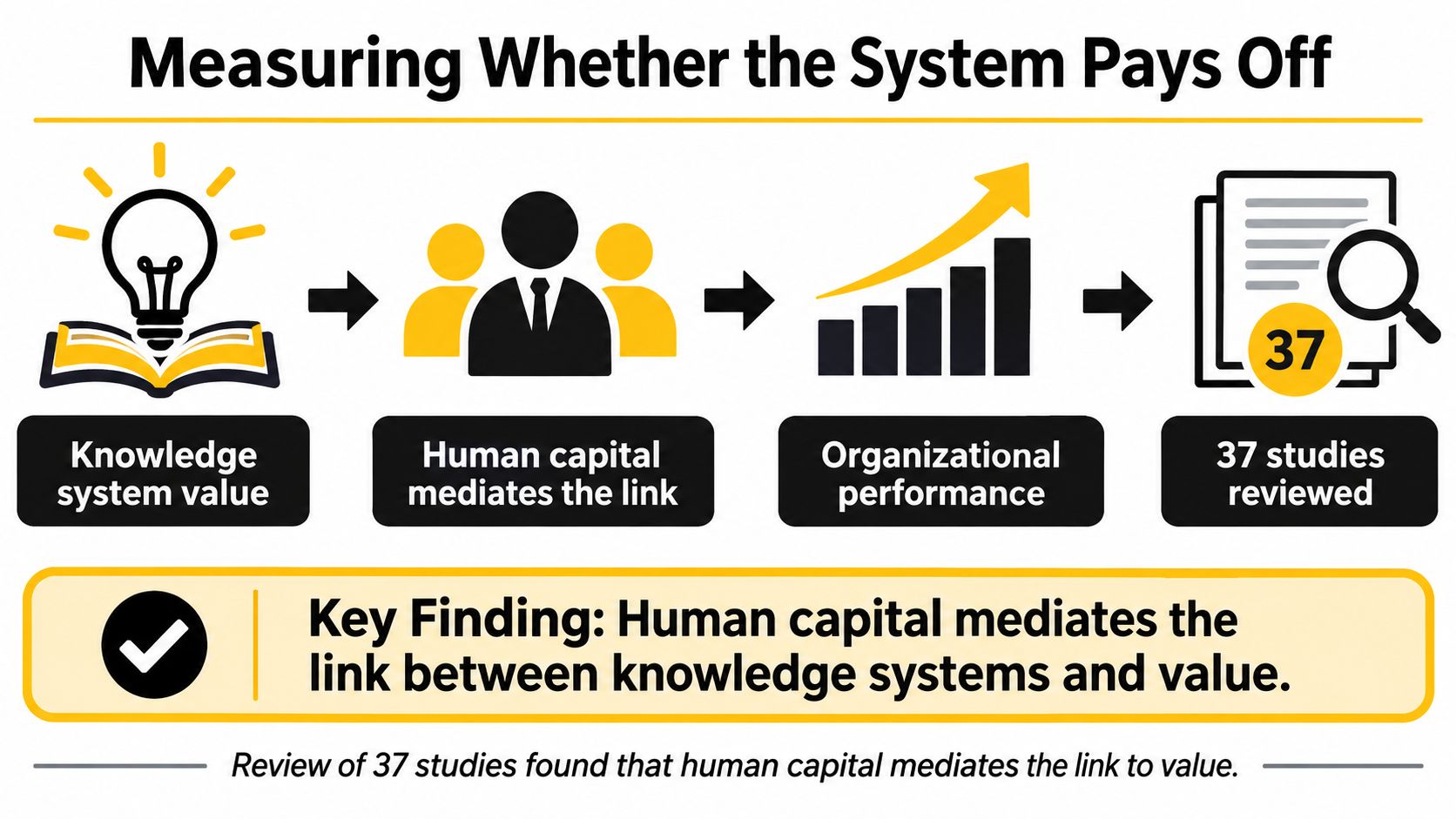
For a support team, that chain means measuring the middle of it, not the end.
| Metric | Healthy Signal | What It Reveals |
|---|---|---|
| Retrieval success | Most questions find an approved source | Whether content matches real questions |
| First-contact resolution | Rising month over month | Whether answers finish the job |
| Escalation completeness | Handoffs include history and a summary | Whether humans start from context |
| Time to resolution | Falling for repeat topics | Whether reuse saves effort |
| Reuse of approved answers | Growing share of replies | Whether the library is trusted |
| Correction rate | Falling over time | Whether sources are accurate |
| Unanswered questions | Shrinking backlog | Where knowledge is still missing |
Fluency is not the test. Judge AI answers on groundedness and on whether the task got resolved, because a graceful paragraph that resolves nothing costs the same as a rude one.
Say a team handles 300 chats a month and logs 40 questions it couldn't answer from an approved source. The backlog is a map. Two published articles on the most common of those 40, each with an owner and a review date, shrink the backlog and pull the correction rate down, because agents stop patching replies and start fixing the source.
Results move unevenly, so review the numbers monthly rather than once at launch. Source quality, employee trust and feedback behavior all change the outcome, and a team that stops watching will drift back to confident guessing. The measurement habit itself is the intervention, and the reporting in contact center analytics gives you a place to keep it.
Confirm the Fit Before You Choose a System
Before comparing providers, test whether your knowledge is ready to support reliable answers. Start with ten common customer questions. For each, record the approved answer, its owner and its last review date. Blank fields show where the source material needs attention.
Next, list the website pages, help center articles, files and internal notes the system might use. If two sources disagree, decide which one is authoritative and update or retire the other. A file in the system is not automatically approved knowledge.
Run a two-week pilot. Compare each answer with its approved source, and log corrections alongside the questions that prompted them. Set an escalation rule for questions with no approved answer: name who receives them and what context they need.
A useful pilot log fits on one page: the ten questions, owners, review dates, weekly correction counts and any answer given without an approved source. Use the same questions and checks for each provider, so the comparison reflects answer quality rather than demo polish. Teams using Slack, Microsoft Teams or Google Chat can include SignalZen in that evaluation. Chat sessions and Customer Support mailbox emails can reach the team in Microsoft Teams, and customers can ask questions on the business's website in their own language at any hour.
A pilot should show that answers remain tied to approved material and that unsupported questions reach a person under a clear rule. If the test exposes gaps, treat them as work to resolve before relying on automated answers.
SignalZen answers customer questions using a business's website, files, help center and instructions, and the team can manage conversations in collaboration tools, the Console or mobile apps. Visit SignalZen to see how it answers customer questions from your own website, files and help center, and how difficult conversations reach your team with the history attached.



Better support without a bigger support team.
Start with AI. Add your team when the conversation needs a person.