

82% of consumers said they would use a chatbot rather than wait for a customer representative to take their call, according to 2024 Statista findings on consumer opinions of conversational AI. That preference gives automation a clear job: help customers make progress without waiting. It doesn't give a bot permission to handle every problem.
A useful customer support chatbot answers routine questions, recognizes its limits, and passes a usable conversation to a person. For a small support team, the strongest measure isn't how many chats avoid an agent. It's whether customers get an accurate answer or reach someone who already understands the problem.
Table of Contents
- What a Customer Support Chatbot Is For
- Which Conversations the Bot Should Handle
- How to Train the Bot on a Knowledge Base
- How a Clean Human Handoff Works
- KPIs That Show Real Resolution
- Customer Support Chatbot Examples in Practice
- Put the Bot Beside Your Team
What a Customer Support Chatbot Is For
Gartner customer research cited by Macha's customer-service adoption overview found that 49% of customers would have been willing to use a chatbot if the company had provided one, yet only 7% used a chatbot or digital assistant during their most recent customer-service interaction. Willingness and actual use aren't the same thing. A hidden widget, stale answer, or dead-end conversation can make an available bot practically useless.
Think of the bot as a conversational front desk. A customer asks about a delivery, the bot identifies the request, finds an approved answer, and either helps or routes the conversation. Unlike a search box, it doesn't merely return links; unlike a rigid script, it shouldn't keep repeating a menu when the customer needs something else.
What belongs at the front desk
A properly configured setup can support several distinct jobs:
- Explain routine information: Answer questions from approved help content outside staffed hours.
- Retrieve live details: Look up order or booking status through authorized connected systems.
- Prepare a case: Collect an order reference and relevant photo before an agent takes over.
- Support language needs: Respond in a supported customer language and preserve that preference.
- Route the conversation: Send the request to the team responsible for resolving it.
These capabilities require different permissions. Knowing the shipping policy doesn't mean a bot can access a customer's shipment, and reading a refund policy doesn't authorize it to approve a refund.
For teams mapping those connections, SnapDial's overview of AI-powered customer service workflows provides useful context for thinking beyond a standalone chat widget. The working setup needs a routing policy, approved knowledge, a handoff packet, and a resolution scorecard.
The mistake is treating every conversation kept away from an agent as a success.
Which Conversations the Bot Should Handle
Answer, clarify, or hand off should be an explicit operating policy, not a judgment improvised during each chat.
| Conversation | Bot action | Why |
|---|---|---|
| Hours, shipping, order status, documented how-to | Answer from approved sources | Low risk and already written down |
| Vague product or setup question | Ask one clarifying question, then answer or route | One missing fact blocks a correct reply |
| Refund, billing dispute, or account ownership | Hand off immediately | Money, identity, or a policy exception |
| Safety, legal issue, or a distressed customer | Hand off and say a person is taking over | Empathy and consequences need a human |
| Ambiguous identity or sensitive personal data | Collect only what policy allows, then route | Limit what the bot stores or repeats |
| Low confidence or the customer asks for a person | Stop and transfer with a summary | Don't trap the customer in another loop |
The risk test comes before the answer
The first question is whether an incorrect response could cause meaningful harm. Publishing opening hours is different from deciding whether someone owns an account. Even when both answers appear easy, the consequences aren't comparable.
Order status belongs in the answer category only when the connection enforces the business's access rules. Without verified access to the relevant record, the bot should explain how tracking works rather than guess where a parcel is.
A documented refund policy is also different from an individual refund decision. The bot may explain published eligibility, but a request to return money should reach the authorized team under this conservative starting policy.
Clarification needs a stopping rule. For a vague setup request, the bot might ask which operating system the customer uses. If the reply still doesn't identify a supported procedure, the conversation should move to a person rather than become an extended diagnostic interview.
Practical rule: A plausible answer isn't enough. The bot needs an approved answer, appropriate access, and permission to handle that kind of request.
Disclosure and an obvious exit
The CCMA's analysis of chatbot and human preferences reports that 46% of consumers rated their most recent AI or chatbot experience positively, while 71% said knowing when they are speaking with AI is very or extremely important. A bot shouldn't introduce itself as an agent or imply that a person has reviewed its answer.
The opening message should identify the assistant as AI and explain how human support works. A visible human option should trigger routing, not another attempt to persuade the customer to continue with automation.
For sensitive requests, the response should explain the boundary without blaming the customer. The bot can state that account ownership requires the support team and identify the approved verification channel. It shouldn't request passwords, full payment details, or unrelated personal documents in chat.
Language uncertainty also belongs in the policy. If the bot can't reliably interpret the request, it should preserve the original wording and flag the language requirement for review.
Before scripts are written, the support lead should tag the team's most common intents and assign each an action, an owner, and a permitted information source.
How to Train the Bot on a Knowledge Base
For support operations, training usually means connecting the bot to approved company material and testing whether it retrieves the right information. It shouldn't mean letting the assistant browse freely and combine company policy with unrelated public advice.
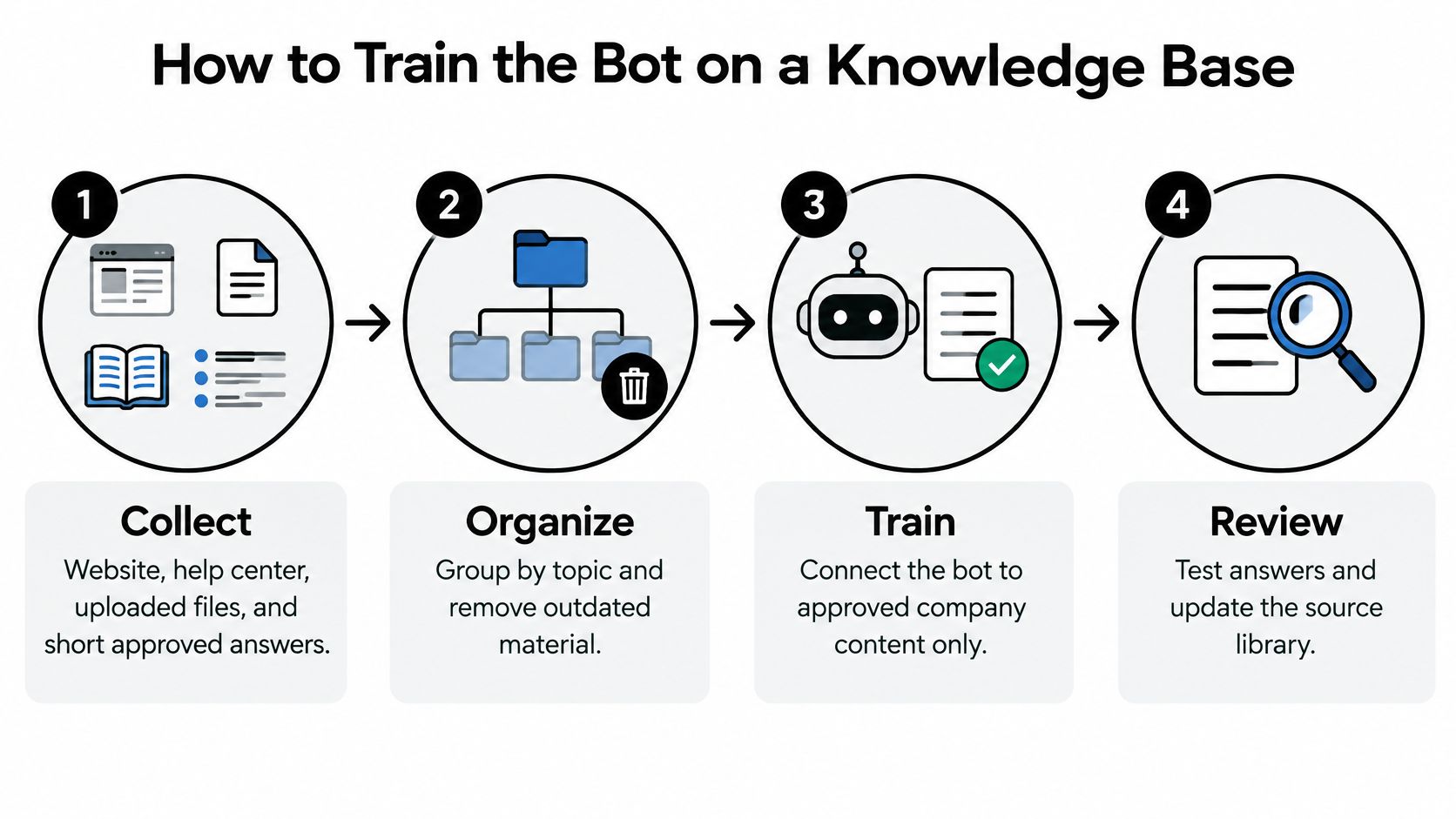
The content workflow can be organized into collection, cleanup, connection, and review.
Build the source library and its rules
Collect and clean the material. The support owner should gather website pages, help-center articles, uploaded files, and short approved answers. Superseded policies, duplicate instructions, and conflicting product steps should be removed before connection.
Write behavioral boundaries. Instructions should define permitted topics, required escalation, prohibited promises, and tone. For example, the bot may explain a published cancellation procedure but mustn't invent an exception or claim that a cancellation has occurred.
Prefer a shared help center. Customers, agents, and the bot should work from the same maintained explanation. A well-structured knowledge-base article should identify the relevant product, prerequisites, procedure, and expected result.
Test retrieval rather than fluent wording
Create a golden question set. The team should save representative customer questions alongside the expected answer or handoff. Tricky wording, incomplete requests, obsolete product names, and questions outside policy belong in the set, not just easy examples.
Set confidence rules by intent. A retrieval score isn't proof of correctness. The team should test whether the retrieved passage supports the proposed answer and route weak or conflicting matches instead of allowing the bot to fill gaps.
Refresh and retest after changes. Policy owners should trigger updates whenever prices, eligibility rules, or product procedures change. The golden set should run again after the source library updates, with failures assigned to a named content owner.
Speed deserves separate testing. In an e-commerce experiment documented in Ezra Seppenwoolde's thesis, 91 participants were assigned to response conditions, and users receiving a 0.5-second response reported significantly higher satisfaction than those experiencing a 10-second delay with a typing animation.
The operational response is to show genuine progress quickly, not to invent an answer sooner. Where supported, partial responses can stream while retrieval completes, provided unsupported conclusions aren't displayed prematurely.
The dashboard should distinguish time to first visible output from time to the completed answer. Median and tail latency should be reviewed by intent, because a quick opening message can conceal a slow or stalled retrieval path.
A polished answer can't repair an incorrect source page.
The final content check is simple: if the underlying page gives the wrong procedure, the bot has no reliable foundation for giving the right one.
How a Clean Human Handoff Works
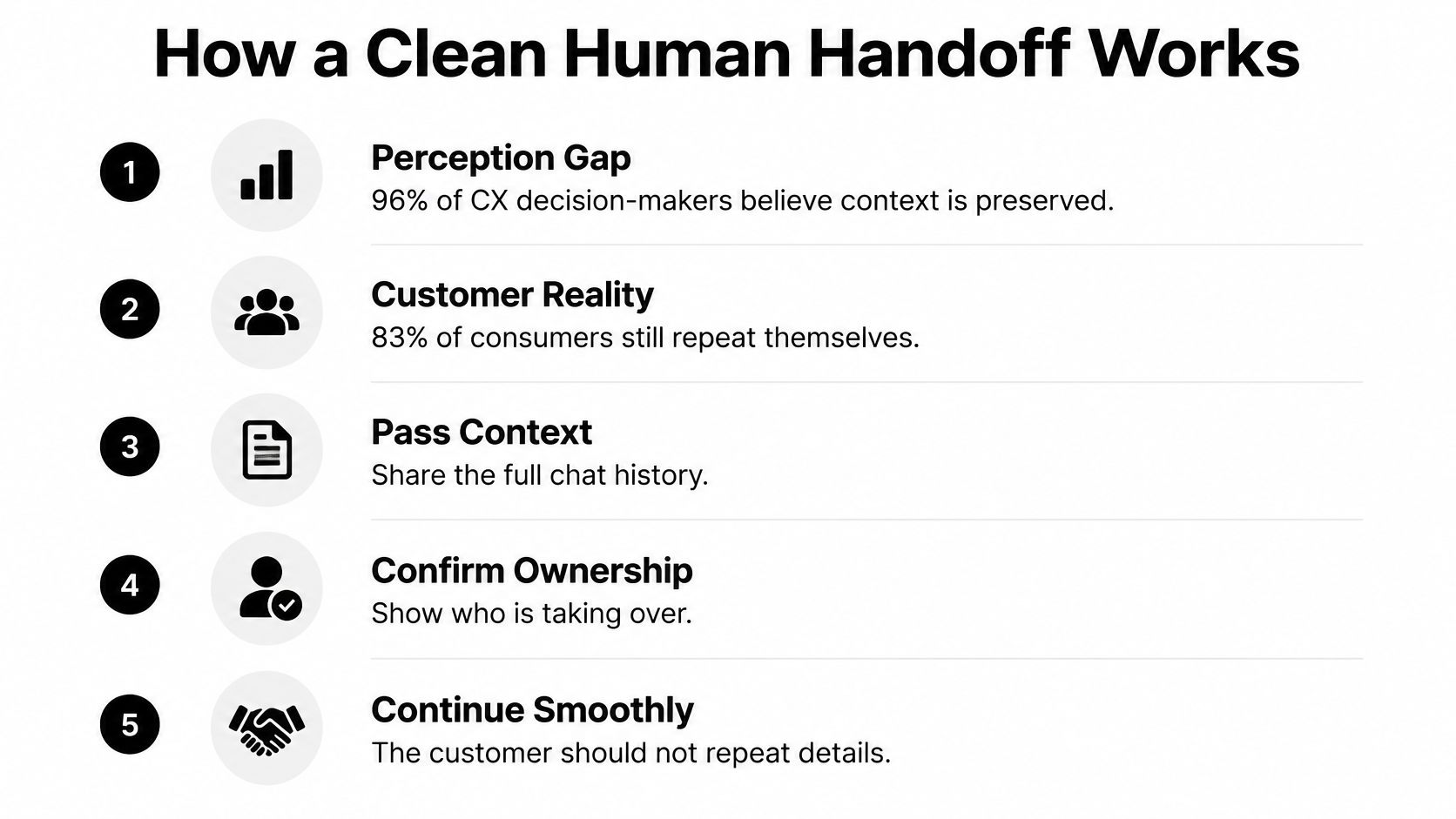
96% of CX decision-makers believe their organizations preserve context during AI-to-human transfers, yet 83% of consumers say they still have to repeat themselves at least sometimes, according to findings discussed in CMSWire's analysis of broken AI handoffs. That gap makes context preservation something to test, not merely a feature to enable.
A transcript attachment alone isn't a complete handoff. An agent needs to understand what happened, what remains unresolved, and who owns the next action.
The packet an agent should receive
The transfer should carry a readable summary backed by the original conversation:
- Issue summary: The customer's goal, current problem, and reason for escalation.
- Attempted troubleshooting: Steps already suggested, completed, or rejected.
- Account or order context: Relevant identifiers and verified status, within access policy.
- Attachments: Photos, screenshots, and files linked to the correct thread.
- Language preference: Original messages and any translation used during the exchange.
- Customer state: Observable frustration or urgency, without speculative personal judgments.
- Attempted answer and evidence: What the bot said and which approved material supported it.
- Unresolved questions: Information still needed and the decision awaiting a person.
- Ownership: The receiving queue and the named agent once someone accepts the case.
A summary should distinguish customer statements from verified facts. A customer saying a charge appeared twice isn't the same as the billing system confirming duplicate payment.
The support lead's procedure for escalating an issue should specify acceptance as well as routing. Until an agent accepts the conversation, the interface shouldn't suggest that someone is actively reviewing it.
Transfers need honest status
After hours, the bot should explain that the request has entered a queue and show the team's actual availability. It mustn't invent an immediate response promise.
For multilingual conversations, the packet should preserve the original text alongside translation and flag any uncertainty. If a technical phrase could change the diagnosis, the agent should confirm that detail rather than rely blindly on the summary.
When a wrong automated answer has upset the customer, the receiving agent should acknowledge the mistake and continue from the unresolved point. Starting with a generic greeting or repeating the failed advice makes the transfer feel like another obstacle.
B2B teams that route a support conversation into a specialist appointment also need clear assignment. Docket's comparison of Chili Piper competitors for B2B teams can help evaluate that scheduling step, which shouldn't be confused with ownership of the support case.
The team should track repeat-explanation rate, transfer abandonment, resolution time after escalation, and customer effort. A practical audit follows live transfers from the customer's request through agent acceptance and records every avoidable request to restate information already supplied.
KPIs That Show Real Resolution
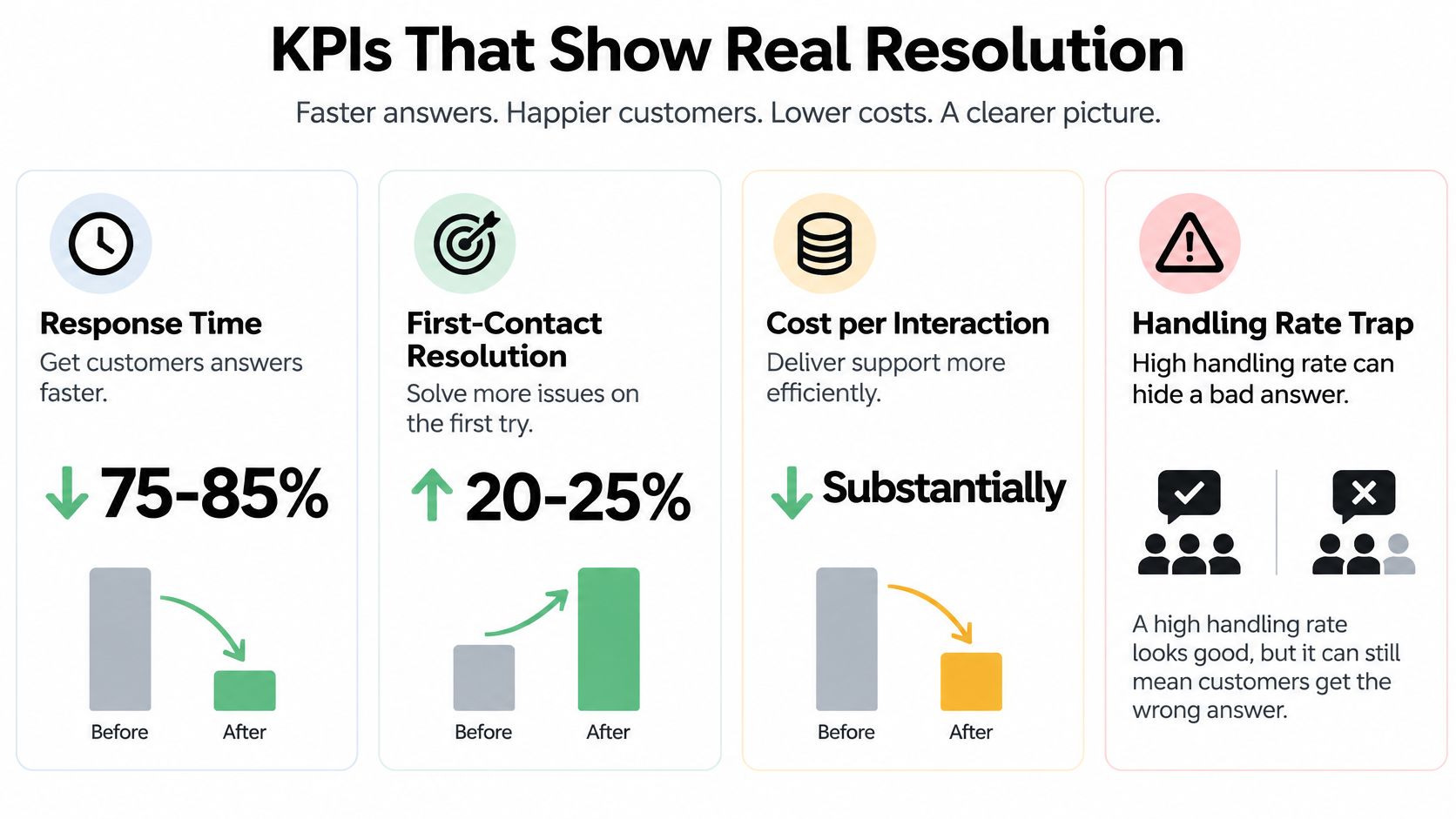
A high handling rate can hide a bad answer. A bot may touch a conversation, produce a confident response, and close the window without solving anything.
Containment means the conversation didn't reach a person. Resolution means the customer's issue was addressed. Those outcomes need separate reporting.
Customer support chatbot KPIs
The following reference signals describe reported deployments, not promises or targets for every business.
| Metric | What it measures | Reference signal |
|---|---|---|
| Confirmed resolution | Chats closed without a repeat contact, with supporting resolution evidence | Keep separate from raw automation rate |
| First-contact resolution | Issues finished on the first try | One evaluation reported a 20–25% lift |
| Response time | Speed of the response within the interaction | One evaluation reported a 75–85% reduction |
| First visible response | Time until the customer sees progress | Measure separately; the reported implementation's 2-second average response isn't explicitly a first-visible-output measure |
| First-attempt accuracy | Correct initial answers | One implementation reported 85%, with 15% escalated |
| Cost per interaction | Cost where resolution still holds | One evaluation reported approximately a 45–50% drop |
| Reopen and repeat contact | Failed answers that come back | A rising rate warrants investigation |
The numerical reference signals come from evaluations described in the American Scientific Research Journal article on AI customer service, which reports a 20–25% increase in first-contact resolution, 75–85% lower response times, and approximately 45–50% lower cost per interaction in a service-company evaluation, plus a separate implementation with 85% first-attempt answer accuracy, 15% escalation, and 2-second average response time.
The distinction between response measures matters. A typing indicator, a completed answer, and final issue resolution are different events; a dashboard shouldn't put them under the same label.
Count outcomes, then diagnose misses
The volume view should separate AI-handled, AI-resolved, escalated, reopened, and repeat-contact conversations. These categories describe different stages and may overlap, so their definitions should be documented before totals are compared.
Confirmed resolution also needs evidence. An explicit customer confirmation is stronger than silence, while an agent audit can identify answers that looked complete but omitted a necessary step.
Scorecard warning: A fast reply followed by another contact isn't a clean automation win.
A practical contact-center analytics view should connect each outcome to its intent, source article, and routing decision. That lets the support lead distinguish a missing instruction from a retrieval failure or an inappropriate attempt to automate.
For transcript reviews, SourceX's guide to ticket insights for support operators offers context for identifying useful resolution details. Reviewers should record what finally solved the problem, not just the last message before closure.
When automation and reopened cases rise together, the team should inspect the affected intents before expanding coverage. Lower interaction costs aren't convincing if customers must return repeatedly to finish the same task.
Customer Support Chatbot Examples in Practice
The following scenarios illustrate how the operating rules affect an actual conversation. Each example has a specific endpoint rather than treating an automated reply as success.

An online shopper needs an update
An online shopper opens chat late in the evening to ask where an order is. After the approved verification step, the bot retrieves the current status from the connected order system and explains the carrier's displayed delivery window using the business's shipping guidance.
The important distinction is where each detail comes from. Help content explains delivery terms; the order connection supplies shipment-specific facts. If the tracking question is answered and the shopper confirms that nothing else is needed, the outcome is resolved.
The shopper then reports that an item arrived damaged and requests a refund. The AI-labeled assistant gathers the permitted order reference and a photo, then routes the case with the shipment check attached. The refund request is handed off, not marked resolved because the intake finished.
A SaaS user needs account help
A SaaS user asks how to reset a password. The bot provides the current help-center procedure and the correct reset-page link, without requesting the password or claiming access to the user's credentials.
The user completes the procedure and confirms access. That outcome is resolved.
Another user reports a duplicate charge and mentions an invoice. The bot preserves the user's wording and relevant invoice reference for billing review rather than suggesting browser troubleshooting or promising a reversal. That outcome is handed off.
An agency covers a client site after hours
A visitor contacts a digital agency's client site in another language because checkout isn't working. The initial message doesn't identify the failing step, so the bot asks whether the error appears before or after payment submission.
The visitor identifies an address-validation problem. The bot offers the documented correction procedure, but the visitor reports that it still fails; the conversation moves into the client's support queue with the original message, translation, attempted procedure, and remaining error.
The outcome is clarified, then handed off. The morning agent can investigate the specific failure instead of restarting intake.
Across these scenarios, placement matters too. A clearly labeled help entry near checkout, account access, or order tracking gives customers a relevant way to start. A capable bot that customers can't find won't help them finish the task.
Put the Bot Beside Your Team
A manageable launch starts with a narrow set of supported questions and a named person responsible for reviewing the results. The team doesn't need to automate every category before making routine support easier.
A first-week working plan
Build the question inventory. The support lead should review recent chat and email conversations, group repeated requests, and identify the questions that consume avoidable agent time.
Assign each request an action. Every candidate needs an answer, clarification, or handoff classification. Requests involving judgment should retain a human owner from the start.
Connect current material only. Content owners should approve the website pages, files, and help articles used for answers, removing contradictions before launch.
Configure the transfer record. The workflow should require conversation history, relevant files, attempted steps, and the unresolved question. A receiving agent should test whether the record is sufficient to continue.
Create a small outcome view. The initial dashboard should distinguish AI-resolved conversations, escalations, and repeat contacts. Raw containment shouldn't determine whether the pilot expands.
SignalZen's AI Support answers automatically from the business's website, files, help center, and instructions; its Knowledge Base publishes help content customers can read and the AI can answer from. A human agent can take over any conversation with the full history and customer context.
Expand only after review
The team should review early transfers together and assign corrections to the person who owns the relevant content or workflow. A new intent should enter automation only after its expected-answer tests pass and outcome reviews show that customers aren't returning because of incomplete answers.
The finished operating policy belongs beside the maintained help content. That gives agents a practical reference for what the assistant may handle and who takes responsibility when it stops.
SignalZen combines automated answers from approved business content with human takeover that preserves conversation history and customer context. Teams ready to put these boundaries into practice can visit SignalZen and start with a focused set of routine questions, a tested handoff, and a resolution-based scorecard.


Better support without a bigger support team.
Start with AI. Add your team when the conversation needs a person.