

McKinsey research found that 76% of consumers become frustrated when companies fail to deliver personalized interactions. That finding changes the question for a support team. Personalization isn't an extra flourish; it's whether a customer can continue a conversation without starting over.
For a small team, the practical standard is manageable: use a little relevant context to resolve the issue, explain why it was used, and preserve it if a person takes over. The measure of success isn't how much a system knows about a customer. It's whether the customer gets help with fewer repeated questions and a clean handoff when automation can't finish the job.
Table of Contents
- Why Personalized Support Is Now the Baseline
- What Personalized Service Means and Where Customers Draw the Line
- Data and Tools a Small Team Actually Needs
- Running One Conversation Through Handoff and Worked Examples
- Metrics That Show Whether Personalization Cuts Effort
- Start From Context You Already Hold
Why Personalized Support Is Now the Baseline
A customer asks about a delayed order. A clerk who remembers the last visit can check the right purchase and pick up where the conversation left off. A counter that asks for a name, order number, and the whole story every time may be polite, but it makes the customer do the work again.
That difference is what personalized customer service means in practice. McKinsey reports that 71% of consumers expect personalized interactions, 76% become frustrated when those interactions are missing, and 72% expect businesses they buy from to recognize them as individuals and understand their interests. For support, those expectations translate into remembering relevant account history, carrying details between messages, and tailoring the explanation to the actual issue.
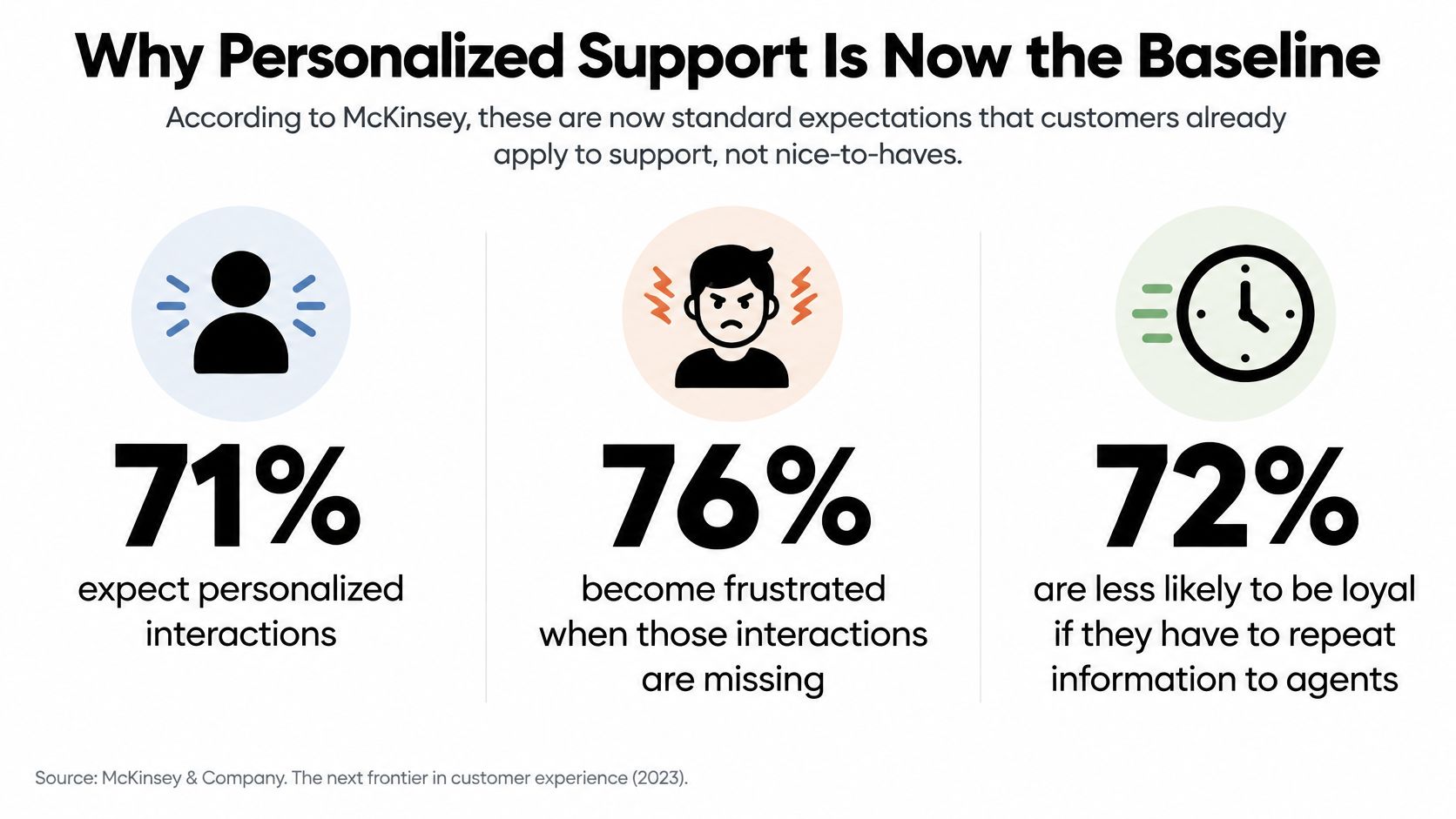
The same McKinsey research found that 76% of consumers said personalized communications influenced their consideration of a brand, while 78% said personalized content made them more likely to repurchase. Those findings are about consumer expectations and commercial outcomes, not a guarantee that a particular support script will raise sales. But they show why relevant service belongs in the customer experience, not just in marketing.
| What customers expect from personalized service | Share of consumers | Support behavior |
|---|---|---|
| Expect personalized interactions | 71% | Use known context, not a blank greeting |
| Frustrated when personalization is absent | 76% | Don't restart every chat as anonymous |
| Expect to be recognized as individuals | 72% | Reflect interests and prior relationship |
| Personalized communications affect consideration | 76% | Make the message relevant to this customer |
| Personalized content raises repurchase intent | 78% | Tailor the resolution to their situation |
For a digital business, context often gets scattered across email and chat. The customer may have already described the problem in one channel, only to be asked to explain it again in another. A shared view of the conversation, and a route to a person when the issue is complex, can prevent that reset. Teams deciding where AI fits can also use this practical guide to managing AI customer support.
A greeting that uses someone's name is a start, not the result. The useful work is remembering the issue, showing the customer how context helped, and carrying the conversation through to resolution.
What Personalized Service Means and Where Customers Draw the Line
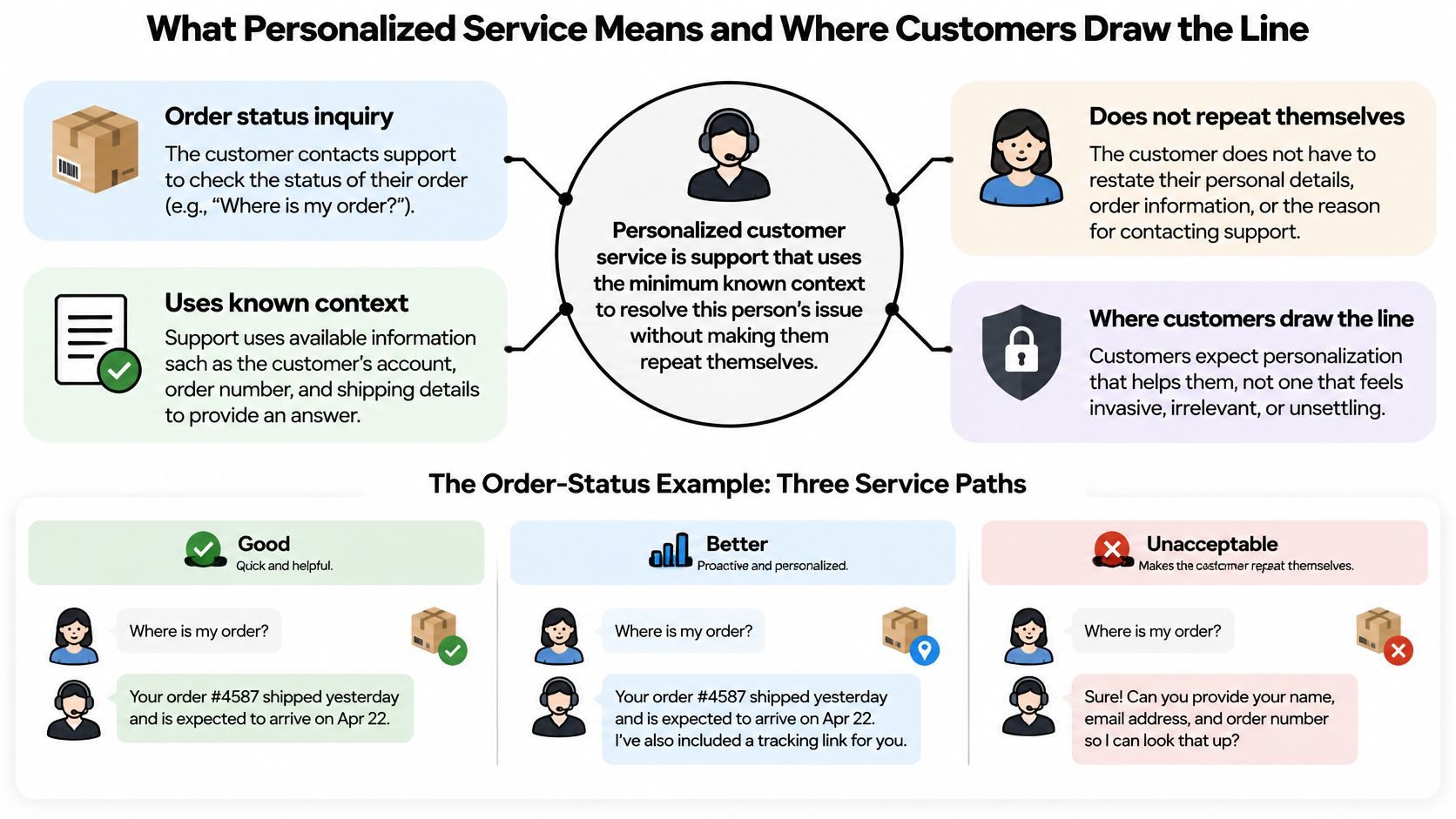
A customer asks about a delayed order. A generic reply explains how to find tracking information. A personalized reply recognizes the order, sees what the customer has already tried, and gives the next useful step. The difference is not how much the business knows about the customer. It is whether the context helps resolve the issue without making them repeat themselves.
Choose context that earns its place
A customer's name can make a greeting feel familiar, but it rarely changes the support they receive. Remembering the open case can. If the customer has already provided an order number or tried a troubleshooting step, the next reply should build on that information rather than restart the script.
That creates a practical boundary: use context when it changes the answer, the next step, or the handoff. If it does none of those things, it may not belong in the conversation.
| Personalization move | Context required | Do this | Stop when |
|---|---|---|---|
| Known-account greeting | Authenticated identity | Skip re-asking name and plan | Identity is uncertain |
| Continue the last case | Prior conversation | Start from the open question | History belongs to someone else |
| Answer from purchases | Purchase history | Give status without a lookup script | The purchase is unrelated |
| Suggest a help article | Matching help-center article | Offer the article that fits the question | The match is unclear |
| Hand off with a summary | Intent, steps tried, open question | Let the agent check the summary, then reply | The customer asks for a human immediately |
| Reply in their language | Detected language | Answer in that language and make translation clear | Terms are sensitive or ambiguous |
Make the exchange visible and reversible
Personalization should be understandable to the customer. A simple explanation can show why a detail appeared: “I can see the order you're asking about, so I'll check its delivery status.” If the information is wrong, the customer should be able to correct it.
Keep the service purpose clear. Use relevant conversation or account context to answer the request, and avoid reaching for unrelated personal details. The goal is a useful answer, not a fuller profile.
For a support team, the boundary is also practical: pass only the context needed to answer or route the conversation, and let a person take over when the issue needs judgment. A clean handoff carries the history and the customer's unresolved question forward, rather than asking them to start again.
Practical rule: Use task-relevant history that shortens the support conversation. Don't use browsing inferences or social posts just because they're available.
SignalZen asks for personal information only when it is needed to provide a service, and collects it by fair and lawful means with the person's knowledge and consent. Personalization earns its place when it helps resolve the immediate issue and makes the next step clearer.
Data and Tools a Small Team Actually Needs
Most small and midsize teams can start with four first-party sources: the website and help center; uploaded files and internal instructions; authenticated account fields the customer already supplied; and the conversation itself, including chat and email. Together, they can answer routine questions and help an agent pick up the thread without assembling an elaborate customer profile.
For ordinary support, that usually doesn't require social-media content, inferred demographics, or financial details beyond the order the customer is asking about. A support team should be able to explain what each field is for. If that explanation is awkward, the field may not belong in the workflow.
Build the working stack in order
Start with a chat widget that can pass useful visitor context, offer suggested questions, accept files and screenshots, and collect an offline message when no agent is available. SignalZen's Live Chat widget lets a business control its appearance and behavior and pass context about visitors. Teams can review the visitor metadata documentation to understand the kind of context a chat can carry.
Next, give both the customer and the support team a shared knowledge base. The customer should be able to read the same help articles the assistant and agent use, so the answer can be checked instead of treated as a mystery. A knowledge base on the company's own domain can also make support articles easier for customers to find through search.
Then add an AI layer that answers from those sources, not from unsupported guesses. SignalZen AI Support answers customer questions using the business's website, files, help center, and instructions, and can remain available when the team is offline. The final essential piece is a shared queue: email from the support mailbox and live chat should land together, with agents able to work from Slack, Microsoft Teams, Google Chat, or a mobile app instead of managing a second inbox.
A context record doesn't need to be elaborate. It should capture the authenticated identity, detected intent, relevant order or account identifiers, sources retrieved, steps already tried, and the unresolved question. Webhooks can optionally send chat events into the company's own systems, but they're a pipe for events, not a substitute for a clear support record.
If the team can't see the customer's last message and the relevant help article in the same view, more personalization features won't solve the basic problem.
Running One Conversation Through Handoff and Worked Examples
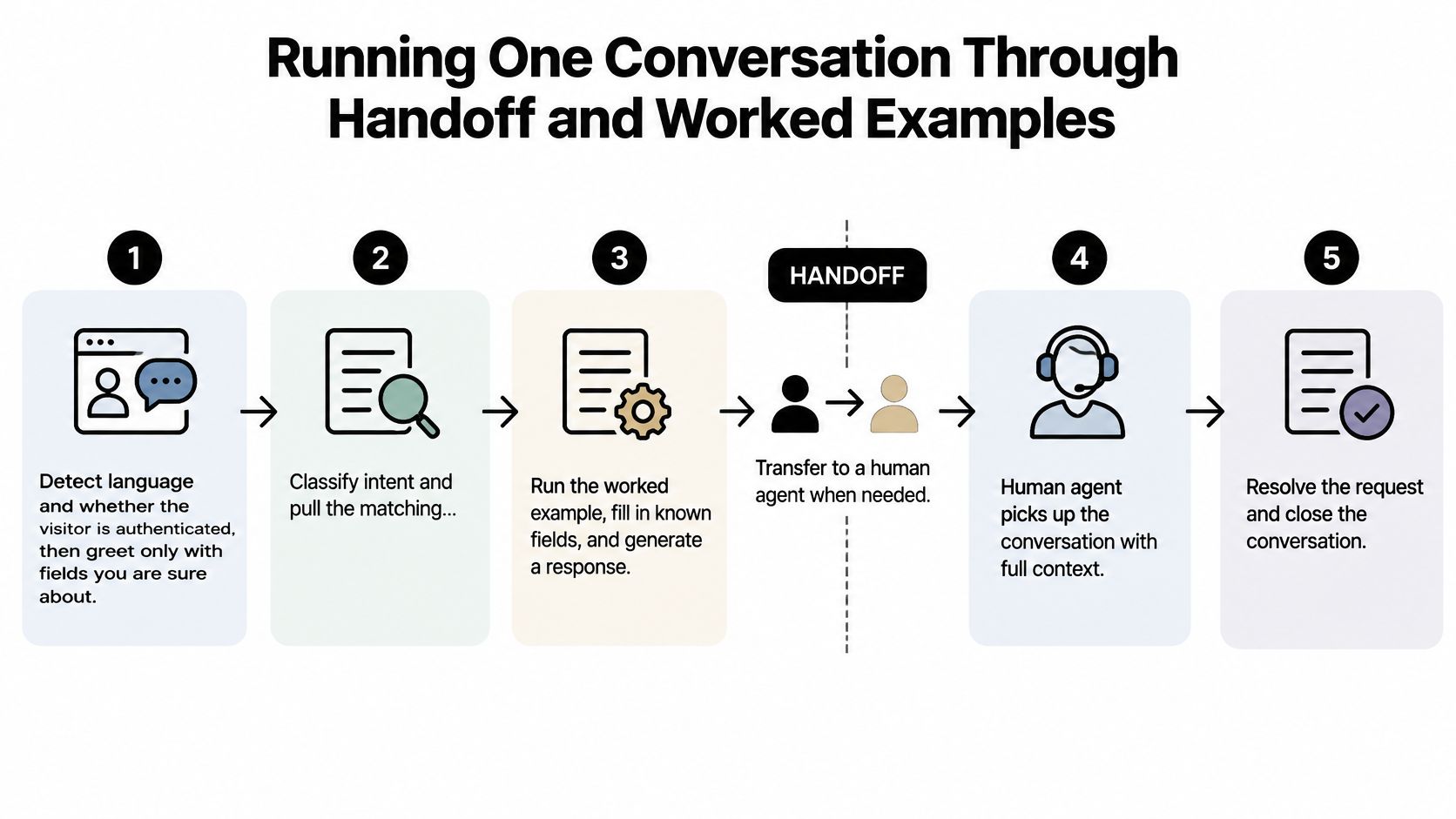
A personalized conversation needs a clear routine that works whether AI resolves the issue or a person takes over. Treat the handoff as a designed step in the service, one that carries the conversation forward instead of resetting it.
Keep the conversation intact
Check language and identity. Detect the visitor's language and whether the account is authenticated. Greet the customer only with details the system can verify; an uncertain identity should never be treated as a fact.
Classify the intent and retrieve a source. Find the help-center passage, internal file, or prior case that matches the question. Make the source visible in the support workflow so an agent can check the answer rather than relying on a silent guess.
Answer the immediate question and explain the context. If a reply uses an order number from an earlier chat, say so in plain language. Customers should be able to understand why the system brought that information into the conversation.
Offer a person when the conversation calls for one. Escalate when the answer is uncertain, the customer repeats the problem, or the issue is complex. Keep the thread intact rather than making the customer restart.
Transfer a useful state packet. Give the agent the verified identity, intent, relevant identifiers, sources, actions already attempted, unresolved questions, urgency signals, and a short summary. The agent should be able to edit or verify the summary before replying.
Close and retain the thread. After resolution, request the configured service rating and keep the conversation available so the next contact can continue from the last open point.
This routine earns personalization through resolution, not through data collection. A global BCG survey of 23,000 consumers found that customers value personalization for connecting with the right service agent and feeling recognized as loyal customers. Automation meets that expectation when it resolves the issue and damages it when it fails: satisfaction holds when an automated reply fully answers the question, and drops when the customer has to repeat identity, chronology, troubleshooting, or emotional context to a person. The AI-to-human handoff is where that damage concentrates.
Apply the routine to different situations
A pre-sales chat: A visitor asks about pricing after viewing a pricing page. The widget can note that page as context, but the assistant should answer from the help center rather than assume what the visitor wants. If the customer needs a custom quote, a person takes over with the question and relevant source already in view.
A delayed-order email: The customer's message enters the same queue as chat. An agent can cite the order already on file and continue from the customer's description, instead of asking for the tracking number again. If the customer needs a person immediately, that preference should take priority over an automated script.
An after-hours message in another language: The assistant detects the language and answers from the knowledge base. For a one-language team, two-way translation can help the customer and agent communicate, while ambiguous or sensitive terms should be flagged for a human check. The response should make clear when translation or AI drafting is involved.
Access matters here as much as convenience. Capgemini's 2025 customer-service research reports that more than half of consumers consider ease of access critical, while over one-third are frustrated by limitations involving service hours, language barriers, access to human agents, and contact options. Personalization delivered in the moment also shapes purchase intent, yet brands widely struggle to act on customer signals in real time. The operational rule is simple: offer a viable route to resolution across language and channel instead of treating access as a cosmetic detail.
The same research reports that 82% of online consumers prefer a human for complex customer-service issues. Automation should stop when the issue demands judgment, negotiation, or careful interpretation. A useful primer on cold versus warm call transfers helps teams think through how much context a receiving agent needs before the conversation continues. SignalZen lets a human agent take over with the full history and customer context, while AI Summaries condense long threads into what happened and what remains open. Teams planning a consistent process can also review how to escalate an issue.
Metrics That Show Whether Personalization Cuts Effort
A personalized workflow should be judged by the effort it removes, not by how often it uses a customer's name. These measures belong together because a single headline number can hide a broken handoff.
| Metric | What it reveals | How to read it |
|---|---|---|
| Containment and CSAT | Share resolved without a person and how customers rate it | Read together, never alone |
| Transfer rate | How often AI hands off to a person | A high rate points to weak answer sources |
| Repeat-question rate | Whether context carried through the conversation | It should fall once the routine is live |
| Escalation to first human reply | Speed of human takeover | Measure from the handoff request |
| Resolution after handoff | Whether a person actually closes the issue | Compare with resolution before handoff |
| Post-handoff CSAT | Satisfaction once a person takes over | Shows whether handoff is the failure point |
High containment with low CSAT is a warning, not proof that automation is working. A high transfer rate can point to missing or poorly matched answers; a high repeat-question rate can signal that context didn't survive the move between systems or people. Measuring the time from a handoff request to the first human reply shows whether customers are left waiting after asking for help.
Teams should review these measures by channel, so chat results don't obscure email problems. During the first month, a weekly review gives support leads a chance to fix a weak knowledge source or transfer routine before expanding to another channel or adding more data. A practical guide to contact center analytics can help teams organize those measurements into a repeatable review.
Start From Context You Already Hold
A first-week pilot should be narrow enough to diagnose. Choose one channel, usually website chat, and one job, such as order status or a product question the website already answers. Load the website, help center, and a short set of instructions, then limit automated answers to those known questions.
Set the boundary before launch: anything uncertain goes to a person, and the conversation history stays attached. Publish a short explanation of what context is used and why, then ask customers to rate the service when a thread closes. Support systems can also route tasks into familiar workflows; a useful comparison is how Autotask ticket intake works.
The first test needs only two measures: repeat-question rate and time from escalation to the first human reply. Check whether customers can see why context was used in a response. If both measures improve, bring email into the same queue as chat; if they don't, improve the answer source or transfer process before adding channels.
For a small business, the operating principle is straightforward: AI answers what it can, and the team handles what matters. SignalZen provides AI-powered customer support for small and medium businesses, with agents able to reply from Slack, Microsoft Teams, or Google Chat without using another inbox. Its plans start with a 30-day free trial, with no commitments and no credit card required to begin.
SignalZen brings website, help-center, file, chat, and email context into an AI support workflow with human handoff when a person is needed. Support teams can start with one channel and measure whether conversations need fewer repeated questions and faster human follow-up by visiting SignalZen.



Better support without a bigger support team.
Start with AI. Add your team when the conversation needs a person.