

AI-assisted customer-service agents resolved 13.8% more issues per hour in a large-scale field study described in this review of human-in-the-loop customer support. The important distinction is assistance: people still handled the conversations. Businesses don't need to make every interaction autonomous to gain support capacity.
The strongest way to automate customer support starts with a boundary, not a chatbot. Routine questions need reliable answers; sensitive cases need an accountable person. A useful automation plan specifies both, including exactly what happens when the software shouldn't answer.
Table of Contents
- What Automated Customer Support Covers and Why Teams Adopt It
- Match Each Support Task to the Right Automation
- How to Build an Escalation Policy That Holds
- Choosing Chatbots, Templates and Routing Tools
- Where the Savings Come From and How Big They Are
- Pitfalls That Quietly Erode Automation ROI
- Launch One Automation and Measure It First
What Automated Customer Support Covers and Why Teams Adopt It
A good hotel receptionist answers questions about checkout and parking immediately, then passes a disputed room charge to the manager. Automated support should follow the same logic: resolve predictable requests without pretending that every problem is a frequently asked question.

Automated customer support is the software layer that answers, sorts, or drafts replies so people can concentrate on work requiring judgment. Its main components are:
- Self-service help: Searchable articles and guided actions.
- AI answers: Responses grounded in approved business content.
- Auto-triage: Classification and routing before an agent starts.
- Human handoff: Transfer to a person when automation reaches its limit.
The economic case starts with customer behavior. An Accenture federal contact-center transformation report states that 81% of customers across industries attempt to solve their issue before contacting support. It also cites average contact costs of $8.01 through traditional channels, compared with $0.10 through website or mobile self-service.
Task-specific self-service can be more useful than an open-ended chat box. For a cleaning business, Estimatty's instant estimates for house cleaning offers a relevant example of placing a defined customer task ahead of a general inquiry.
The catch is resolution. Inaccurate or hard-to-find answers generate another contact instead of eliminating work. A business can start with AI support and add its team when a conversation needs a person, keeping financial decisions, identity exceptions, and emotionally charged cases under human control.
Match Each Support Task to the Right Automation
Automation to use for each support task
| Support task | Automation to use | Human role |
|---|---|---|
| Order status and tracking | AI answers from order system and help center | Agent only when lookup fails |
| Store hours, shipping and returns policy | AI answers from website and help center | Team updates source pages |
| Password reset and account access | Guided self-service with verification link | Agent handles identity failures |
| Appointment changes and bookings | Saved replies with self-service rescheduling | Agent confirms exceptions |
| Pre-sales product questions | AI chat with suggested questions | Sales agent takes over on buying intent |
| Bug reports | Auto-tag and route to engineering queue | Agent confirms the bug can be reproduced |
| Refund requests | Auto-triage and drafted reply | Agent approves every refund |
| Billing disputes, fraud and account security | Route straight to agent, no automated answer | Agent owns the case end to end |
| Complaints and urgent or angry messages | Priority routing by keyword and sentiment | Agent replies first, AI drafts only |
The safest candidates have a dependable source of truth. Order tracking qualifies only when the system can retrieve the correct authenticated order. A help article can explain delivery policy, but it can't establish where a particular parcel is.
Policy questions are similarly suitable when the published wording is current and exceptions are explicit. The automation should explain the return process, not invent eligibility when a purchase falls outside the documented conditions.
Separate guidance from authority
Account access requires a narrower approach. Automation can direct someone to a verified reset flow, but it shouldn't bypass identity checks, request passwords, or decide that a plausible story proves account ownership.
Bookings and appointment changes work well through approved self-service actions. Exceptions involving deposits, cancellation charges, or unavailable slots should stop at a confirmation step rather than automatically changing a commitment.
Pre-sales questions can begin with documented product facts. Negotiated pricing, contractual promises, and suitability questions need an appropriate salesperson. Bug intake can collect an error message, environment, and reproduction steps, but it shouldn't promise a fix date.
Practical rule: Automate the documented action, not the authority to make an exception.
Refunds illustrate that distinction. Software can identify the purchase and prepare a response, while an agent approves the financial decision. Fraud, security incidents, and billing disputes need direct ownership because even a polished answer can mislead the customer or compromise an investigation.
Keep an owner behind every route
Urgent or distressed messages need priority handling, not a longer troubleshooting script. For sensitive intake, Lighthouse Legal's resource on after-hours intake for injury firms is relevant to separating information collection from professional judgment.
Every row retains a human role because lookup failures, policy exceptions, and misclassification remain possible. Before building anything, a support lead should rank the highest-volume ticket types and ask whether each has an approved answer and a low consequence if that answer is wrong. Only tasks meeting both conditions belong in an initial autonomous rollout.
How to Build an Escalation Policy That Holds
The handoff is part of the service, not an admission that the service failed. In Verizon's customer-experience insights report, 47% of consumers report frustration when they can't access a human, while 55% say they've had to escalate an AI-handled issue. A policy must therefore make human access operationally reliable, not merely visible in a widget.
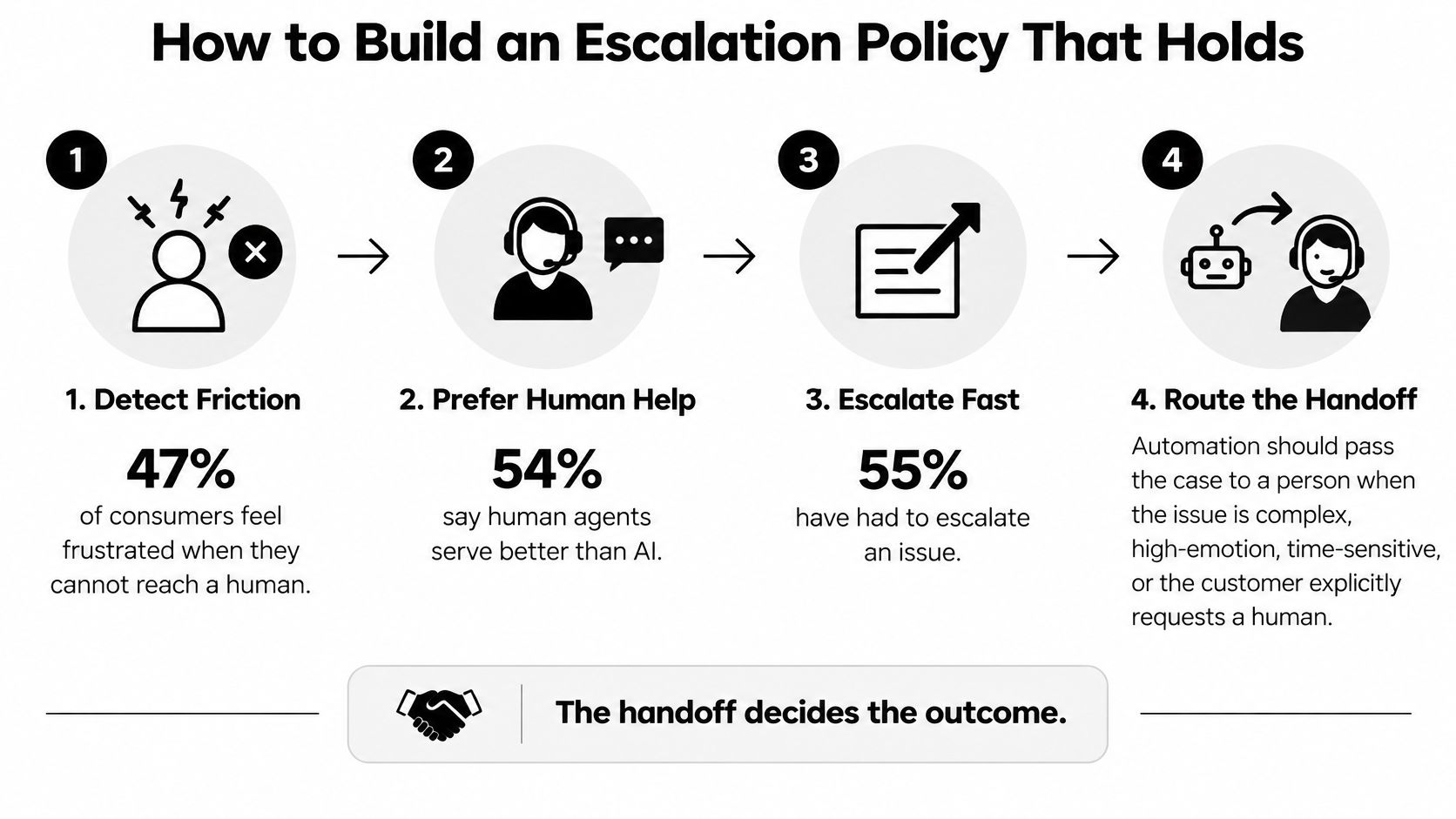
Define the stop rules
Name the prohibited decisions. Fraud, account-security incidents, legal threats, and refund approvals should go to authorized people; software may collect safe intake details without deciding the outcome. The common slip is treating a routine return and a disputed charge as the same intent.
Require evidence before answering. Handoff should trigger when no approved source answers the question or when approved sources contradict each other. The common slip is trusting a confidence score without checking whether the retrieved material supports the response.
Prioritize urgency and vulnerability. Combine intent, keywords, and sentiment to route threats, distress, suspected harm, and urgent access problems before an automated substantive reply goes out. The common slip is waiting for the word manager while missing a customer who describes a serious problem calmly.
Make the transfer usable
Specify the handoff packet. Include the customer's request, relevant identifiers, actions already attempted, source material used, unresolved questions, and the next required decision. The common slip is a fluent summary that omits the detail explaining why ordinary troubleshooting won't work.
Write an honest fallback. The message should identify the receiving team, explain what has been passed along, and give only a response expectation the business can meet. The common slip is promising immediate help when nobody is available, or asking the customer to restart elsewhere.
Assign continuing ownership. A named agent should retain responsibility through closure, with reopened cases returning to that owner or a designated backup. The common slip is dropping every reopened conversation into a general queue, where another agent repeats the investigation.
At SignalZen, a conversation that needs a person is handed over with a summary so nobody repeats themselves. A documented procedure for when to escalate an issue should also explain who accepts the transfer and what happens if that person is unavailable.
A handoff isn't complete when a ticket changes queues. It's complete when an accountable person receives enough context to act.
Before launch, replay real escalated conversations against the policy. Reviewers should check whether an agent could identify the next action without asking for information already supplied. Necessary new questions are acceptable; repeated background gathering is the failure to remove.
Choosing Chatbots, Templates and Routing Tools
Tool categories and when each one fits
| Tool type | What it does | Best for | Watch out for |
|---|---|---|---|
| AI chatbot | Answers from website, help center and uploaded files | Repeat questions with one verified answer | Confident wrong answers when content is outdated |
| Saved replies and macros | Inserts approved text with one click | Shipping, returns and appointment changes | Templates go stale and sound robotic |
| Auto-triage and routing rules | Tags intent and sends tickets to the right queue | High-volume mixed inboxes | Misfires on new wording and new complaints |
| Escalation and handoff | Passes full history and a summary to an agent | Complex, emotional or account-specific cases | Summaries that miss key customer context |
| AI copilot for agents | Drafts replies and adjusts tone from conversation context | Newer agents and long threads | Agents accept drafts without checking them |
| Help center knowledge base | Publishes articles that customers and the AI both read | FAQ-heavy businesses | Articles nobody updates after launch |
An AI chatbot fits a queue dominated by documented questions. It's a poor first purchase when the website contradicts the help center or account-specific information isn't available through an authorized connection. Better wording can't repair missing evidence.
Saved replies and macros offer a simpler starting point for predictable requests. Agents retain control while approved instructions reduce repetitive typing. Templates should include clearly marked fields and exception notes so staff don't accidentally send generic promises.
Choose the tool that removes the actual bottleneck
Routing rules suit teams spending too much time sorting a shared inbox. Their weakness is unfamiliar wording: a new product problem may resemble an existing category while requiring a different owner. Misrouted tickets need regular review and revised examples, not merely more keywords.
Handoff tools should preserve the original thread alongside the summary. Copilots serve a different purpose: helping agents draft and revise answers without sending them autonomously. Draft review still needs to cover facts, permissions, and commitments, not just tone.
The help center supports both customers and software. Franchise Foundry's knowledge base guide provides a relevant starting resource for organizing that content; a knowledge base chatbot then needs a clear relationship between each answer and its approved material.
A selection checklist should cover:
- Channels: The places customers request help, including email rather than chat alone.
- Languages: The terminology and languages the team must support.
- Workspace: Where agents will receive, own, and close escalated cases.
- Controls: Permissions, source visibility, reporting, and a reliable disable switch.
Starting with a single tool category makes diagnosis easier. Installing a chatbot, routing engine, and copilot together makes it harder to establish which change helped or introduced errors.
Where the Savings Come From and How Big They Are
Support automation creates capacity in distinct ways: agents can finish assisted conversations faster, and customers can complete suitable tasks without an agent. Those benefits shouldn't be combined into an assumed staffing reduction before the business measures them separately.
A National Bureau of Economic Research field study covering 5,179 customer-support agents found that AI access increased issues resolved per hour by 14% on average, with a 34% gain for novice and lower-skilled agents and minimal improvement for experienced, highly skilled agents. That's evidence for assisted work in a specific enterprise setting, not a guaranteed autonomous-resolution rate.
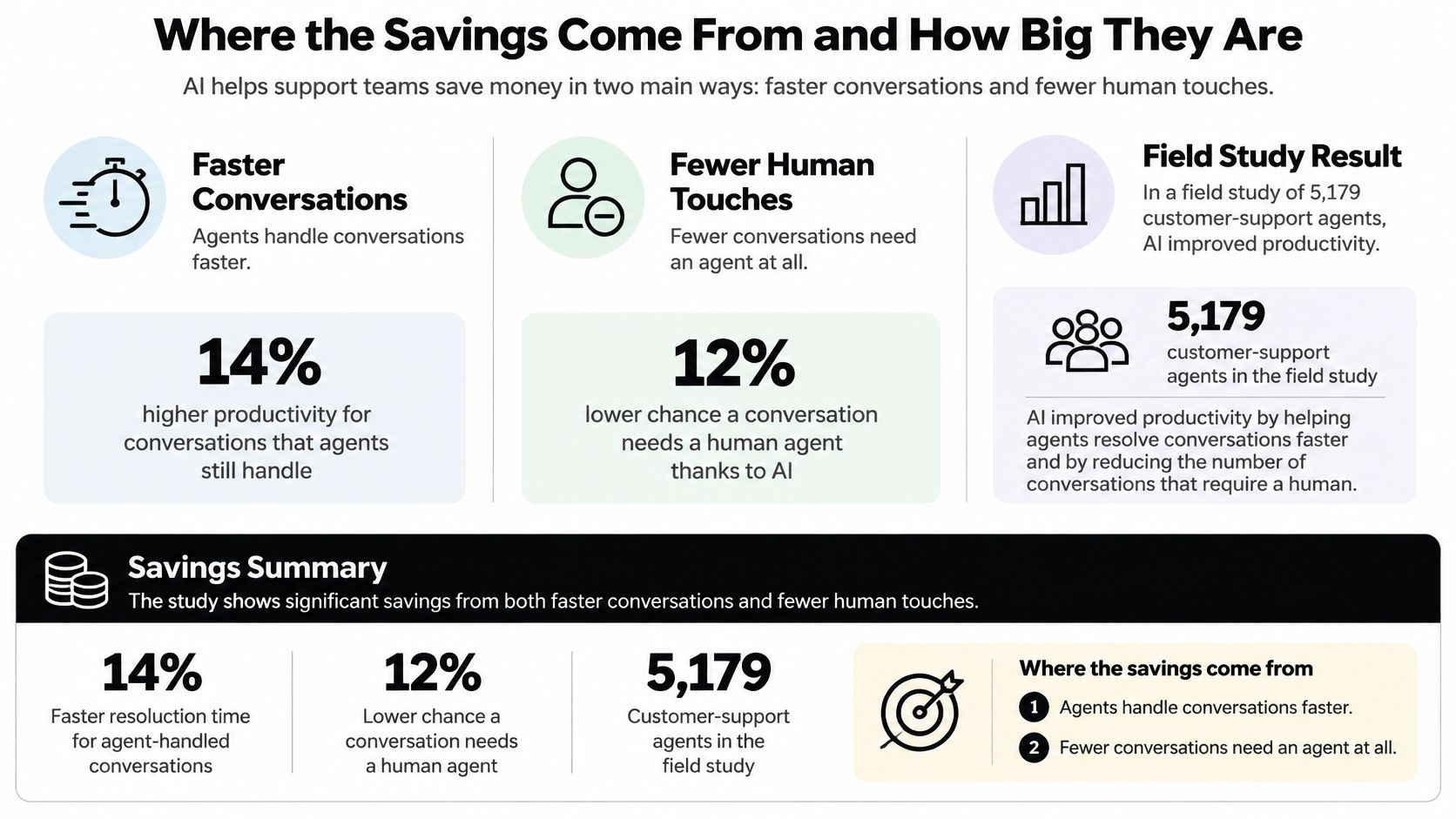
Calculate released capacity before claiming savings
Build the business case by task type and agent cohort. Newer staff may gain from suggested answers and guided next steps, while senior staff may primarily benefit from shorter preparation and less thread reading.
For autonomous work, the calculation should use internal operating records:
| Calculation input | What belongs in it |
|---|---|
| Eligible workload | Routine contacts that meet the automation policy |
| Baseline effort | Actual handling time for those contacts |
| Released capacity | Eligible workload multiplied by handling time genuinely avoided |
| Gross capacity value | Released time multiplied by loaded agent cost |
| Net operating value | Gross value minus software, maintenance, review, and additional failure-handling costs |
A hypothetical retailer might have many shipping-policy questions but already answer them using a quick macro. Automating that category could remove substantial ticket volume while releasing little agent time. A less frequent task requiring repeated document lookup might offer greater capacity value.
Distinguish time value from cash savings
Released capacity isn't automatically money removed from payroll. If staffing stays unchanged, the benefit may be shorter queues, better coverage, more coaching, or delayed hiring. Those are useful outcomes, but they belong in the business case under their actual names.
Maintenance also needs a cost owner. Policy updates, failed-answer reviews, routing corrections, and integration checks consume staff time even when the chatbot handles the customer-facing exchange.
Monthly reporting should connect ticket type, handling time, escalation rate, recontact, maintenance effort, and quality scores. A credible ROI assessment shows whether the team resolved more work per staffed hour without creating extra customer effort. It doesn't treat every automated conversation as a fully avoided agent contact.
Pitfalls That Quietly Erode Automation ROI
A fast reply proves nothing about whether the customer's problem was solved. The Freshworks Customer Service Benchmark Report distinguishes first-response time, resolution time, and first-contact resolution. Teams that optimize only the initial reply can make a dashboard look healthier while customers continue struggling.
First-response time measures the wait for acknowledgment or an answer. Resolution time measures the path to completion. First-contact resolution asks whether the initial interaction settled the issue, rather than forcing another attempt.
Count outcomes, not disappearing conversations
Each conversation should finish with an explicit outcome: resolved by AI, escalated with sufficient context, or unresolved or reopened. Use a consistent review window, and don't interpret a customer leaving the widget as proof of success.
The dashboard should pair AI containment with first-contact resolution, reopen rate, escalation completeness, median time to human takeover, and knowledge-article coverage. Containment without quality measures encourages teams to hide the human-contact option rather than improve the service.
Warning sign: Falling agent-contact volume alongside rising repeat contacts can indicate abandonment or failed answers, not successful automation.
Operational fixes should target the cause:
- Stale knowledge: Give every article a named owner and review trigger tied to policy or product changes.
- Channel blind spots: Use shared ownership and reporting across email and chat so channel switching doesn't resemble a new problem.
- Missing reopen tracking: Attribute a failed automated answer to the original interaction instead of counting the follow-up as unrelated demand.
- Fallback loops: Set a short attempt limit, then hand off rather than rephrasing the same unsuccessful instructions.
- Unverified retrieval: Restrict answers to approved content and remove conflicting material before expanding coverage.
A repeat contact adds work to a problem the business has already handled. A useful audit checks recent tickets for repeated questions, reopen clusters, overdue article reviews, and escalations missing identifiers or attempted steps. Each finding should result in a content correction, routing change, or narrower automation scope.
Launch One Automation and Measure It First
- Choose a bounded task: Pick a frequent, low-risk request with a clear completion condition, such as explaining an established shipping policy.
- Confirm the approved answer: Update the relevant source and remove conflicting instructions before connecting the automation.
- Write the stop conditions: Define the exceptions, receiving owner, fallback message, and required handoff fields.
- Establish the baseline: Record handling effort, successful outcomes, repeat contacts, and quality before launch.
- Review live failures: Inspect escalations and incorrect answers, then decide whether to expand, revise, or disable the workflow.
A time-boxed pilot should give the team a scheduled decision point rather than an indefinite experiment. The initial scope should remain narrow enough that reviewers can inspect failures and understand why they happened.
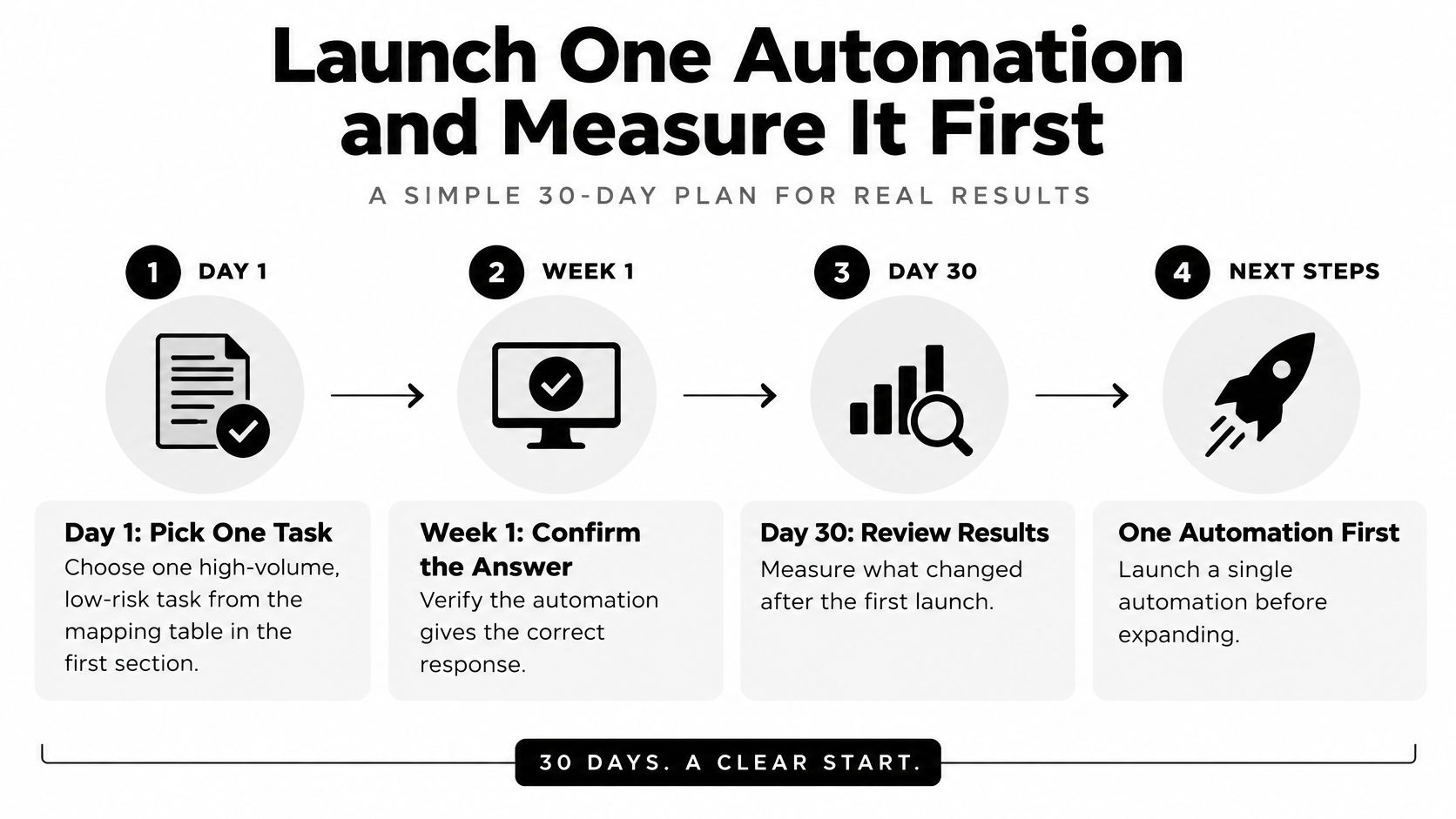
Set the expansion decision before launch
The team should agree on what would justify expansion and what would trigger rollback. Incorrect financial commitments, exposed account information, or broken human routing require immediate intervention; minor wording problems may only require a content edit.
Reporting should make those differences visible. A practical contact center analytics setup connects the operational measures to actual conversations so reviewers can inspect the cases behind a change.
SignalZen is one option for this operating model. Its AI Support answers customer questions from the business's website, files, help center, and instructions, while the team can take over from Slack, Microsoft Teams, or Google Chat. It serves small and medium businesses with an approach in which AI answers what it can and the team handles what matters.
Any platform meeting the operational requirements can support a useful pilot. The purchase decision should follow a concrete question: Which task would release the most agent time while keeping unsupported answers away from customers? If the team can't identify the source, owner, and failure path for that task, it isn't ready for autonomous handling.
SignalZen combines automated answers from approved business content with human takeover and preserved conversation context. Visit SignalZen to evaluate a focused support workflow, starting with a documented routine task and an explicit escalation policy.


Better support without a bigger support team.
Start with AI. Add your team when the conversation needs a person.