

A customer opens the chat widget on your site to change the delivery address on a recent order. The bot says it can help and asks for the order number. Then it says it can't reach order records. The customer types the number again, and again, and by the fourth message they're typing "agent" in capitals.
The person who finally picks up that chat opens with the one question the customer has now answered three times. That gap, between a bot that can't finish and a human who starts from zero, is where support automation loses most of the goodwill it built.
Table of Contents
- How a Chatbot Hands a Conversation to a Person
- When a Chatbot Should Stop and Transfer
- Why Handoffs Break and What Context Must Travel
- How to Set Up Handoff for Your Support Team
- Metrics That Show Whether Handoffs Work
- Confirm Your Handoff Path This Week
How a Chatbot Hands a Conversation to a Person
Teams often picture the transfer as a button. It's more useful to picture a relay race, where the baton is everything the customer has already said.
A hotel concierge makes the point. Guests ask about breakfast times and taxi bookings, and the concierge handles those alone. When a guest has a problem the desk can't fix, the concierge doesn't point at the duty manager and walk away. The concierge crosses the lobby, gives the room number and the story so far, and the manager takes over mid-sentence.
A chatbot human handoff is that walk across the lobby. It's the transfer of an active conversation from automation to a person, with the context attached and the thread unbroken.
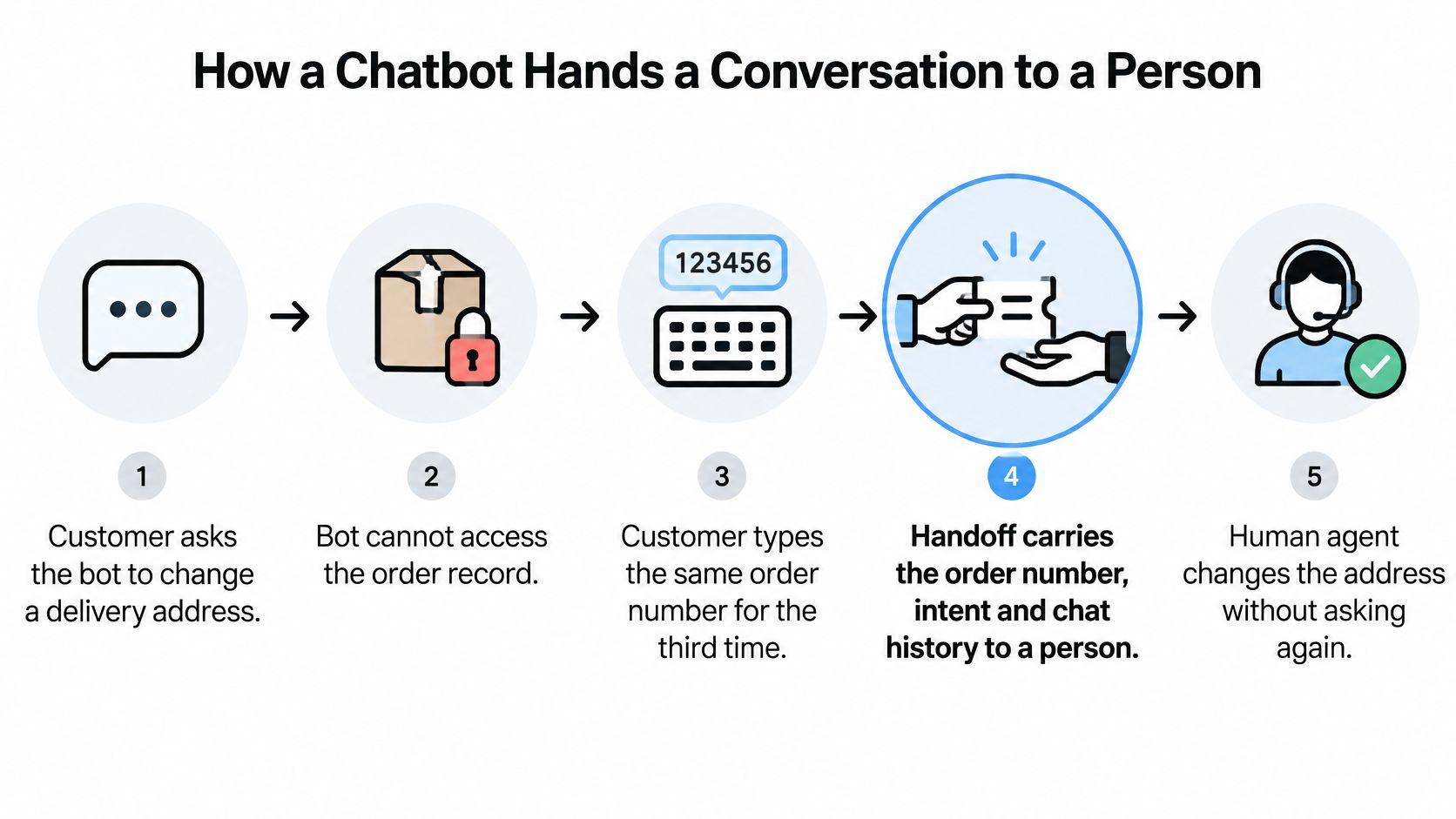
The path has five stages, and each one can fail on its own.
- Detection. The bot recognises it can't finish the job, either because it has no access to the system involved or no answer in its knowledge base.
- Reason capture. It records why it stopped, such as missing order access, low confidence, an account action, or a direct request for a person.
- Notice. The customer gets one short line telling them what happens next, so the switch doesn't feel like a crash.
- Queue. The conversation lands with the team that can resolve it, not just whoever is free next.
- Takeover. An agent opens the chat with the transcript, the order number, and the reason already on screen.
Skip stage two and the agent knows something went wrong but not what. Skip stage four and a billing dispute waits behind a delivery question. The order matters, because a customer who has already been asked twice for the same detail notices when the third ask arrives.
Why the transfer keeps mattering
Customers aren't asking for fewer humans. In a 2025 survey, 93% of U.S. consumers said they preferred speaking with a human agent rather than an AI system, 78% believed humans resolved problems faster, and 84% believed they resolved them more accurately, as No Jitter's summary of the survey reports. The same survey found 55% frequently needed to escalate from an AI interaction to a human.
That last figure reframes the job. A bot doesn't remove the agent's workload. It changes the agent's role from taking every first question to receiving the conversations that need judgment, empathy, or an exception to policy. A handoff that drops the history undercuts the very speed and accuracy customers say they came for.
Hold onto one idea before moving on: handoff is a designed path with five stages, not a fallback button that appears when the bot gives up. Teams that build the path get predictable transfers. Teams that build the button get a queue full of half-finished conversations.
When a Chatbot Should Stop and Transfer
A confidence threshold sounds like a clean rule. If the bot is less than a set percentage sure, it transfers. The rule falls apart as soon as consequence enters the picture. A bot that's unsure about a fabric's washing instructions should ask one more question. A bot that's confident about a refund it can't process should hand over immediately, because being wrong there costs the customer money.
The rule that survives contact with real customers combines confidence with consequence. Low-confidence answers on a low-impact product question can earn one clarifying turn. Uncertainty that touches refunds, account access, safety, or legal obligations goes to a person at once, whatever the confidence score says.
| Trigger | Example | Routing decision |
|---|---|---|
| Low confidence on a product question | Asks about a feature the knowledge base does not cover | Ask one clarifying question, then offer an agent |
| Repeated failed turns | Repeats the same question after a wrong answer | Transfer on the second failure |
| Account or money action | Refund, cancellation or login reset | Transfer immediately |
| Customer frustration or urgency | Angry wording or "this is urgent" | Transfer immediately |
| Explicit request | "Talk to a person" | Transfer at once with no retry |
| Multi-step troubleshooting | Diagnosing a failed integration | Transfer after the first attempt |
| Language ambiguity | Mixed or unclear language in the message | Clarify once, then transfer with language preference set |
Why waiting for failure is expensive
Popular advice says escalate after the bot fails twice. The trouble is that "fails" is doing a lot of work in that sentence. In the 2025 LiveOps Holiday AI Customer Service Report, 45% of surveyed U.S. holiday shoppers said AI failed to understand their problem, and 54% believed humans provided better service. A customer who has already been misunderstood once rarely reads the second attempt charitably.
Those rows in the table aren't equally urgent, and treating them as one rule is where teams get stuck. Frustration and money triggers fire on the first message. A product question gets a turn to breathe.
The two questions teams argue about
The first is how many failed turns are acceptable. Set it per intent rather than globally. Product questions get two attempts, because a clarification often saves the whole conversation. Anything involving money, safety, or a legal obligation gets zero, because the cost of being wrong dwarfs the cost of an unnecessary transfer. Multi-step troubleshooting sits in between, at one attempt, since a bot without system access rarely fixes an integration by asking again.
The second question is whether to tell the customer why they're being moved. Always tell them, in one line: "I'm passing you to a billing specialist because this refund needs an account review." A named reason makes the switch feel deliberate. A silent jump to a new voice feels random, and customers fill that silence with the assumption that nobody was paying attention.
Practical rule: if the customer asks for a person, or the outcome can't be reversed once done, transfer without a second attempt. No exceptions, no "let me just try one more thing."
Then let them stay with a human. Once a conversation has escalated for a money or account reason, further automation in that same thread should be off by default, with the customer able to opt back in if they want a quick answer instead. If the routing logic still feels abstract, it helps to see how a chatbot and live chat divide the work before writing your own rules.
Why Handoffs Break and What Context Must Travel
Self-service looks bigger from the inside than it does to the customer. Gartner's survey of 5,728 customers, conducted in December 2023 and reported in 2024, found that 73% of customers used self-service at some point during their service journey, but only 14% said their issues were fully resolved there. That 59-point gap says something simple: the bot is usually one stage of a longer journey, not the end of it.
That makes a handoff a normal continuation rather than a failure of automation. It also changes what you optimise for. The target isn't the highest possible containment rate. It's routing unresolved cases without friction and keeping the context the customer has already built up along the way.
Timing changes the outcome more than availability does
Research on human-in-the-loop customer service found that human intervention preserved service quality when the escalation involved a technical issue beyond the AI's capability, but was substantially less effective when a human arrived only after the customer had expressed frustration. A telecom benchmark reported in the same work put episode NPS at -48 when customers reached a human only after chatbot failure, against +10 when human support was offered proactively. That's a 58-point swing produced entirely by when the person appeared, not by whether one appeared.

The scene is familiar to anyone who has watched a customer work through the same request four times. The bot isn't wrong to offer help. It's wrong to keep offering it after the customer has already said what they need.
Four ways a handoff breaks
- The hidden button. Escalation exists but lives behind a menu, a keyword, or a specific phrase, so the customer keeps rephrasing and the bot keeps missing it.
- The dropped transcript. The transfer creates a fresh ticket with a one-line subject, and the agent opens a blank screen while the customer waits.
- The agent who starts over. Even with history visible, the agent asks for the order number out of habit, and the customer concludes that nothing carried over.
- The queue with no owner. The conversation lands in a shared inbox that three people watch and nobody owns, so it sits until the customer gives up.
An agent who has to ask for the order number has been handed a queue item, not a conversation.
Continuity is the real test
A visible button proves nothing about what happens after it's pressed. In a 2025 survey of 4,800 consumers across 12 countries, 78% said switching from AI to a human was important, yet only 15% reported experiencing a successful handoff. Customers want the door. Almost none of them get a smooth walk through it.
That's why the design question isn't "is there a way to reach a person". It's "what exactly travels with the customer". Seven fields do most of the work.
| Context field | What to include | Why the agent needs it |
|---|---|---|
| Full transcript | Every message in order | Agent reads the case instead of asking again |
| Customer identity | Name, email, phone and account ID | Agent verifies without repeating the questions |
| Attempted actions | Links sent and steps the bot already tried | Agent skips fixes the customer has already done |
| Retrieved knowledge | Help center articles the bot showed | Agent knows what the customer has already read |
| Language preference | The customer's language | Agent replies in the right language or translates |
| Escalation reason | Trigger code, such as low confidence or account action | Agent knows why the case arrived |
| Confirmed vs assumed | Facts the customer stated and guesses the bot made | Agent verifies guesses before acting |
Confirmed facts versus confident guesses
The last row is the one teams skip, and it causes the most damage. An AI summary written as flowing prose blends two very different things: what the customer said and what the model inferred. "Customer wants a refund on an order because the item arrived damaged" reads like fact. If the bot inferred the damage from a vague complaint, the agent may open with an apology and a refund policy, and the customer corrects them before the underlying issue surfaces.
Separate the two in the summary. Facts the customer typed go in one line. Assumptions go in another, marked as unconfirmed. An agent who knows which is which can verify in one question instead of discovering the error three messages in.
The summary that works
Six fields turn a transcript into a usable brief: the issue in one sentence, the evidence behind it, the actions already tried, the remaining blocker, the outcome the customer asked for, and any open decision the agent must make. Anything longer than that gets skimmed, and skimming is how details get missed.
SignalZen builds the handoff around exactly that idea. When a conversation needs a person, the AI hands it over with a summary attached, and the agent can take over with the full history and customer context already in front of them, so nobody repeats themselves.
Two questions expose almost any setup. At what point is the human offered, and what must the customer repeat after the transfer? If the answer to the second is anything at all, the payload needs work before anything else does.
How to Set Up Handoff for Your Support Team
The setup is a short list of decisions, not a platform migration. Each one below closes a specific failure from the previous section, and each takes minutes rather than a project.
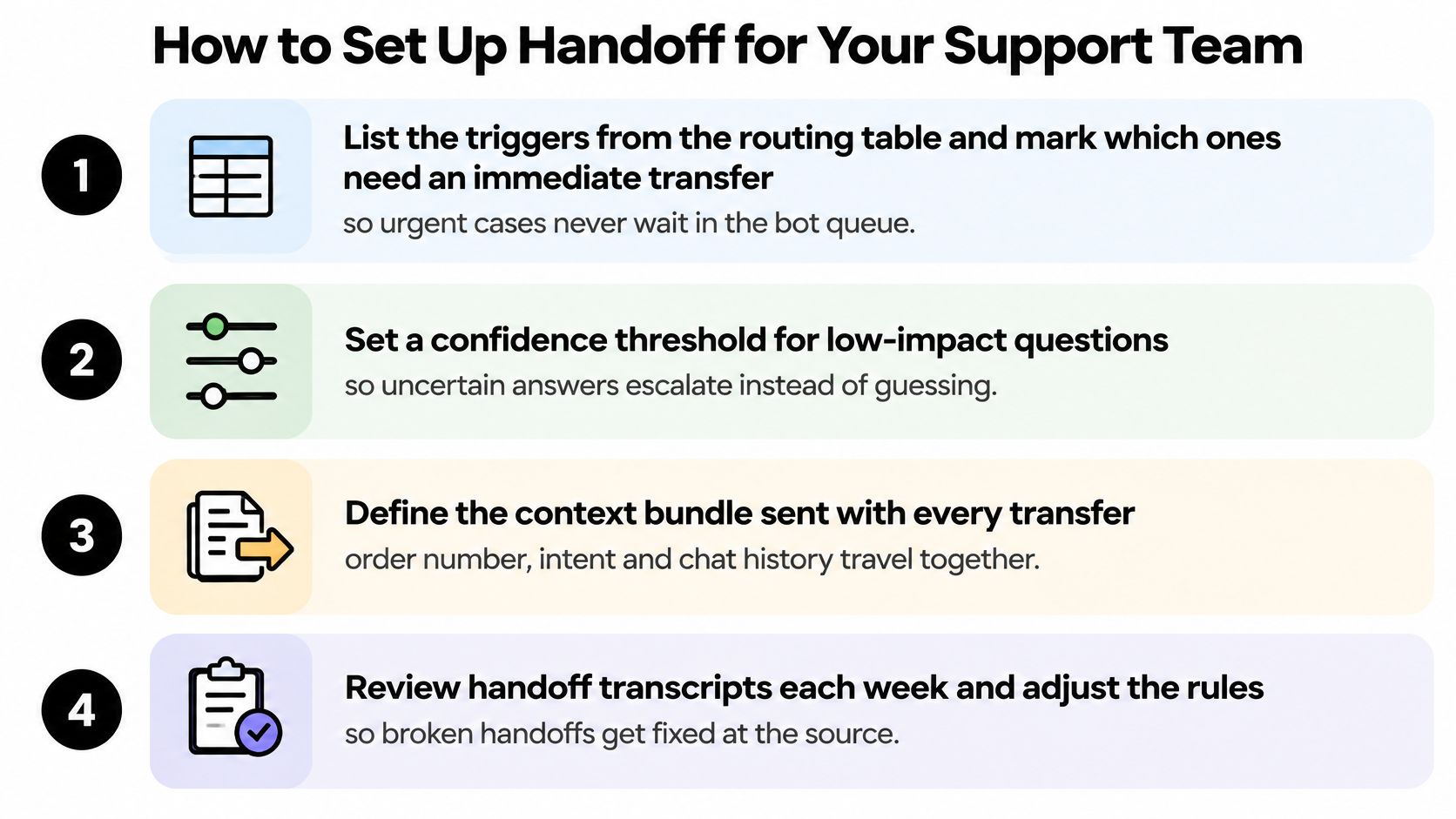
- List the triggers and mark the urgent ones. Copy the routing table into a document and mark which rows must fire on the first message. Urgent rows get a hard rule; the rest get a threshold.
- Set the confidence threshold for low-impact questions only. Keep it separate from money and account rules, so a nervous bot can't delay a refund request behind a clarifying question.
- Route by skill, not by availability. Billing goes to billing, technical goes to whoever handles integrations. A fast answer from the wrong person usually turns into a second transfer.
- Build one summary template and use it everywhere. The six fields from the previous section, in the same order, for every transfer. Consistency is what lets an agent scan a brief in five seconds.
- Write the sentence the customer sees. Name who will reply and roughly when: "Sam from billing will pick this up within the hour." A vague "someone will be with you shortly" invites the customer to leave.
- Test with 20 real transcripts from past chats. Run each one through the rules and ask whether the agent could resolve it without asking the customer anything new. The ones that fail show you exactly which field is missing.
- Review transfers weekly and change one rule at a time. A trigger that fires too often buries the team; one that fires too late produces frustrated customers. The transcripts tell you which, and a single change per week keeps the cause clear.
If you only fix one thing: make the summary carry the escalation reason. An agent who knows why the case arrived stops guessing and starts resolving.
Small teams don't need a separate support department to run this. A business can start with AI support and add its team when a conversation needs a person, which means the first version costs attention rather than headcount. When a rule needs adjusting mid-flight, the team can escalate an issue manually and watch what the agent receives, which is faster than waiting for a weekly review to surface the gap.
Metrics That Show Whether Handoffs Work
One escalation rate is not a quality score, and treating it as one leads teams to the wrong fix. A large contact-center dataset of 9,177 customer interactions found that 30.8% escalated to a human while 69.2% were resolved through automation. The split that matters sits underneath: only 5.3% of low-complexity cases escalated, against 87.0% of high-complexity cases, according to the IRJEMS contact-center study.
Read that second pair carefully. Escalation tracks complexity, which is what good routing looks like. A rising rate may mean the bot got better at recognising its own limits, not that it got worse at its job. So split every number by intent and complexity before drawing a conclusion.
| Metric | How to calculate it | Healthy direction |
|---|---|---|
| Escalation rate by intent | Escalations divided by conversations, split by intent | Read per category, not as one number |
| Repeated-question rate | Transfers where the agent asks for information already given, divided by all transfers | Lower |
| Time to meaningful response | Minutes from transfer to a useful agent reply | Lower |
| First-human resolution | Cases resolved on the first human contact, divided by all transfers | Higher |
| Customer correction rate | Transfers where the customer corrects the summary, divided by all transfers | Lower |
Read it by category: an escalation rate on its own tells you nothing about quality. The same number can mean sharp routing or a bot that gave up early.
The diagnostic value comes from the pattern, not the figure. Say the repeated-question rate is high for billing transfers only, while product and technical transfers look clean. The trigger rules are probably fine, since those transfers fire on the right signals. What's missing is the account fields in the billing summary template, so the agent opens without the plan tier or the invoice number and asks for both.
That's a five-minute fix in one template, and you'd never find it by staring at a blended escalation rate. Review one metric per category each month rather than all five weekly, and pair each change with the number it should move. Teams that track contact center analytics this way can point to the rule change behind each improvement instead of guessing.
Confirm Your Handoff Path This Week
Three live conversations will tell you more than a month of discussion. Pick one routine product question, one account action such as a login reset or a refund request, and one customer who asks for a person. Run each through the chat widget and note three things: how many clicks it took to reach a human, whether the agent saw the transcript and summary, and which trigger fired.
- Log the result for each test. Record the trigger, the route it took, and every item the customer had to repeat. Guessing from memory hides the pattern.
- Find the most expensive failure. Rank the three by time lost or information repeated. One will stand out, and it's usually a missing summary field rather than a broken trigger.
- Change only that one thing, then rerun the same three tests. A single change per cycle keeps the cause visible, so the next result tells you whether it worked.
Repeat the cycle monthly. Chat sessions created by chat or email can be answered by the team in Slack, Microsoft Teams, the Console, or the iOS and Android mobile apps, which means the test measures the same handoff your agents will see during a shift. Pair each change with the metric it should move, and the team can see which fix worked instead of arguing about whether the bot got better.
SignalZen is built for the moment this article describes: the AI answers what it can, and when a conversation needs a person, it hands over with a summary and the full history attached, so the agent starts where the customer stopped rather than at the beginning. The handoff lands in Slack, Microsoft Teams, the Console, or the mobile apps, which means the team works from the tools already open on their screens. Visit SignalZen to book a live walkthrough and bring three real transcripts to test against it.



Better support without a bigger support team.
Start with AI. Add your team when the conversation needs a person.